41
English
OR
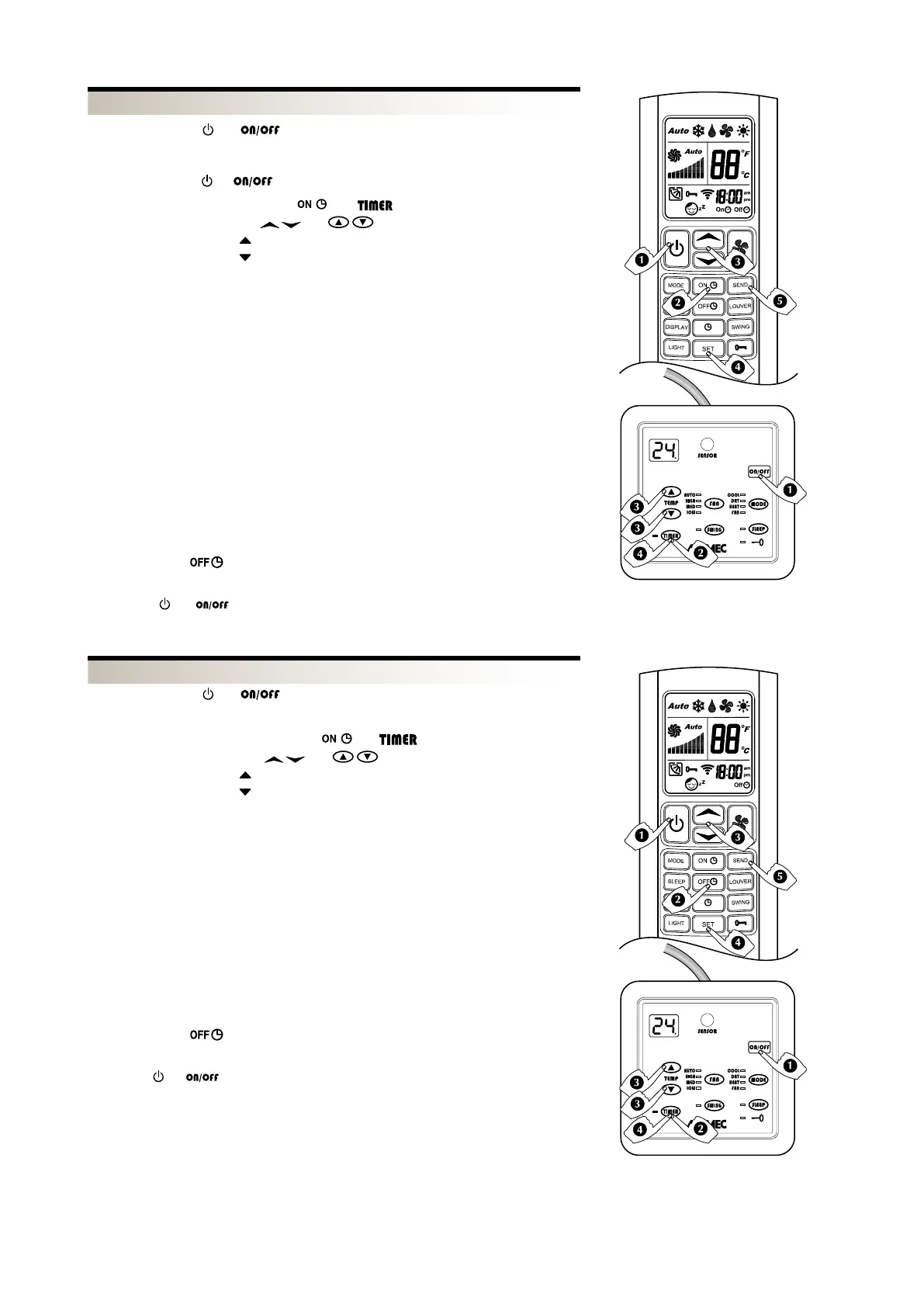
– Set the required conditions (MODE, FAN, TEMP) on the remote control that you want
active when starting the unit.
– Turn off with keys
or
OR
OR
– The key with the symbol
allows increases of 1 hour
– The key with the symbol
allows decreases of 1 hour
The display only shows the hours the unit remains off before the unit is turned on,
TLW2 from 1 to 18 hours,
PLW2 from 1 to 24 hours,
The number is updated every hour until the unit turns on.
At the time of switching on the unit:
- a beep indicates that the unit has started
- the display will show the conditions previously chosen in point 1)
At the time the unit is programmed to come on, the fan may not come on:
- because the space temperature is already within the programmed parameters
- because the temperature of the water is not appropriate for the operation mode
required
- because during the programmed standby hours the unit's power went down.
To transmit the new parameters shown on the LCD to the remote control.
- TLW2: Press the
key to cancel the timer setting
- PFW2: Press the TIMER key for 3 seconds to cancel the timer setting.
- Press the
or key to manually turn ON the unit while the timer is pro-
grammed.
PFW2
TLW2
PFW2
TLW2
OR
– Set the conditions (MODE, FAN, TEMP) on the remote control
OR
OR
– The key with the symbol
allows increases of 1 hour
– The key with the symbol
allows decreases of 1 hour
The display shows the operating mode and the programmed running hours before the
unit is turned off,
TLW2 from 1 to 18 hours,
PLW2 from 1 to 24 hours,
The number is updated every hour until the unit turns off.
Before the programmed turn off a beep will be emitted from the unit.
At the time the unit is programmed to turn off the unit may not switch off if the power
has been interrupted during the programmed running time.
To transmit the new parameters shown on the LCD to the remote control.
- TLW2: Press the
key to cancel the timer setting
- PFW2: Press the TIMER key for 3 seconds to cancel the timer setting.
- Press the
or key to manually turn OFF the unit and the timer programme is
can- celled.


 To Next Page
 Loading...