
 Need help?
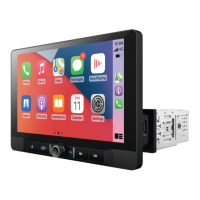
Do you have a question about the Aerpro AM9XFW and is the answer not in the manual?
Guide on adjusting the LCD screen position using the extension bracket for optimal viewing.
Instructions for installing the mounting sleeve and trim ring into the dash for secure fitment.
Detailed steps on connecting the LCD wiring harness to the main receiver chassis.
How to securely attach the LCD screen to the head unit using mounting screws.
Attaching side panel covers to conceal the LCD extension and complete the installation.
Explanation of the various icons displayed on the unit's interface for user navigation.
Instructions for automatically scanning and tuning available radio frequencies.
Guide on how to select and switch between FM and AM broadcast bands.
Steps for saving favorite stations and recalling them for quick access.
Detailed explanation of buttons and controls for playing music and video files.
Step-by-step guide to pair and connect mobile phones via Bluetooth.
Configuration of auto-connect, auto-answer, and microphone gain for Bluetooth.
Navigating the screen to manage paired devices and activate/deactivate features.
Adjusting general settings like date, time, beep, and reverse line display.
Customizing audio settings including equalizer, loudness, and subwoofer.
Adjusting screen brightness, contrast, saturation, and camera settings.
Accessing system version, steering wheel control, and factory reset options.
Instructions for connecting an iPhone to the unit using a USB cable.
Instructions for connecting an iPhone wirelessly via Bluetooth and Wi-Fi.
Instructions for connecting an Android phone to the unit using a USB cable.
Instructions for connecting an Android phone wirelessly via Bluetooth and Wi-Fi.
Essential requirements and initial phone setup for Apple CarPlay functionality.
How to utilize Siri for voice commands and control within the CarPlay interface.
Common Siri commands for messages, calls, and navigation in CarPlay.
How to use Google Assistant for voice commands in Android Auto.
Essential requirements and initial phone setup for Android Auto functionality.
Understanding the Android Auto home screen and app navigation.
Solutions for problems connecting Android Auto wirelessly.
Troubleshooting general issues with connecting mobile phones to the unit.
Explains the importance of the GPS module for navigation accuracy.
Resolving issues where CarPlay/Android Auto won't work without park brake connection.
 General
| Brand | Aerpro |
|---|---|
| Model | AM9XFW |
| Category | Car Stereo System |
| Resolution | 1024 x 600 |
| DIN Size | Double DIN |
| Bluetooth | Yes |
| USB Ports | 2 |
| USB Input | Yes |
| Operating System | Android |
| GPS Navigation | Yes |
| Apple Carplay | Yes |
| Android Auto | Yes |
| Steering Wheel Control Compatibility | Yes |
| Reverse Camera Input | Yes |
| Compatibility | Universal |
| Connector Type | ISO |
| Color | Black |
| Material | Plastic |
| Display Size | 9 inches |
| Audio Formats Supported | MP3, WMA |
| Video Formats Supported | MP4, AVI, MKV |

 To Next Page
