AEV STARGATE
Futurcom Srl via della Tecnica 35, 40050 Argelato Bologna ITALY
18
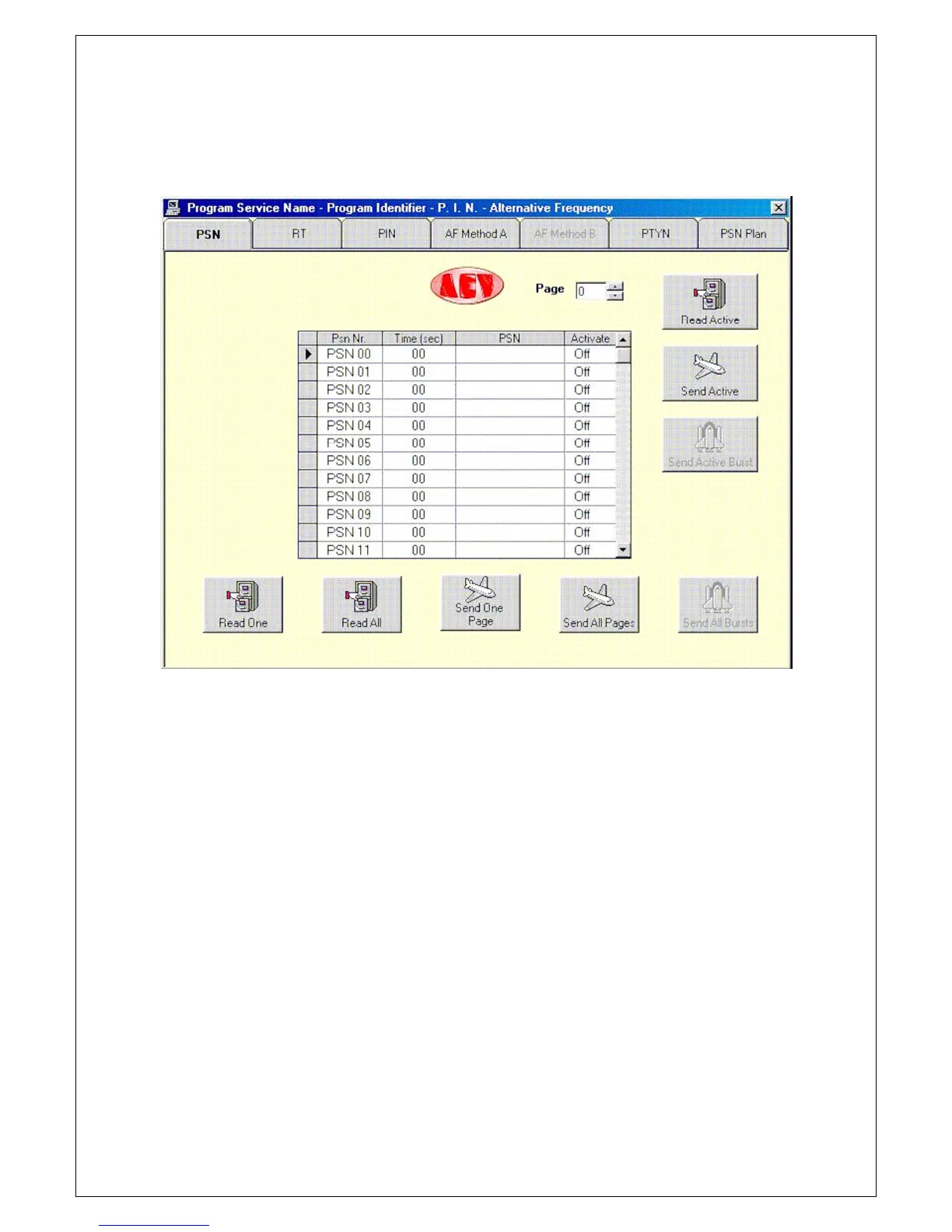
pressing the push button with a PC, a menu of boards will appear. By clicking on the tab of
the board, the option to be modified can be selected. The first board illustrated will be that
of the Program Service Name.
From here onwards all the windows that appear will refer to a "local" coder. If we were working
in the via "satellite" mode, all the Read’s would be disabled, whereas the Burst push button
would be enabled.
Up to 50 PSN’s can be programmed. Programming is quite simple. Enter the Time
( se c) (transmission time in seconds) of each PSN (it is advisable to enter a time of less
than 3 sec). Edit the PSN, which may have a length of 8 characters, including spaces.
Finally enable the PSN by double clicking on the Act iva t e box of this PSN.
The number of the PSN page can be selected in the Page box (from 0-9), which can be sent to
the RDS by programming the PSN Plan.
Let’s see what the push buttons are used for.
Read One reads the PSN selected.
Read All reads all the PSN’s of the page selected.
Send One Page sends the PSN selected.
Send All Page sends all the PSN’s of the page selected.
Read Act ive reads the page being transmitted by the rds coder.
Send Act ive sends the page displayed, which will be immediately transmitted on the rds coder.
Let’s examine the programming of the Radio Text. As described earlier, click on the
board Radio Text tab.
The following window will be displayed.


 To Next Page