AEV STARGATE
Futurcom Srl via della Tecnica 35, 40050 Argelato Bologna ITALY
17
- Stop Bit
This parameter may not be altered. It is used to display the status of the "Stop Bit".
For connections in downlink from satellite mode, a baud rate of 9600 must be set unless
requested otherwise in the technical specifications of the satellite downlink..
Once the communication parameters have been set, communication must be enabled with the
coder, by sending it an address (default setting=?????).
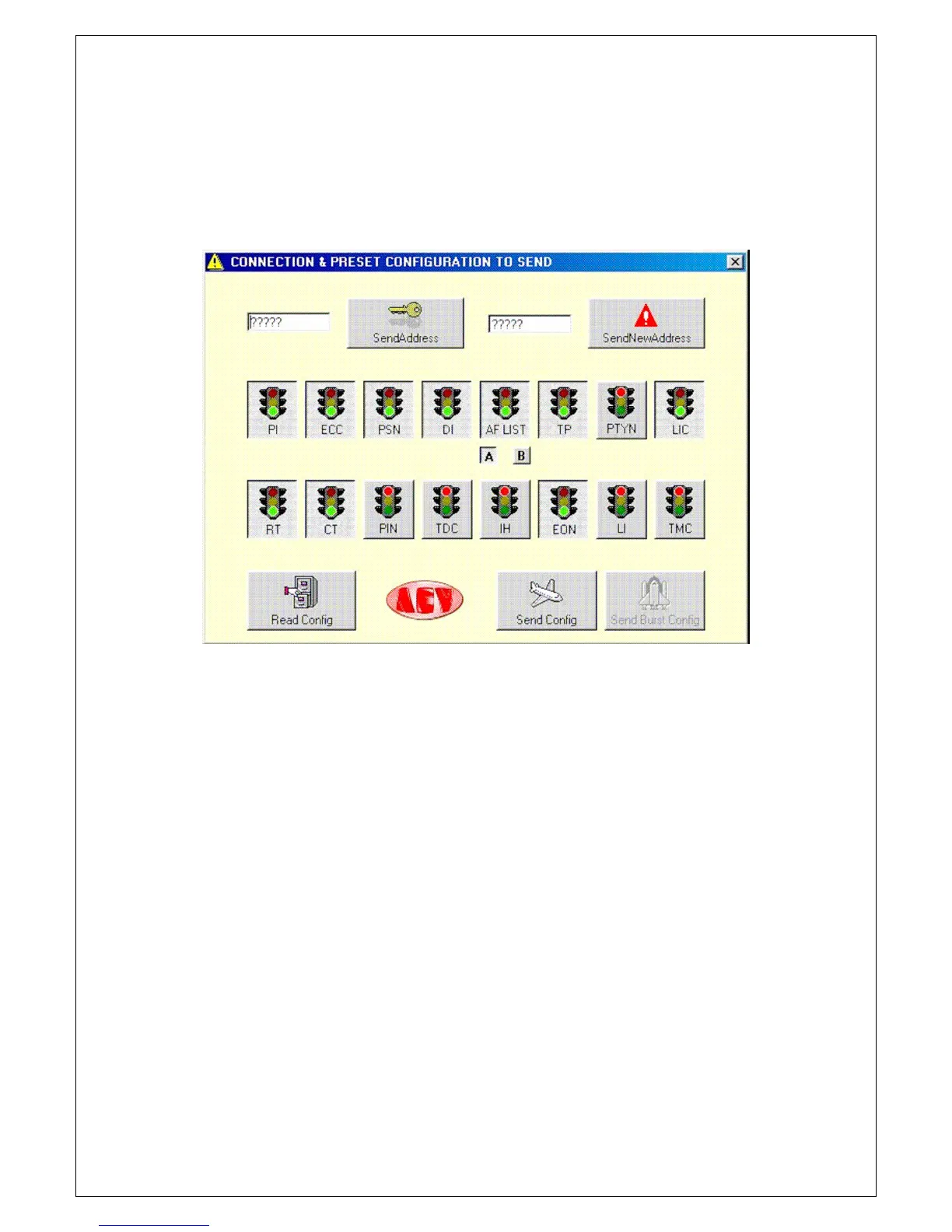
Press the Connect ion push button to gain access to the code send and change menu, together
with a set of push buttons used to send or read certain categories without entering the
appropriate window.
Let’s see the parameters and their meaning.
A box at the left hand part is displayed where the coder address is entered. The default
address is ?????.
The Send Address push button at the side of this text box is used to activate the coder for
programming, whether this is done “locally” or “via satellite”.
Another text box and a push button on the right hand part are used to change the address
of the coder (this operation is normally done only for applications via satellite).
16 push buttons are available (On/Off), which gather the functions of the RDS coder. The
functions in ON status (green traffic light) can be transmitted or read simultaneously.
Two small square push buttons under the AF switch are used to select the type of
transmission of the alternative frequencies.
The small A push button is used to program a single list made up of a maximum of 25
frequencies, which are reduced by one each time the frequencies type xxx.250, xxx.750
are enabled. This is the only system that allows the enabling of frequencies with 25KHz
steps.
The small B push button is used to program up to 50 lists, each of which is made up of a
maximum of 12 pairs of alternative frequencies.
Three push buttons are available in the part underneath. In “local” configuration, Read Config
and Send Conf ig will be enabled, which are used to send or to read the options selected by
means of the “traffic lights”. In “satellite” configuration, Send Config and Send Burst will be
enabled, which are used to send the options selected by means of the “traffic lights”.
Exit this menu to return to the main Menu.
At this stage, it is a good rule to save the parameters set so far using the relative push
buttons. NEW is used to create a new file (with the default parameters), OPEN to open an
existent file and SAVE to save the file in use or to re-name it. It is advisable to give the
configuration file (rds), a name different from RDSPCSAT.rds, OldLocal.rds and Full.rds as
these are the names of those already existing.
Let’s analyse the PSN-RT-PIN-AF-PTYN push button parameters. From the main menu, by


 To Next Page