14
mode q drink s.saver
-23
°c
-23
°c
zone 1 zone 2
cooler
mode q drink s.saver
-23
°c
zone 1 zone 2
cooler
03
mode q drink s.saver
°c
-23
°c
zone 1 zone 2
cooler
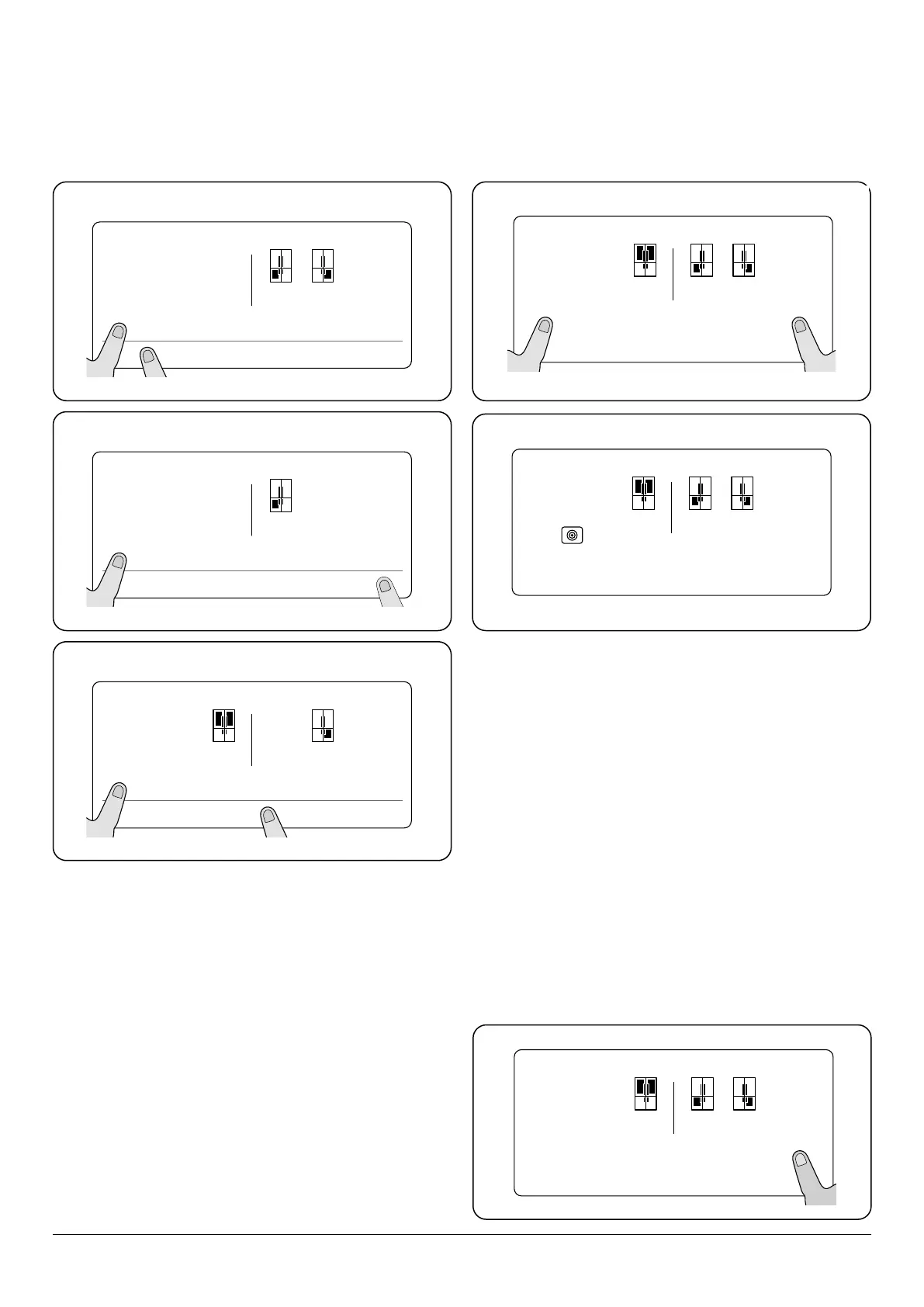
Fig. 3.5 Fridge compartment will switch o.
Fridge compartment and Zone 2 will switch o.
Zone 1 freezer will switch o.
Fig. 3.6
Fig. 3.7
Switching zones off (Fridge / Freezer)
A combination of cooling/freezing zones can be disabled
as required. The button combination should be applied for
greater than 5 seconds.
Switching zones on
Each disabled zones can be reinstated by repeating the
process as described above.
NOTE: Disable screen safe mode.
NOTE: Disable screen safe mode.
NOTE: Disable screen safe mode.
Turn off Night Sensor
Repeat operation as above.
SCREEN SAVER (s.saver)
This mode saves energy by switching o all control panel
lighting when the panel is left inactive. Once activiated the
screensaver mode will switch on after 10 seconds. When the
screensaver is active, only the s.saver icon is illuminated.
To activate (Fig. 3.8) the screensaver, press and hold the
‘s.saver’ button for 3 seconds. A single beep will advise the
user that the function is set.
To deactivate (Fig. 3.8) the screensaver, press and hold the
‘s.saver’ button for 3 seconds. A single beep will advise the
user that the function is set.
NOTE: Screensaver function is cancelled if the power is cycled
o, on.
88
mode q drink s.saver
°c
-88
°c
-88
°c
zone 1 zone 2
cooler
88
mode q drink s.saver
°c
-88
°c
-88
°c
zone 1 zone 2
cooler
Step 1. Press and hold the mode and s.saver for 3 seconds.
Step 2. The night sensor indicator will appear.
Night sensor
This night sensor function saves energy by switching
the lights inside the refrigerator o if there is sucient
illumination in the room. To activate follow Step 1 and
Step 2.
02
mode q drink s.saver
°c
-22
°c
-22
°c
zone 1 zone 2
cooler
Hold for 3
seconds
Fig. 3.8
Hold for 3
seconds
NOTE: Disable screen safe mode.
NOTE: Disable screen safe mode.


 To Next Page