15
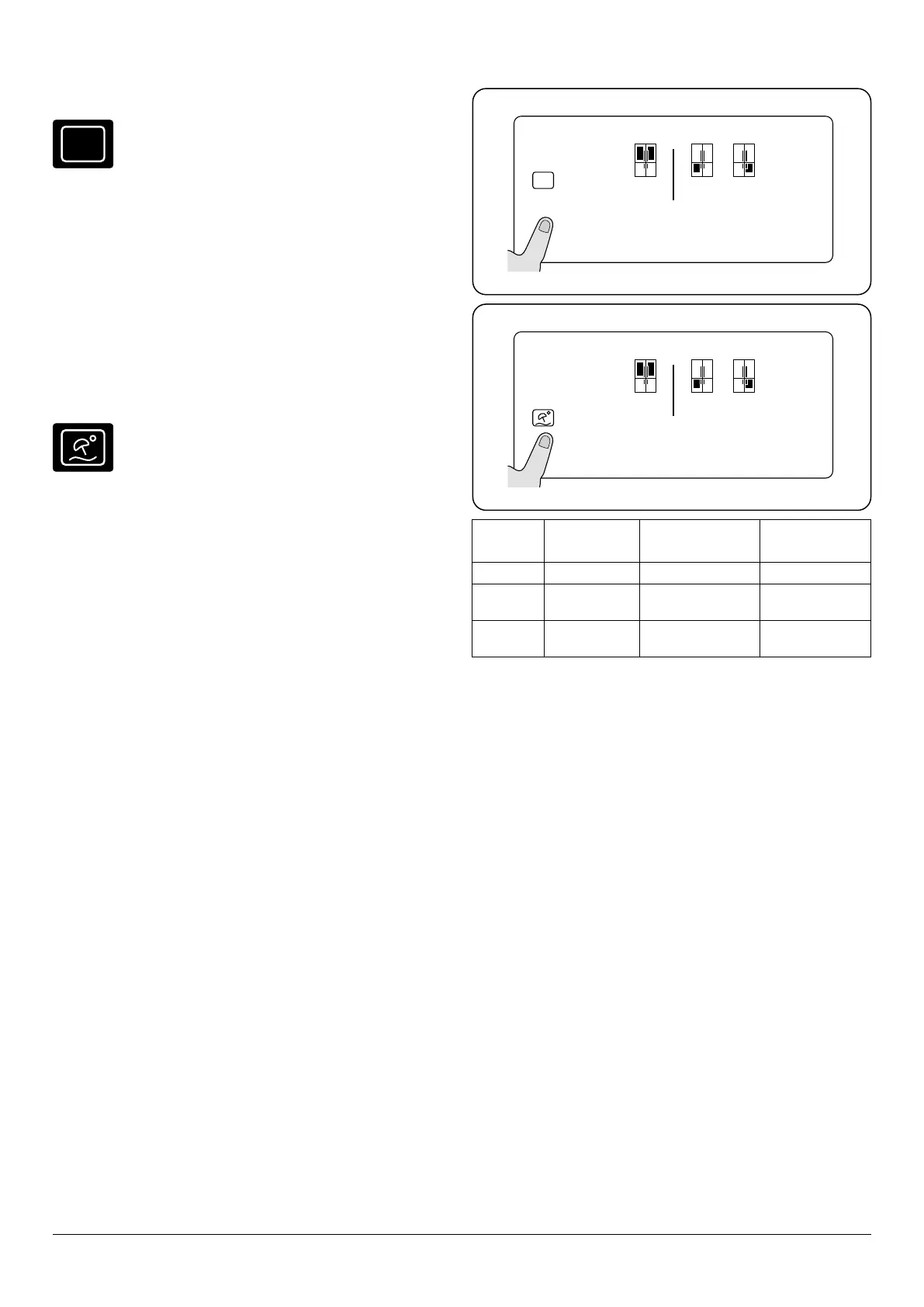
Economy (eco) Fig. 3.9
eco
During periods of less frequent use (door opening)
or absence from home, such as a weekend holiday,
eco program can provide optimum temperature
whilst saving power.
In order to activate eco mode, press the [mode] button until
“eco” symbol and “E” illuminate.
Whilst in eco mode, the temperatures for both the fridge and
freezer compartment are 4°C for fridge and -18 °C for freezer.
Cancel Economy (eco)
In order to deactivate eco mode, press the [mode] button
until “eco” symbol and “E” are no longer visible.
Holiday Fig. 3.10
Holiday mode is to be used if the device is to be
left for an extended period. During Holiday mode
only the freezer compartment remains active.
Benets: save on electricity bills when away from
home.
It is represented by an umbrella and sun. If the cooler
compartment is not to be used for some time, such as during
a holiday, activate holiday mode. To activate holiday mode,
press the mode button until the holiday mode symbol and ‘H’
are illuminated.
Holiday mode will be active for these congurations (Table
3.1).
WHILST IN HOLIDAY MODE, ALL FOOD SHOULD BE
REMOVED FROM THE FRIDGE COMPARTMENT AS THIS
WILL BE TURNED OFF.
Whilst in holiday mode, the freezer temperature will default
to -18°C for freezer.
Cancel Holiday
To activate holiday mode, press the mode button until the
holiday mode symbol and ‘H’ are no longer visible.
Door open alarm function
If either the fridge or freezer door is left open for more than 2
minutes, the appliance will beep.
Active
mode
Cooler Zone
(Fridge)
Freezer Zone 1
(Left)
Freezer Zone
2 (Right)
Holiday Turns o Remains on Remains on
Holiday Turns o Turns o if set as
chiller
Remains on
Holiday Turns o Zone 1 set to OFF
by user
Remains on
Table 3.1
00
eco
mode q drink s.saver
°c
e
°c
00
°c
zone 1 zone 2
cooler
00
mode q drink s.saver
°c
h
°c
00
°c
zone 1 zone 2
cooler
Fig. 3.9
Fig. 3.10
NOTE: Disable screen safe mode.
NOTE: Disable screen safe mode.


 To Next Page