16
Setting Zone Temperatures
Cooler (COOLER)
The cooler mode is used for setting the temperature of the
cooler compartment. Press the cooler button to set the
temperature to 1, 2, 3, 4, 5, 6, 7 or 8 °C.
Freezer / Cooler 1 (ZONE 1)
To use the zone 1 compartment as a freezer, press the
‘zone1’ button to set the temperature of the bottom-left
compartment to -14, -15, -16, -17, -18, -19, -20, -21, -22, -23 or
-24 °C.
Freezer (ZONE 2)
Press the ‘zone2’ button to set the temperature of the
bottom-right compartment to -14, -15, -16, -17, -18, -19, -20,
-21, -22, -23 or -24 °C.
Refer to Table 3.2 Setting Super-cool and Superfreeze
Table
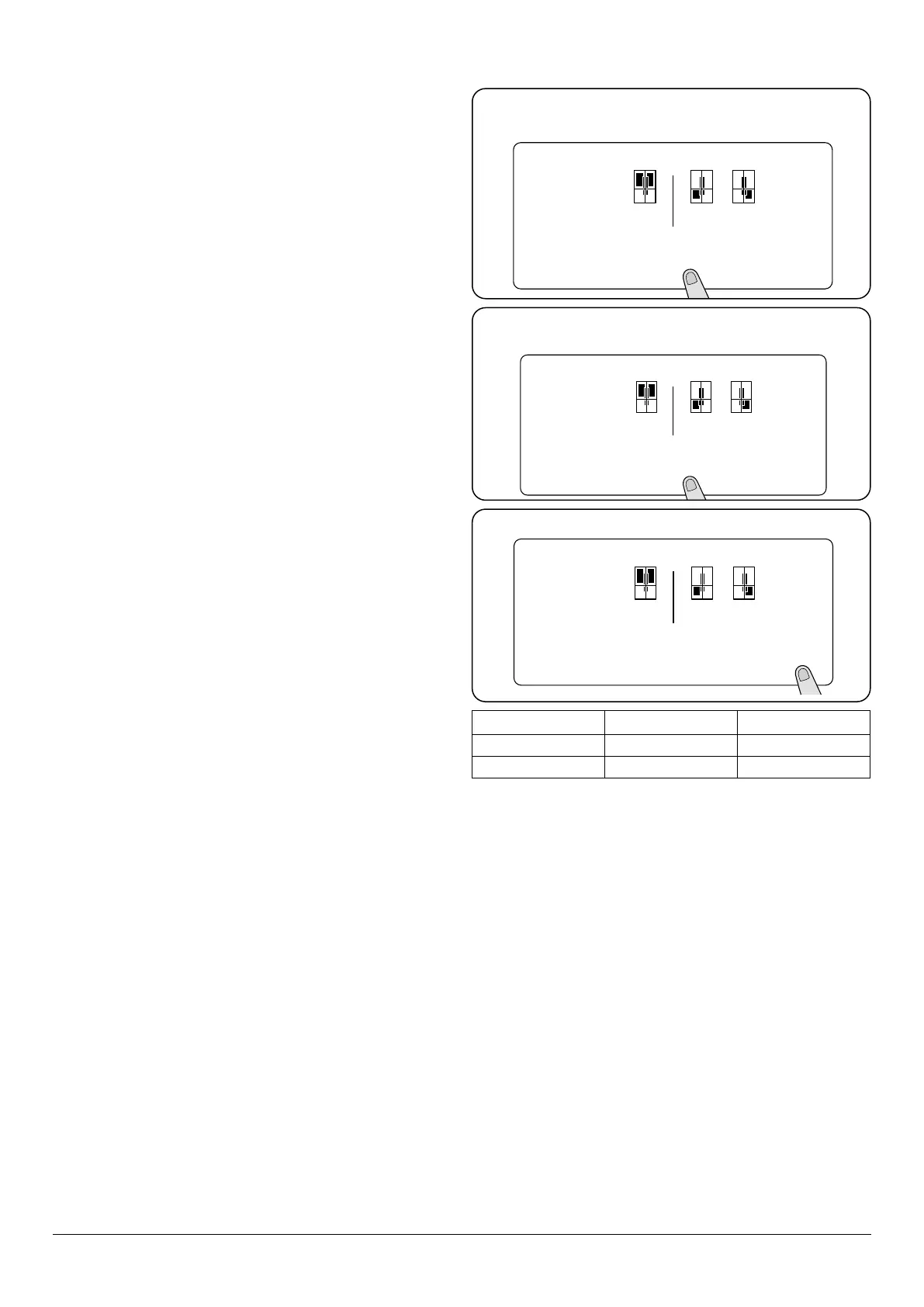
ZONE 1 (left freezer)
To set the freezer to chiller
To use the bottom-left compartment as a cooler, press
and hold the ‘zone 1’ button for 3 seconds. Then, set the
temperature to 1, 2, 3, 4, 5, 6, 7 or 8 °C (Fig. 3.11).
Food should only be stored if the cabinet temperature is
at required storage temperature.
To set the chiller to freezer
To use the ‘zone 1’ compartment as a freezer, press the ‘zone1’
button for 3 seconds to set the temperature of the bottom-
left compartment to -16, -17, -18, -19, -20, -21, -22, -23 or -24
°C (Fig. 3.12).
Food should only be stored if the cabinet temperature is
at required storage temperature.
ZONE 2 (right freezer)
Press the ‘zone 2’ button until display show -16°C. To set the
temperature of the bottom-right compartment to -16, -17,
-18, -19, -20, -21, -22, -23 or -24 °C (Fig. 3.13).
02
mode q drink s.saver
°c
-02
°c
-22
°c
sc sf
zone 1 zone 2
cooler
Hold for 3
seconds
02
mode q drink s.saver
°c
-20
°c
-22
°c
sc sf
zone 1 zone 2
cooler
02
mode q drink s.saver
°c
-22
°c
-18
°c
sc sf
zone 1 zone 2
cooler
Hold for 3
seconds
Fig. 3.11
Zone 1 freezer to chiller. NOTE: Disable screen
safe mode.
Zone 1 freezer to chiller. NOTE: Disable screen
safe mode.
NOTE: Disable screen safe mode.
Cooler / Fridge Zone 1 Zone 2
SUPER-COOL SUPERFREEZE FREEZE
COOL SUPERFREEZE SUPERFREEZE
Table 3.2 Setting Super-cool and Superfreeze Table
Fig. 3.12
Fig. 3.13


 To Next Page