6
1. Identify parts packed in carton against the parts list. Remove all protective materials and set parts on a flat,
non-abrasive surface.
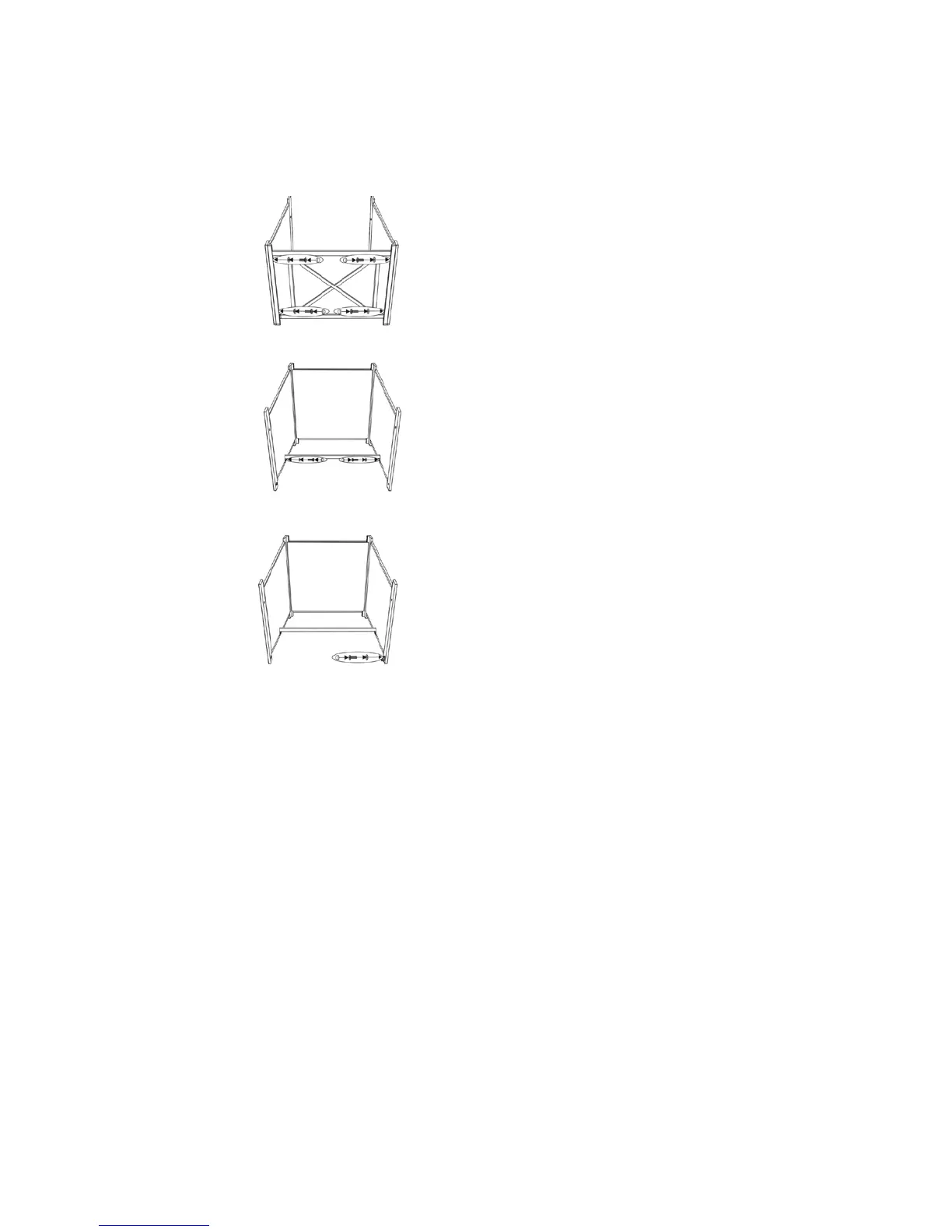
2. Attach the back panel to side panels by using four 1/4"x40 mm bolts and washers as shown in Fig 2.
Guide bolts through holes in back panel, into pre-drilled holes in the side panels. Hand tighten only.
Figure 2
3. Attach the middle support to side panels by using four 1/4"x15 mm bolts and washers as shown in Fig 3.
Guide bolts through holes in middle support, into pre-drilled holes in the side panels. Hand tighten only.
Figure 3
4. Attach the "L" connector to right side panel by using a 1/4"x15 mm bolt and washer as shown in Fig 4.
Guide bolt through hole in "L" connector, into pre-drilled hole in the right side panel. Do not over tighten.
Figure 4


 To Next Page