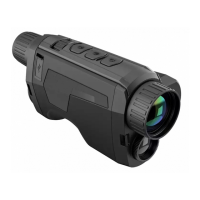
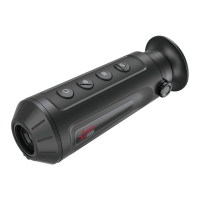
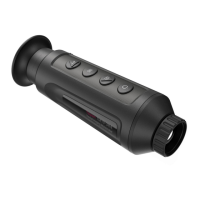
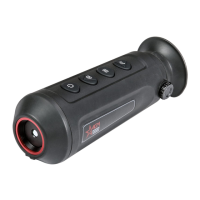
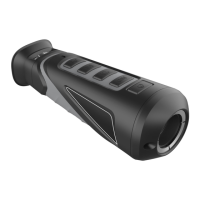
The AGM Fuzion Handheld Thermal & Optical Bi-spectrum Monocular is a versatile device designed for various applications, including patrol, search and rescue, drug interdiction, and suspect apprehension. It is equipped with advanced imaging technology to perform effectively in challenging environments such as smoke, fog, rain, and snow.
Function Description:
The Fuzion monocular offers three distinct image viewing modes: thermal, visible light, and fusion. These modes can be easily adapted to different environmental conditions, providing flexibility for the user. The device integrates a 12µm high-sensitivity thermal detector and an ultra-low light optical detector, allowing for quick detection of hidden objects. The 1024x768 OLED display and a large field of view enhance the viewing experience. The fusion image function combines thermal and optical channels, displaying a clear image with enhanced edge detail. The device also features a bi-spectrum image fusion and object highlight capability, along with detail enhancement and target recognition.
Important Technical Specifications:
The Fuzion series includes models TM25-384, TM35-384, and TM35-640, each with specific characteristics:
- Detector Type: 12 µm VOx Uncooled Focal Plane Arrays for all models.
- Resolution: 384 x 288 for TM25-384 and TM35-384; 640 x 512 for TM35-640.
- Refresh Rate: 50 Hz for all models.
- Response Waveband: 8 µm to 14 µm for all models.
- Thermal Lens Focal Length: 25 mm for TM25-384; 35 mm for TM35-384 and TM35-640.
- Aperture: F1.0 for all models.
- Field of View (HxV): 10.5° x 7.9° for TM25-384; 7.5° x 5.7° for TM35-384; 12.5° x 10° for TM35-640.
- Magnification: 2.5x – 20x for TM25-384; 3.5x – 28x for TM35-384; 2x – 16x for TM35-640.
- Digital Zoom: 1x, 2x, 4x, 8x for all models.
- Observation Distance: 1,181 m for TM25-384; 1,653 m for TM35-384 and TM35-640.
- Monitor: 1024x768, 0.39 in, OLED, 50Hz for all models.
- FFC (Flat Field Correction): Auto, Manual, External Correction for all models.
- Palettes: Black Hot, White Hot, Red Hot, Fusion, Visible, Image Fusion for all models.
- Highest Temperature Spot Tracking: Yes for all models.
- Scene Mode: Jungle, Recognition for all models.
- Optical Image Sensor: 1/2" Progressive Scan CMOS, 1960x1080@25fps for all models.
- Optical Sensor Wavelength: 400-1000 nm for all models.
- Optical Module Lens Focal Length: 22 mm for all models.
- Hotspot: Yes for all models.
- Sleep Mode: Yes for all models.
- Built-in Storage: 16 GB EMMC for all models.
- Record Video: On-board video recording for all models.
- Capture Snapshot: Yes for all models.
- CVBS Output: Yes (via USB) for all models.
- Battery Type: One 18650 rechargeable battery (removable) for all models.
- Battery Operating Time: Up to 5 hours continuous running (@25°C, WiFi and CVBS off); Up to 3 hours continuous running (@25°C, WiFi and CVBS on) for all models.
- Battery Capacity Display: Yes for all models.
- Power: 5 VDC/2 A, USB Type-C interface. Supports external power supply for all models.
- Working Temperature: -20°C to 55°C (-4°F to 131°F) for all models.
- Protection Level: IP67 (Waterproof) for all models.
- Dimensions: 161 x 87 x 51 mm (6.3 x 3.4 x 2.0 in) for all models.
- Weight (w/o batteries): 470 g (1.04 lb) for all models.
- Warranty: Limited 3-Year Warranty.
Usage Features:
The Fuzion monocular is designed with a user-friendly interface and ergonomic controls for ease of adoption and application.
- Power ON and OFF: Hold the POWER button to power on the device. To power off, hold the POWER button when the device is turned on.
- Standby Mode: Press the POWER button to enter standby mode; press it again to exit.
- Thermal View Observation: Power on the device, hold it to your eye, adjust the eyepiece to cover your eye, adjust the diopter adjustment ring until the OSD text or image is clear, and point the device towards the target, focusing by rotating the objective focus ring.
- Palette Settings: Select different palettes (Optical, White Hot, Black Hot, Red Hot, Fusion, Image Fusion) via the MENU button to display the scene in various color schemes.
- Digital Zoom: Rotate the operation wheel to switch the digital zoom (1x, 2x, 4x, or 8x).
- Video Recording/Image Capture: Press the CAPTURE button and MENU button simultaneously to start or stop recording. Press the CAPTURE button to capture a snapshot.
- Connecting the Device: Connect the device to a PC via USB cable to copy/delete files.
- File Export: Connect the thermal monocular to your PC with a USB cable and open the detected disk. Select and copy videos and snapshots to your PC.
- Menu Operation: Hold the MENU button to display the menu. Rotate the operation wheel to move between menu items, and press the MENU button to select an item. Hold the MENU button to exit.
- Main Functions:
- Contrast Adjustment: Adjust image contrast with 5 levels.
- Brightness Adjustment: Adjust image brightness with 5 levels.
- Scene Mode: Switch between Recognition mode (object edge is more distinct) and Jungle mode (suitable for hunting).
- Fusion Level: Adjust the fusion level according to observation distance.
- Trigger Calibration: Performs correction of nonuniformity of display.
- FFC (Flat Field Correction): Performs correction of nonuniformity of display (Manual, Auto, External).
- CVBS Output: View video on a CVBS monitor (USB-CVBS cable needed).
- Defective Pixels Correction (DPC): Correct defective pixels manually.
- Burning Prevention: Turn on/off the Burn Prevention function to protect the thermal sensor from high temperature bright light.
- Language Setting: Select different languages.
- View Device Information: View firmware version and serial number.
- Restore Device: Restore device to defaults.
- Time Synchronization: Set time and date.
- OSD (On-Screen Display): Enable or disable OSD.
- Auto Power Off: Set automatic shutdown time (30 min or 45 min).
- Hot Tracking: Enable/disable hot spot mark.
- Network Configuration: Connect to the Wi-Fi hotspot to configure parameters and realize functions.
- Client Software Introduction: Install T-Vision software on your mobile phone to connect to the monocular's hotspot. The device password is set upon first activation. The software allows viewing live video, adjusting image parameters, and recording video.
Maintenance Features:
Proper maintenance ensures the longevity and optimal performance of the device.
- Cleaning Procedures:
- Gently brush off dirt from the device body.
- Moisten a clean cloth with fresh water and gently wipe external surfaces.
- Dry wet surfaces (except lenses) using another dry, clean, soft cloth.
- Use a lens brush to remove loose dirt from the lenses.
- Dampen a cotton swab with ethanol and gently wipe down the lenses using circular movements, starting from the center of the lens and moving outwards. Repeat until glass surfaces are clean.
- Clean accessories with a soft brush or cloth dampened with soap and water.
- Preparing for Extended Storage:
- Thoroughly dry each item before placing them into the storage case.
- Clean the monocular and accessories.
- Place all items into the storage case.
- Updating the Device Firmware:
- Download the firmware update package to your PC and unzip it.
- Connect the thermal device to your PC with a USB cable.
- Turn on the thermal device.
- Open the detected disk (USB drive) in file manager program. Copy the unzipped .dav file and paste it to the root directory of the device.
- Turn off the device.
- Turn on the device. The firmware update process will start automatically. The screen will display "Upgrading..." and then "Upgrading..." goes out when complete.
- Repeat steps 4-6 for each updating file.
- Turn off the device and disconnect it from your PC.
- General Maintenance Notes:
- If the product does not work properly, contact your dealer or service center.
- Wipe the device gently with a clean cloth and a small quantity of ethanol, if necessary.
- The equipment is designed for use in a manner specified by the manufacturer.
- Clean the lens with soft and dry cloth or wiping paper to avoid scratching it.
- Using Environment:
- Ensure the running environment meets the requirement of the device. Operating temperature should be -20°C to 55°C (-4°F to 131°F), and operating humidity shall be 95% or less.
- Do not expose the device to extremely hot, cold, dusty, corrosive, saline-alkali, or damp environments.
- The device can only be safely used in the region below 2000 meters above the sea level.
- Avoid equipment installation on vibratory surface or places subject to shock.
- Do not aim the lens at the sun or any other bright light.
- Emergency: If smoke, odor, or noise arises from the device, immediately turn off the power, unplug the power cable, and contact the service center.

 Need help?
 General

 To Next Page