Help and Troubleshooting
How to reset the language?
There are two ways to reset the language as shown below.
Can’t turn on the player; the screen of player goes
blank/black; the player is crashed or has a
firmware bug.
1. Power off the player and try again.
2. Update the firmware. Please contact our customer service or
check our website at https://www.agptek.com/blog to download
the firmware.
Can’t download files from computer.
1. Please confirm whether it’s connected properly;
2. Please check whether the storage space of the internal memory is
full;
3. Please check whether the USB cable is damaged.
Can’t recognize the player when connected to
the computer via USB cable.
1. Reconnect it.
2. Restart the computer and reconnect it.
3. Connect your player to another USB port.
4. Charge the player for about 10 minutes first.
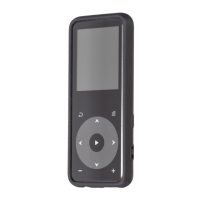
1. Find (Settings) in the home menu and confirm it by pressing
button . Select the first (upper) option and press button to
confirm. Scroll down and select the language you want to set.
2. Find (Settings) in the home menu, enter and scroll down to the
last menu. Press button to enter and choose the first (upper)
option which means "Yes" with button to confirm and restore
to factory settings. And then the player will power on
automatically and then you can choose language again.
09



 To Next Page