2
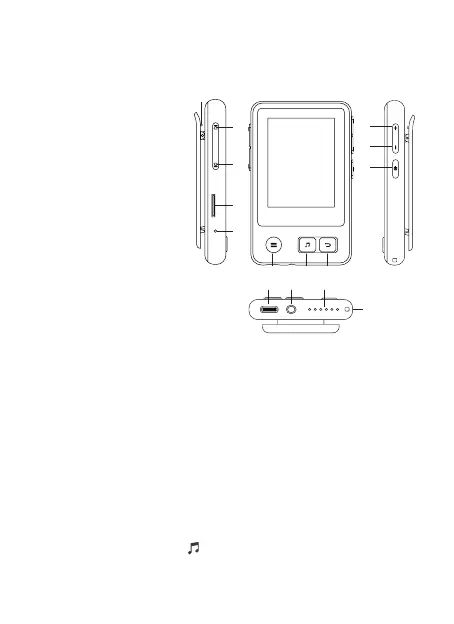
1. VOL +
2. VOL -
3. Power On/Off
4. Return
5. Play/Pause/Long press
to enter music playback
interface
6. Submenu
7. Previous Track/Rewind
8. Next Track/Fast
Forward
9. TF Card Slot
10. Reset Button
11. Back-Clip
12. Type-C Charging Port
13. 3.5mm Headphone Jack
14. Speaker Holes
15. Lanyard Hole
Basic Operation
1. Power On/Off Button: Press the button to turn on/off the player.
2. Screen Display: Press the Power On/Off button to activate
screen.
3. Return Button: On any interface, press the Return button to go
back; long press to enter the home menu directly.
4. VOL +/- Button: On the non-list menu, press the buttons to adjust
volume.
5. Previous/Next Track Button: You can switch songs no matter
the screen is on or off; but if there
’
s no music playing, there will be
no effect pressing the buttons.
6. One Button to Enter the Music Playback Interface: On any
interface, long press the button to enter the music playback
interface.
Product Overview
456
12 13 14
15
7
8
9
10
11
1
2
3



 To Next Page