pg 17
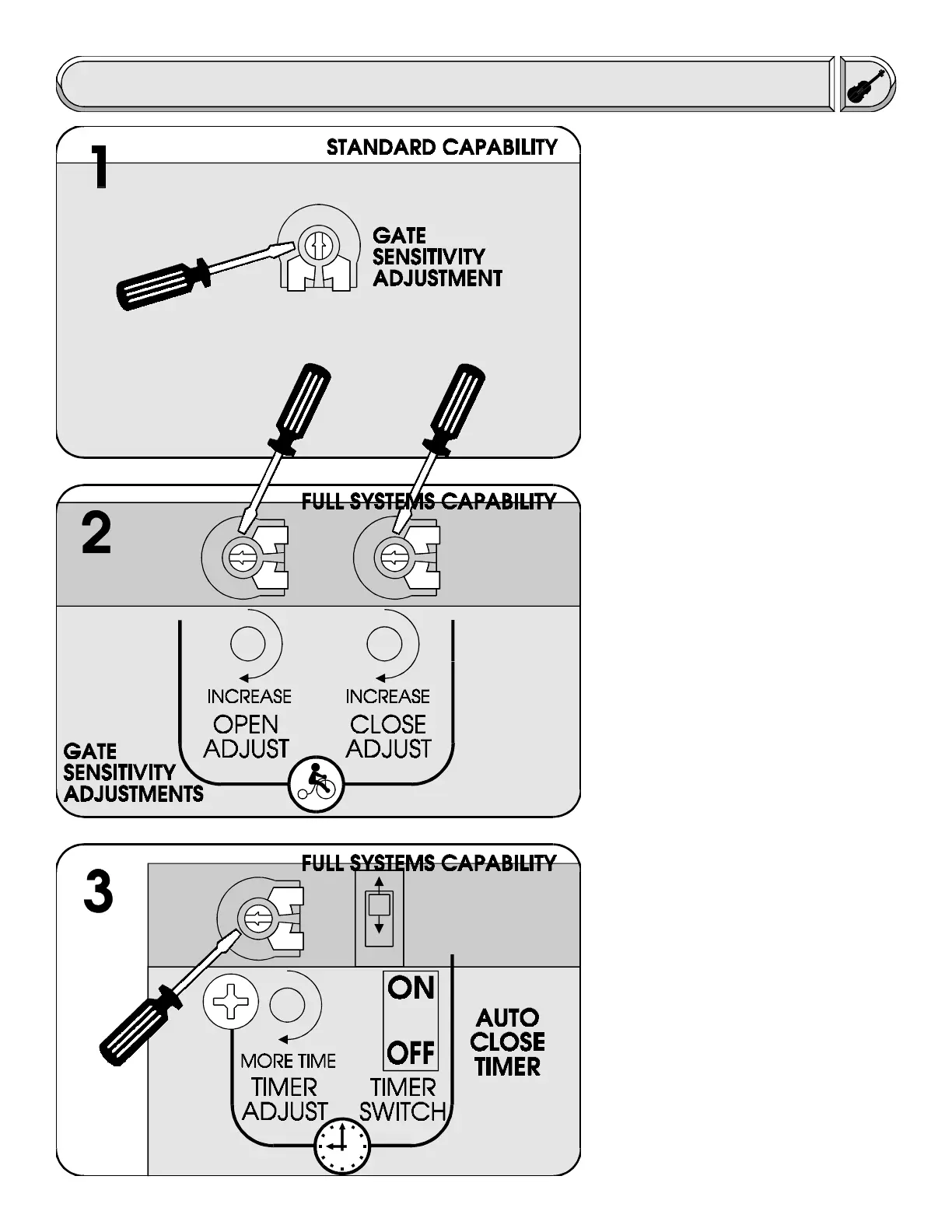
m This step is for sensitivity
adjustment on the standard capability
control board. To make the adjustment,
use a small screw driver and turn the
adjustment "pot" clockwise for less
sensitivity or counter clockwise for more
sensitivity. Try applying force against the
gate while it is moving both open and
close to test the setting (Caution: Do not
stand directly in the path of the gate
while doing this). The gate should stop
easily if the adjustment has been set
correctly and will remain stopped until a
push button is pressed again. Caution:
Disconnect power while making any
adjustments.
m This step is for sensitivity
adjustments on the full systems capabil-
ity control board. To make adjustments,
use a small screw driver to turn the
adjustment "pots" clockwise for more
sensitivity or counter clockwise for less
sensitivity. There are separate adjust-
ments for both the opening and closing
directions of travel and these must both
be adjusted. Try applying force against
the gate while it is moving both open and
close to test the setting (Caution: Do not
stand directly in the path of the gate
while doing this). The gate should stop
or reverse easily. Caution: Disconnect
power while making any adjustments.
m If the gate operator has the full
systems capability control board there is
the option of using the auto close timer
which will close the gate automatically
after it has opened. To turn this feature
on, flip the auto close timer to the on
position. To adjust the amount of time it
takes for the gate to begin closing use a
small screw driver to turn the adjustment
"pot" clockwise for more time (45 sec
max) or counter clockwise for less time.
It is recommended that if the auto close
timer function is used, that there be
additional safety equipment installed to
prevent the gate from closing into a
vehicle or pedestrian. Caution: Discon-
nect power while making adjustments.
Fine Tuning


 To Next Page
 Loading...