Keep Warm Function
Daily check and maintenance
Chili
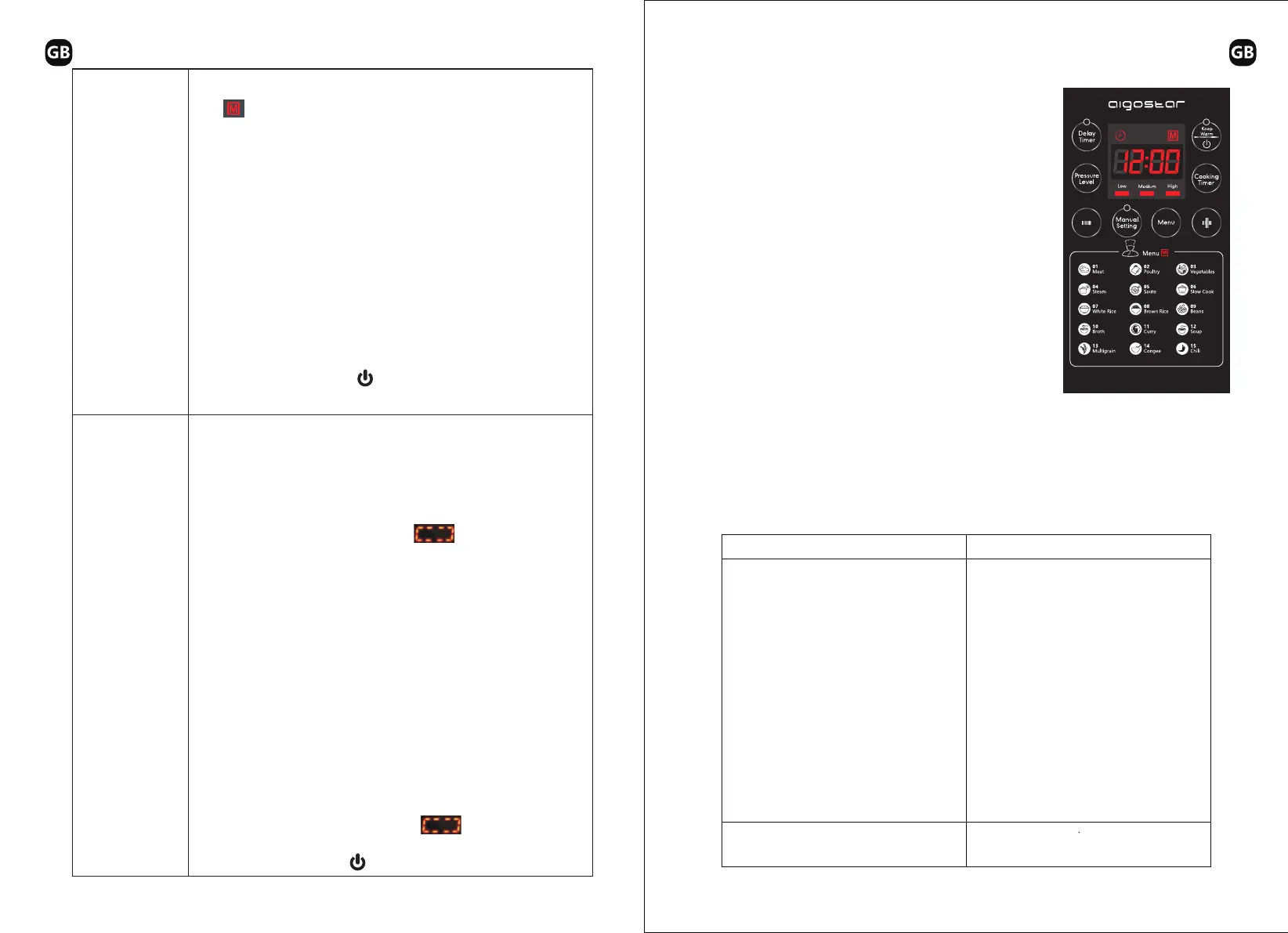
Manual Setting
1.Normal cooking: Under standby state, press the “Menu” button,
“ ” indicator lights on, the digital screen flashes “P01”,
then press “+” fourteen times, the digital screen displays “P15”.
10s later if no button is pressed, the product automatically starts
cooking at “Chili”, the digital screen displays “P15”, and starts
countdown when pressure rises in the cooker.
2.Preset cooking: Under standby state, press the “Menu” button,
then press “+” fourteen times, the digital screen displays “P15”,
press the “Delay Timer” button again, “Delay Timer” indicator
flashes, the digital screen flashes the time, start to adjust the preset
time, press the “+''/“-” button to adjust minute, press it once to
adjust by 10min. 10s after setting, the product automatically starts
preset cooking at “Chili”, the digital screen displays the finishing
time and starts countdown.
Exit work state: Press the “ ” button to exit the current work
state.
1.Normal cooking: Under standby state, press the “Manual Setting”
button, “Manual Setting” and “High” indicators lights on, the
digital screen displays “30”. Press the “Cooking Timer” button
then press the “+”/“-” button to adjust the pressure keeping time
.10s later if no button is pressed, the product automatically starts
cooking, the digital screen displays “ ”, and starts
countdown when pressure rises in the cooker.
2.Preset cooking: Under standby state, press the “Manual Setting”
button, “Manual Setting” and “High” indicators lights on, the
digital screen displays “30”. Press the “Delay Timer” button again,
“Delay Timer” indicator flashes, the digital screen flashes the time,
start to adjust the preset time, press the “+”/“-” button to adjust
minute, press it once to adjust by 10min. 10s after setting, the product
automatically starts preset cooking at “Manual Setting”, the digital
screen displays the finishing time and starts countdown.
3.Pressure selection: Under standby state, press the “Manual Setting”
button, “Manual Setting” and “High” indicators lights on, the
digital screen displays “30”. Adjust the pressure with “Pressure
Level”, the “High” lights off, “Low” lights on. 10s later if no button
is pressed, the product automatically starts cooking at “Manual
Setting”, the digital screen displays “ ” , and starts
countdown when pressure rises in the cooker.
Exit work state: Press the “ ” button to exit the current work state.
If followings occur Solutions
● After cooking, the electric pressure cooker
automatically enters into
the keep warm state; Under keep warm
state, keep warm indicator lights on;
● Under standby state, you may also press
the “Keep Warm” button to
keep warm;
● Keep warm temperature is 140°F~176°F;
● For use the product safely with a longer service life, please carefully check
and maintain it.
● Power cord and plug is expanded,
deformation, damaged and it color is
changed.
● One part of the power cord and plug are
hotter.
● Power cord is flexible with discontinuous
power supply.
● The electric pressure cooker has
abnormal heating and generates bad odor.
There's abnormal noise or vibration when
supply power.
Stop using, and repair it by the authorized
repair center.
Remove the dust or dirt.There's dust or dirt on the plug or socket.
21 22


 To Next Page