EasyManua.ls Logo

Aiphone JV-1MD - Door Station

Aiphone JV-1MD
24 pages
Print Icon
To Next Page IconTo Next Page
To Previous Page IconTo Previous Page
Loading...
-9-
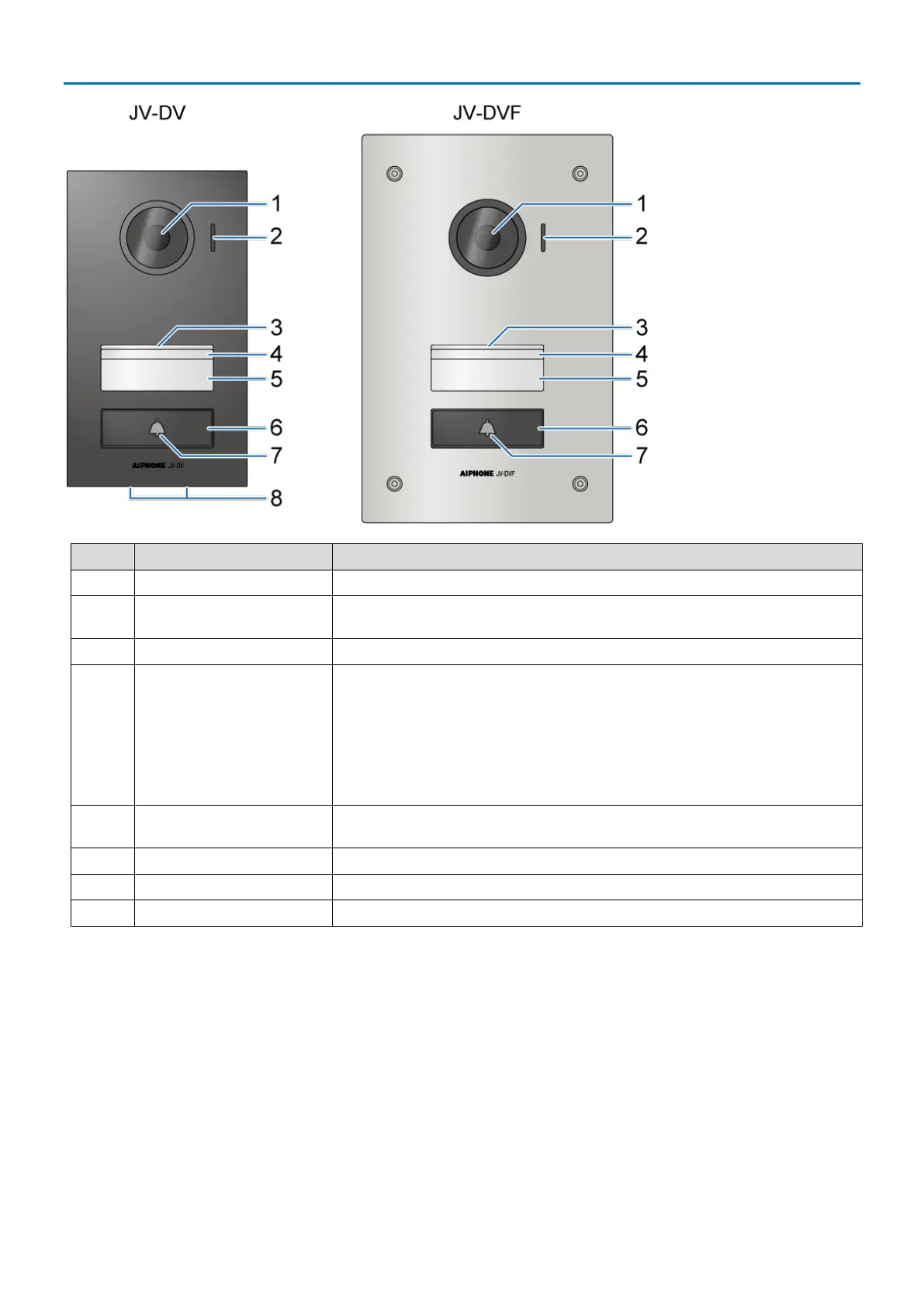
Door station
No.
Item
Description
1
Camera
-
2
Microphone
Do not block the microphone with stickers or tape. Otherwise, communication may
not be possible.
3
Speaker hole
-
4
White light LED
The white light LED is always lit while the power is on. When the door station
detects dark conditions, the light automatically brightens. These conditions include:
The call button is pressed.
While an image at the door station is displayed on the monitor station.
When an electric lock is unlocked by this system.
However, it may not become brighter depending on local conditions since day and
night automatically detected by the door station.

5
Nameplate cover
Do not put a sticker over the nameplate cover. This will decrease the LED's
illumination.
6
Call button
-
7
Bell icon (white)
The backlight is always lit while the power is on.
8
Drainage holes
Holes for discharging rain water from inside the station.

Related product manuals