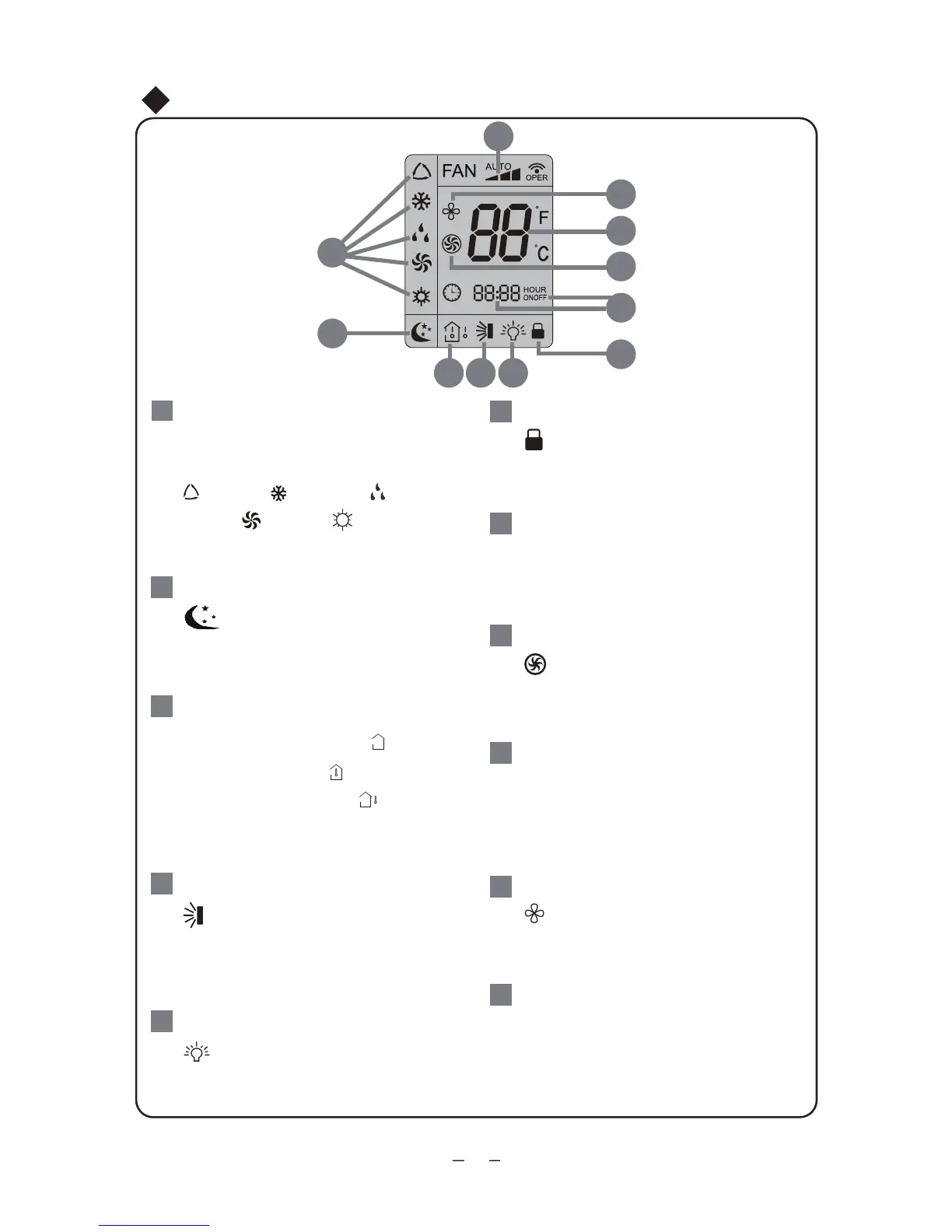
Operation of Remote Controller
6
This area will show the set tempe-
rature. In SAVE mode,"SE" will be
displayed. During defrosting opera-
tion, “H1” will be displayed.
DIGITAL display:
23
Press FAN button to select the
desired fan speed setting(AUTO-
Low-Med-High).Your selection will
be displayed in the LCD windows,
except the AUTO fan speed.
FAN SPEED display:
25
LOCK icon:
and “-” buttons simultaneously.Press
them again to clear the display.
20
LIGHT icon:
LIGHT button. Press LIGHT button
again to clear the display.
19
the
up & down swing
button.
Press this button again to clear
the display.
18
Up & down swing icon:
is displayed when pressing
After pressing TIMER button, ON
or OFF will blink.This area will
show the set time.
SET TIME display:
21
(outdoor ambient temperature)
and blank is displayed circularly.
TEMP icon:
(set temperature),
(indoor
ambient temperature)
Pressing TEMP button,
17
SLEEP icon:
the SLEEP button. Press this
button again to clear the display.
16
is displayed by pressing
nottub siht sserP.nottub OBRUT
again to clear the display.
TURBO icon:
22
is displayed when pressing the
X-FAN button. Press this button
again to clear the display.
X-FAN icon:
24
is displayed when pressing the
15
16
20
23
24
22
25
17 18 19
21
MODE icon:
If MODE button is pressed,
current operation mode icon
is only for heat pump models) will
15
(AUTO), ( COOL),
show.
(DRY), (FAN) or (HEAT
is displayed by pressing "+"
is displayed by pressing the




 To Next Page