Page
13Air Techniques, Inc.
Classic, Ortho & Intraoral
SYSTEM SETUP
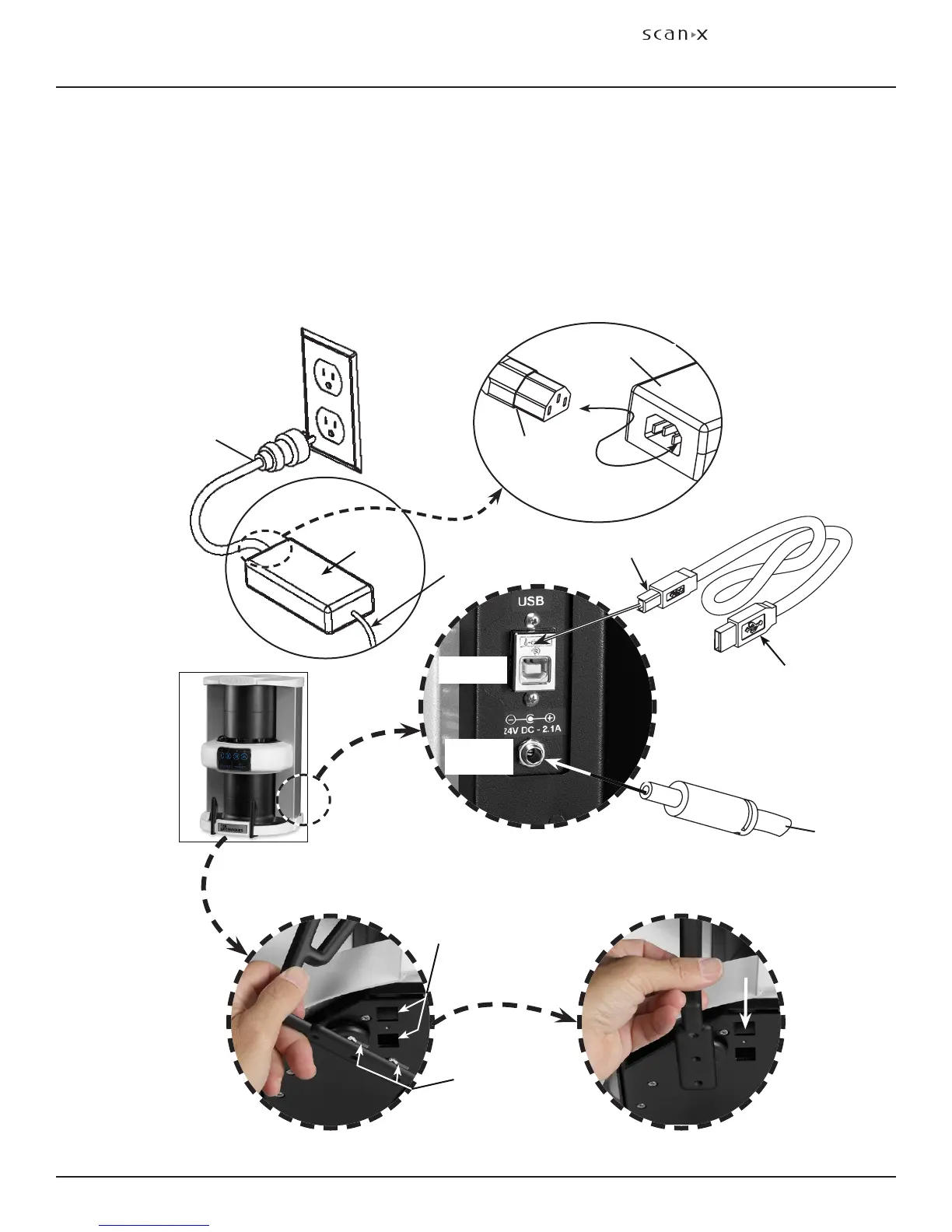
Figure 2. ScanX Power and Computer Connections
Exit Side Plate Supports Installation (ScanX Classic & ScanX Ortho only)
The supports are used to catch extraoral plates after processing. Refer to Details C and D below and
install the supports as follows.
CAUTION: ScanX weighs up to 51 pounds. Two people may be required to perform this
installation to prevent damage to the unit.
1. Carefully tilt the ScanX back enabling access to the slots under of the ScanX.
2. Align the two quick connect clips of each support with the corresponding slots.
3. Insert each support into the slots until a click is heard.
4. Return the ScanX to the upright position on the installation site counter top.
Detail B
Type B USB
Connector
Type A USB
Connector to
Computer
TO
POWER
SUPPLY
Power
Supply
Note: The power line cord is the
Mains disconnect device.
Line Cord
Type B USB
Receptacle
Inlet Power
Jack
ScanX
Side
Quick
Connect Clips
Slots
Detail C
ScanX
Underside
ScanX Power and Computer
Receptacles Located on Right Rear Panel
Power Supply
Line
Cord
Detail A
Align Clips
& Slots
Detail D
Snap
Supports in
Place
To ScanX
Inlet
Power
Jack


 To Next Page