GB
2HOWTOUSEYOURDEVICE
Thecontrolunitfunctionselectorhas4differentmodes:
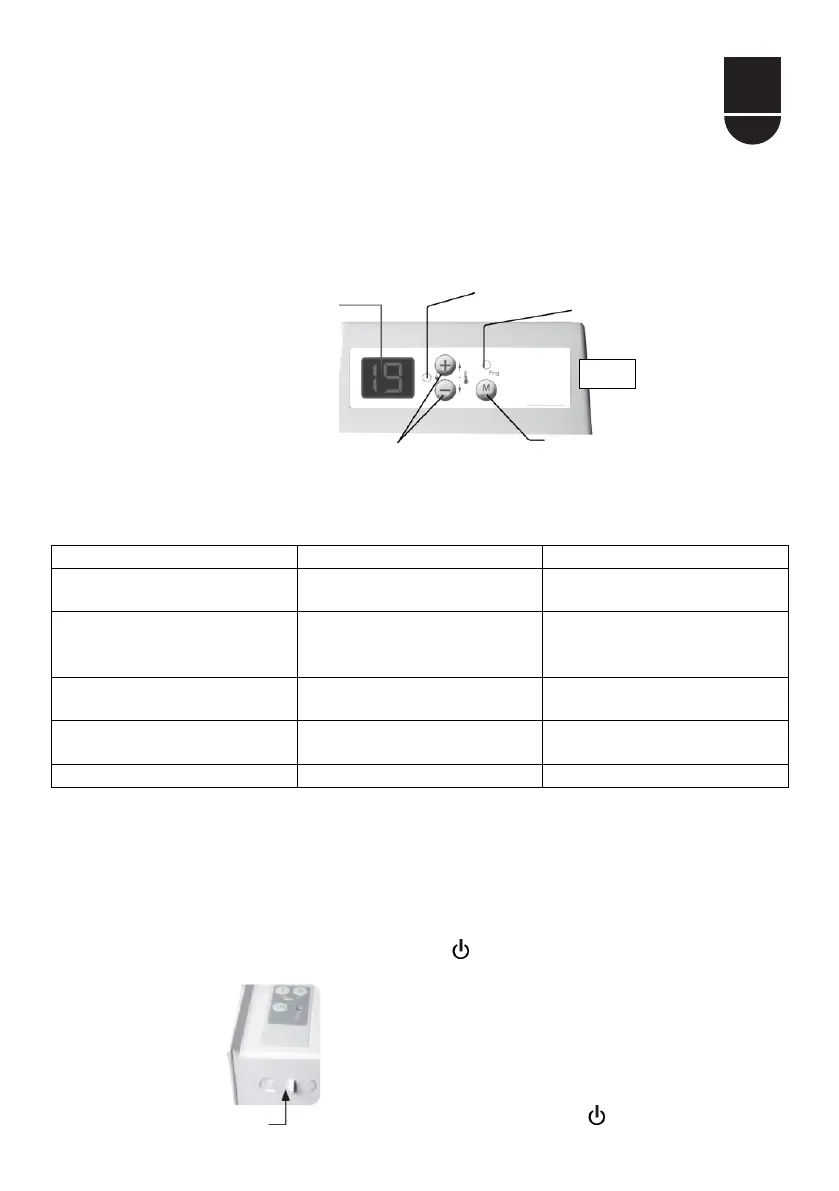
Displaystherequiredsetpoint
temperature
MaintainstheComfort
temperature
Maintainstheroomatthe
Economytemperature
HORSGEL(FROST
PROTECTION)
MaintainstheroomattheFrost
Protectiontemperature.
Switchesofftheheating
functionofthedevice
1 SWITCHINGTHEDEVICEONOROFF:
Toswitchthedeviceon,movetheswitchonthesideofthedeviceto
position"
1".
Toswitchoffthedevice,movetheswitchtoposition" "
SwitchtheheatingOn("
1")andOff( ).
indicator
Setpoint temperature setting
Selection of device
operating modes
* After about ten seconds,
the screen switches off
automatically. It is
reactivated simply by
pressing a key.
View* of the setpoint temperature
or operating mode
Programming
indicator light
48.



 To Next Page