D-17-435-01 rev. 14 17-435-01-rev. 14 04/01/20
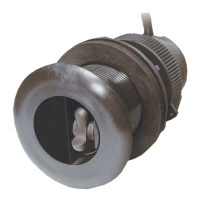
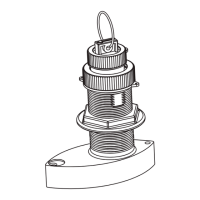
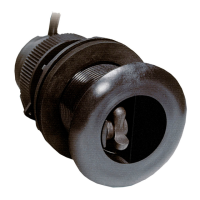
Thru-Hull: Retractable with Valve
TRIDUCER
®
Multisensor
Models: DST800, DST810
Patent http://www.airmar.com/patent.html
Record the information found on the cable tag for future reference.
Part No._________________Date___________Frequency________kHz
CAST
™
App for DST810
Download the CAST App by Airmar to view,
analyze, and share DST810 sensor data and
evaluate your boat’s performance. Install the
CAST App on your iOS or Android device to view
available NMEA data over a wireless or network
connection.
With the CAST App you can perform depth, speed, temperature,
and attitude calibrations. Smart devices with Bluetooth
®
connectivity can be used to view the data. Within the Cast App,
you can link to and download the CAST App User Guide.
Downloading the CAST App
1. Go to the App Store or Google Play Store.
2. Search on the word Airmar.
3. Download the free CAST App
Applications
• Best performance on hull deadrise angle through 7°.
Accommodates up to a 22° deadrise angle.
• Plastic housing recommended for fiberglass or metal hull only.
Never install a plastic housing in a wood hull, since swelling of
the wood can possibly fracture the plastic.
• Bronze housing recommended for fiberglass or wood hull.
Never mount a bronze housing in an aluminum hull because
electrolytic corrosion will occur.
• Stainless steel housing compatible with all hull materials.
Recommended for aluminum hulls to prevent electrolytic
corrosion provided the stainless steel housing is isolated from
the metal hull.
Pretest
Connect the sensor to the instrument and spin the paddlewheel.
Check for a speed reading and the approximate air temperature. If
there are no readings or they are inaccurate, check all the
connections and repeat the test. If there are still no readings or
they are inaccurate, return the product to the place of purchase.
plastic
low profile
P617V housing
Follow the precautions below for optimal
product performance and to reduce the risk of
property damage, personal injury, and/or death.
WARNING: Always wear safety glasses, a dust mask,
and ear protection when installing.
WARNING: The valve is not a watertight seal!
Always install the insert or blanking plug. Be sure it is fully
inserted into the housing and the cap nut is screwed on
completely for a watertight seal.
WARNING: The O-rings must be intact and well
lubricated to make a watertight seal.
WARNING: The YELLOW O-ring must be in place
near the top of the insert to make a watertight seal.
WARNING: To retrofit the insert in a housing without
a valve, the insert must have a BLACK O-ring near
the top to make a watertight seal.
WARNING: Always attach the safety wire to prevent the
insert or blanking plug from backing out in the unlikely
event that the cap nut fails or is screwed on incorrectly.
WARNING: Immediately check for leaks when the
boat is placed in the water. Do not leave the boat
unchecked for more than three hours. Even a small
leak may allow considerable water to accumulate.
WARNING: Stainless steel housing in a metal hull—
Be sure the washer contacts the hull. Do not tighten
the hull nut with the washer against the isolation
bushing, as the housing will not be firmly installed.
CAUTION: Plastic housing—Never use a fairing with
a plastic housing; the protruding sensor would be
vulnerable to damage from impact.
CAUTION: Metal housing—Never install a metal
housing in a vessel with a positive ground system.
CAUTION: Stainless steel housing in a metal hull—
A stainless steel housing must be isolated from a
metal hull to prevent electrolytic corrosion. Use the
isolation bushing supplied.
CAUTION: Never pull, carry, or hold the sensor by its
cable. This may sever internal connections.
CAUTION: The arrow on the top of the insert must point
forward toward the bow to align with the water flow.
CAUTION: Never use solvents. Cleaner, fuel, sealant,
paint, and other products may contain solvents that can
damage plastic parts, especially the transducer’s face.
IMPORTANT: Read the instructions completely
before proceeding with the installation. These
instructions supersede any other instructions in your
instrument manual if they differ.
OWNER’ S GUIDE & INSTALLATION INSTRUCTIONS
Smart
™
Sensor

 Need help?
 General

 To Next Page