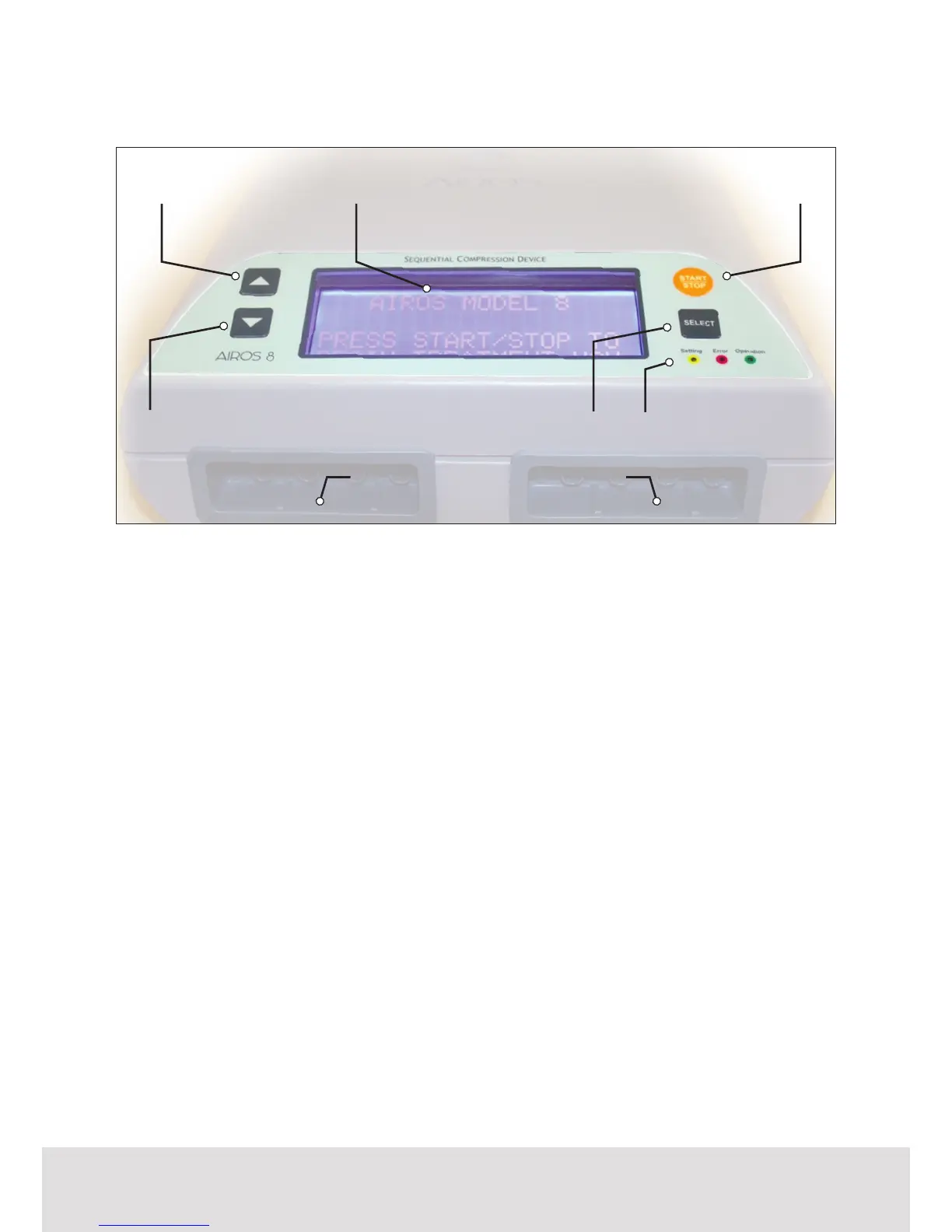
Device Panels: Front Panel
Button Functions
• START|STOP BUTTON: Allows
user to begin and end treatment.
• SELECT BUTTON: Allows user to
select options displayed on the
LCD screen.
• UP BUTTON: Allows user to scroll
up to options displayed on the
LCD screen.
• DOWN BUTTON: Allows user to
scroll down to options displayed
on the LCD screen.
Display
• LCD Screen: Shows user settings
information, chamber pressure,
treatment time remaining, and
other real-time device information.
• LCD Specication: 5 volts
DC, max 0.5 amp, 4 lines x 20
characters per line presentation.
Status Indication
• Green LED: Indicates that
treatment is being administered.
• Yellow LED: Indicates that settings
are being changed on the device.
• Red LED: Indicates there is an
error in operation.
Garment Connector Ports
The Garment Connector Ports are
xed on the device and match with
the Garment Connectors on the
detachable garments used with this
system.
• Air Blocker: The Air Blocker is
used to block air passage to the
unit.
UP BUTTON
DOWN BUTTON
GARMENT CONNECTOR PORTS
LCD SCREEN START|STOP BUTTON
SELECT BUTTON
STATUS LED LIGHTS



 To Next Page