Easy to mount
Daily use
Basics of the App
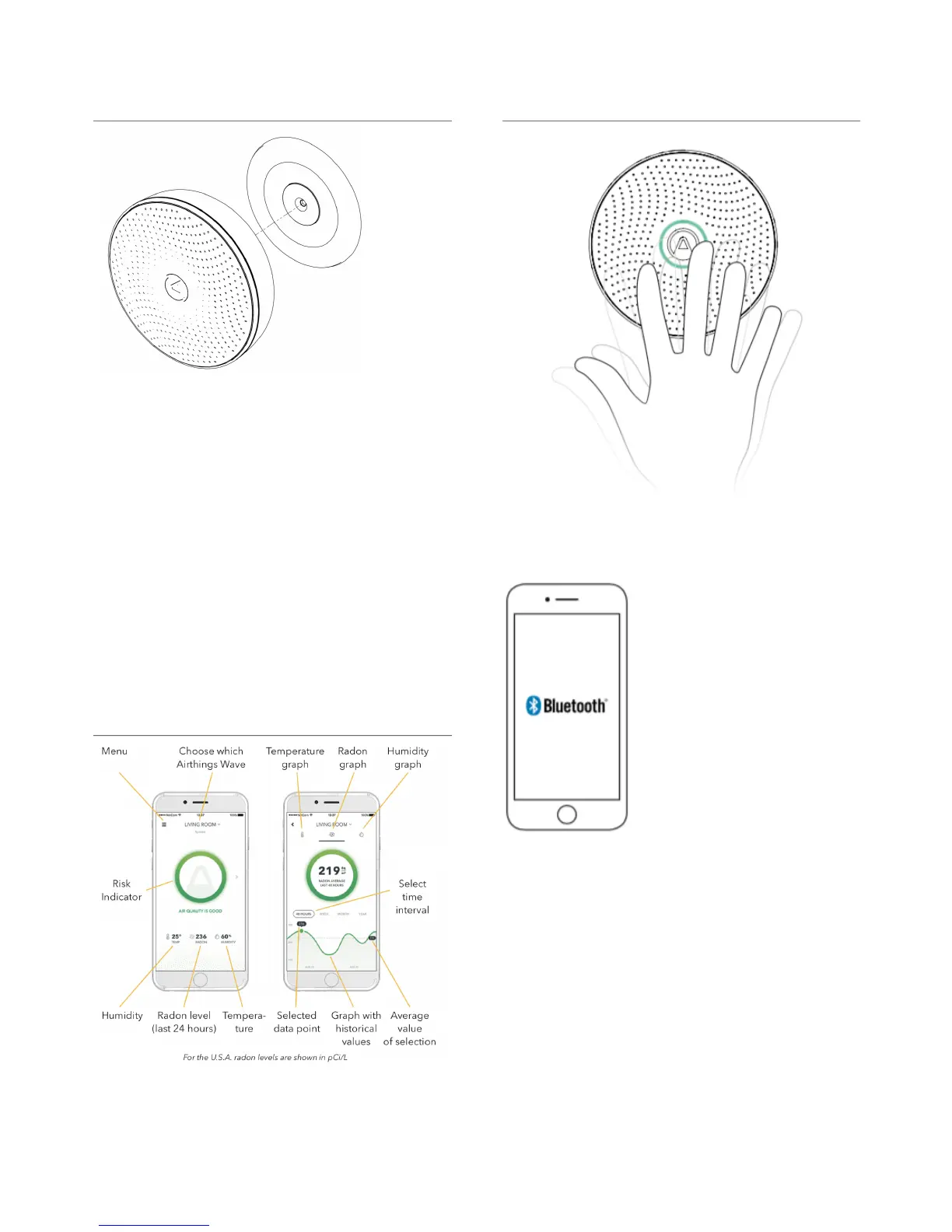
Wave in front of your device to see a visual
indication of your daily radon levels.
To download measurement
data, open the Airthings
Wave app when the phone is
within Bluetooth range of
your device. The app will
search for devices and
download historical data.
You will be notified if any
actions are needed through
the app.
The Airthings Wave 2
nd
gen also includes
Airthings Smartlink which works with the Hub.
Refer to the Hub manual for Smartlink info. The
Hub provides longer range as well as live updates
using Airthings Smartlink.
Fix the mounting bracket to the ceiling or wall
(optional). Make sure you use an appropriate
screw for your wall type. The screw included is
intended for wood. Avoid placing your device
close to vents or windows (Minimum 1 meter / 3
feet distance).
Thanks to the built-in magnet, simply snap the
unit onto the mounted bracket. Then rotate it to
the desired position.


 To Next Page