Need help?
Do you have a question about the Aiwa CDC-X227 and is the answer not in the manual?
Safety guidelines for operating the unit in a vehicle.
Information on FCC rules and potential radio frequency interference.
Warnings regarding unauthorized modifications and CD usage.
Proper handling and care instructions for CDs.
How to activate, cancel, and resume the unit's demonstration mode.
Step-by-step instructions for removing and reattaching the detachable front panel.
Procedures for turning the unit on/off and changing audio sources.
How to adjust the volume and mute the audio output.
Options to customize sound profiles like Bass, Treble, Balance, and Fader.
Aligning source volumes and restoring unit to factory defaults.
Managing button beep sounds and setting the unit's clock.
How to tune into radio stations using Seek or Manual tuning.
Using Monaural, Local modes, and managing preset radio stations.
Automatic suppression of FM noise for improved sound quality.
Inserting, playing, ejecting, and navigating tracks on CDs.
Features like Intro Scan, Repeat Play, and Random Play for CDs.
How to connect and listen to external audio sources via the AUX input.
Adjusting key illumination color and display brightness.
Resolving error codes and resetting the unit.
Guidelines for cleaning the front panel, connector, and back.
Detailed technical data for radio, CD, audio, and general unit features.
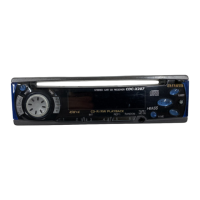
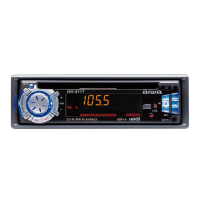
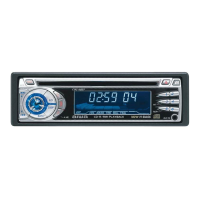
The AIWA CDC-X227 YU is a stereo car CD receiver designed for automotive use, offering a range of audio playback and radio reception features.
The primary function of the CDC-X227 YU is to provide in-car entertainment through CD playback, AM/FM radio reception, and auxiliary input for external devices. It features a detachable front panel for theft protection, ensuring the security of the unit when the vehicle is unattended. The device supports various audio adjustments, including bass, treble, balance, fader, and a high-bass setting, allowing users to customize their listening experience. It also includes a Source Level Adjuster to align volume levels across different input sources.
The CD player is capable of playing standard audio CDs, as well as CD-Rs and CD-RWs. It offers several playback modes such as Intro Play (scanning the first 10 seconds of each track), One Track Repeat Play, and Random Play. The radio tuner supports both Seek Tuning and Manual Tuning, allowing users to find stations automatically or by stepping through frequencies. It also has an Auto Memory function to automatically store up to six strong stations for each band (FM1, FM2, FM3, AM1, AM2) and a Preset Scan feature to briefly play each preset station. For improved radio reception, the unit incorporates Monaural mode for weak signals and Local mode to tune in only to strong stations during Seek Tuning. The Active Tuning Reception Control (ATRC) automatically suppresses FM noise caused by vehicle movement, maintaining sound quality.
An auxiliary input (AUX jack) allows connection of external portable players like cassette players, MD players, or MP3 players, expanding the device's versatility. The unit also includes a clock display and dimmer settings for the display and key illumination, offering customization options for the user interface.
 General
| Type | Car Receiver |
|---|---|
| Tuner | AM/FM |
| CD Playback | Yes |
| MP3 Playback | No |
| USB Port | No |
| Bluetooth | No |
| Detachable Face | Yes |
| Channels | 4 |
| CD Text | Yes |
| Remote Control | Yes |
| Anti-Shock Memory | Yes |
| Aux Input | Yes |
| Preset Stations | 18 FM, 12 AM |
| Max Power Output | 50W x 4 |

 To Next Page