EasyManua.ls Logo

Aiwa CDC-X504MP - User Manual

Aiwa CDC-X504MP
52 pages
Print Icon
To Next Page IconTo Next Page
Loading...
Operating Instructions...........................................................................
Mode d’emploi................................................................................................................
Manual de instrucciones......................................................................................
US
FR
3-263-367-11(2)
©2004 Sony Corporation
CDC-X504MP
ES
POR FAVOR LEA DETALLADAMENTE ESTE MANUAL DE
INSTRUCCIONES ANTES DE CONECTAR Y OPERAR ESTE EQUIPO.
RECUERDE QUE UN MAL USO DE SU APARATO PODAÍA ANULAR
LA GARANTÍA.
FM/AM Compact Disc Player
AUTOESTEREO PARA DISCO
COMPACTO
For assistance and information
visit us on the internet at
www.us.aiwa.com
call toll free 1-800-BUY-AIWA
(United States only)

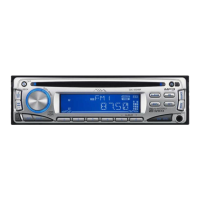
Table of Contents

Questions and Answers

  • D
    Danny ElliottAug 17, 2025
    Why is there no sound coming from my Aiwa Car Receiver?
    • I
      ibrownAug 17, 2025
      If you have no sound from your Aiwa Car Receiver, try the following: * Adjust the volume by turning the (PUSH-MENU) button to the right. * Deactivate the ATT function. * For a 2-speaker system, ensure the fader control is set to the center position.
  • M
    Marcia GomezAug 20, 2025
    What to do if my Aiwa CDC-X504MP Car Receiver displays 'ERROR'?
    • E
      Ebony AndersonAug 20, 2025
      If your Aiwa Car Receiver displays 'ERROR', the CD might be dirty or inserted upside down. Clean the CD or insert it correctly. If the issue persists, the CD may be unplayable, so try inserting another CD.
  • E
    Evan HarringtonAug 23, 2025
    What to do if my Aiwa CDC-X504MP Car Receiver is not getting power?
    • D
      Danny McclureAug 23, 2025
      If your Aiwa Car Receiver isn't getting power, check the connection and the fuse. If your car lacks an ACC position, you can turn on the unit by pressing (SOURCE) or inserting a disc.
  • D
    dannyleeAug 26, 2025
    What to do if the display disappears on my Aiwa CDC-X504MP?
    • A
      athompsonAug 26, 2025
      If the display disappears from your Aiwa Car Receiver, try pressing and holding (OFF) again until the display reappears. Alternatively, remove the front panel and clean the connectors.
  • M
    michelletuckerAug 28, 2025
    Why does my Aiwa CDC-X504MP keep skipping?
    • L
      Lisa BirdAug 28, 2025
      If your Aiwa Car Receiver is skipping, the disc might be dirty or defective.
  • T
    Timothy GutierrezAug 31, 2025
    What does 'HI TEMP' mean on my Aiwa CDC-X504MP?
    • M
      Matthew GrayAug 31, 2025
      The 'HI TEMP' message on your Aiwa Car Receiver indicates that the ambient temperature is above 50°C (112°F). Wait for the temperature to drop below this level.
  • R
    Rebecca RichardsSep 3, 2025
    Why does my Aiwa CDC-X504MP say 'NO MUSIC'?
    • T
      Tyler MillerSep 3, 2025
      The 'NO MUSIC' message on your Aiwa Car Receiver means that the inserted CD is not a music file. Please insert a music CD.
  • P
    Paul DaySep 5, 2025
    What does 'FAILURE' mean on my Aiwa Car Receiver?
    • L
      lynchdonSep 5, 2025
      If your Aiwa Car Receiver displays 'FAILURE', the speaker/amplifier connections may be incorrect. Refer to the installation guide manual for this model to verify the connections.
  • W
    William VillanuevaSep 8, 2025
    How to reset my Aiwa CDC-X504MP Car Receiver?
    • J
      Joseph HawkinsSep 8, 2025
      To reset your Aiwa Car Receiver, press the reset button.
  • D
    Denise ScottSep 12, 2025
    What does 'OFFSET' mean on my Aiwa CDC-X504MP?
    • V
      vbrownSep 12, 2025
      The 'OFFSET' indication on your Aiwa Car Receiver suggests a possible internal malfunction. Check the connection. If the error indication remains, no answer.

Summary

Operating Instructions

Warning and Precautions

General Precautions

Important safety and operational advice before using the unit.

Getting Started

Resetting the Unit

Procedure for resetting the unit before first use or after battery replacement.

Basic Operation, Audio and Clock Adjustment

Turning the Unit On

Steps to power on the unit and deactivate it.

Adjusting Sound Settings

Covers volume, sound stage (DSSA), and tone characteristics adjustments.

Radio Operation

Storing Stations Automatically

Using Best Tuning Memory (BTM) to store radio stations.

CD Player Operation

Playing a Disc

Instructions for inserting and playing CDs, including MP3 files.

Troubleshooting

General Issues

Solutions for common problems like no sound, memory loss, or display issues.

Error Displays and Messages

Error Displays

Explanation of error codes and their meanings during CD play or operation.

Additional Information

About MP3 Files

Details on MP3 file format, recording standards, and playback compatibility.

Limited Warranty

Warranty Periods and Performance

Details on warranty duration, who performs repairs, and what is required.

Aiwa CDC-X504MP Specifications

General IconGeneral
BrandAiwa
ModelCDC-X504MP
CategoryCar Receiver
LanguageEnglish

Related product manuals