EasyManua.ls Logo

Aiwa HV-E212 - Adjustment Procedures; Electrical Adjustments

Aiwa HV-E212
70 pages
Print Icon
To Next Page IconTo Next Page
To Previous Page IconTo Previous Page
Loading...
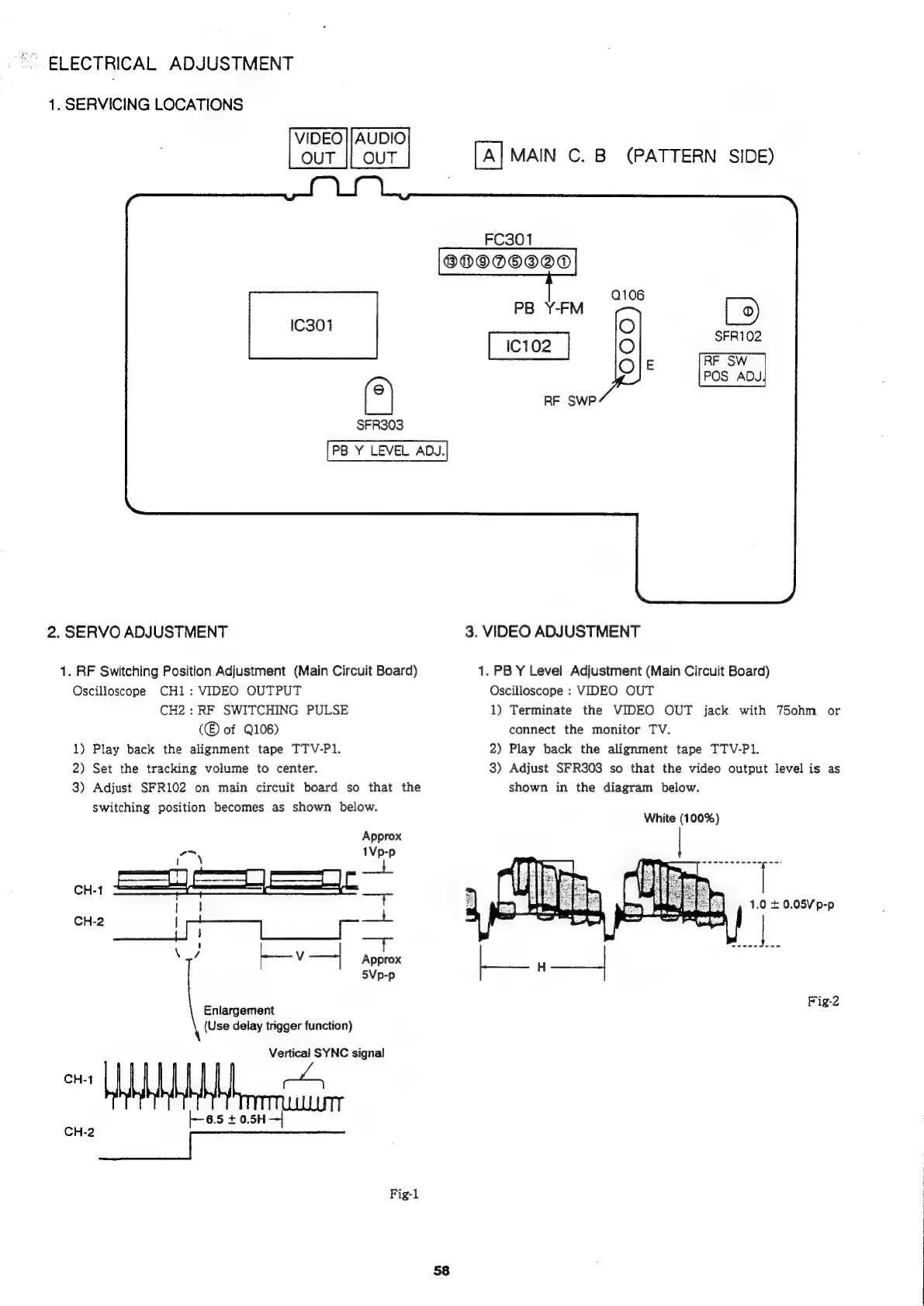
ELECTRICAL
ADJUSTMENT
1.
SERVICING
LOCATIONS
VIDEO
};AUDIO
OUT
jj
OUT
SFR303
PB
Y
LEVEL
ADJ.
2.
SERVO
ADJUSTMENT
1.
RF
Switching
Position
Adjustment
(Main
Circuit
Board)
Oscilloscope
CH1:
VIDEO
OUTPUT
CH2:
RF
SWITCHING
PULSE
of
Q106)
1)
Play
back
the
alignment
tape
TTV-P1.
2)
Set
the
tracking
volume
to
center.
3)
Adjust
SFR102
on
main
circuit
board
so
that
the
switching
position
becomes
as
shown
below.
MAIN
C.
B
(PATTERN
SIDE)
FC301
®BDODOOOD
PB
Y-FM
ie
SFR102
IC102
RF
SW
POS
ADJ
RF
SWP
3.
VIDEO
ADJUSTMENT
1.
PB
Y
Level
Adjustment
(Main
Circuit
Board)
Oscilloscope
:
VIDEO
OUT
1)
Terminate
the
VIDEO
OUT
jack
with
750hm
or
connect
the
monitor
TV.
2)
Play
back
the
alignment
tape
TTV-P1.
3)
Adjust
SFR303
so
that
the
video
output
level
is
as
shown
in
the
diagram
below.
White
(100%)
Enlargement
(Use
delay
trigger
function)
Vertical
SYNC
signal
CH-1
+-6.5
+
0.5H—-|
Fig-1
Fig-2

Related product manuals