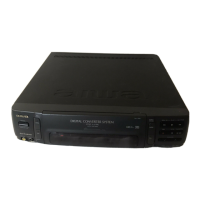
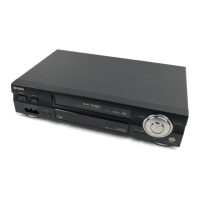
This document describes the Aiwa HV-M110S video cassette recorder, a multi-system VHS device designed for recording and playback of video signals.
Function Description
The Aiwa HV-M110S is a versatile video cassette recorder capable of handling multiple color systems, including PAL, MESECAM, NTSC3.58, and NTSC4.43. It supports both recording and playback across these systems, though recording or playback with other color systems is not possible. A key feature is its built-in digital TV system converter, which allows signals recorded in one TV system to be converted to another specified by the CONVERTER OUT switch during playback. This enables compatibility with various TV systems connected to the rear line outputs.
The unit offers automatic color and tape speed system setting, where the appropriate color system (PAL/MESECAM/NTSC3.58) and recording tape speed are automatically selected during playback. It supports line recording via audio and video input jacks. For optimal picture quality, the HV-M110S incorporates Digital Auto Tracking Control, which automatically adjusts for the best playback image. Additionally, it features Digital Still Picture capability for PAL and NTSC systems, allowing users to freeze playback pictures digitally without visible video noise lines.
The HV-M110S is designed for worldwide use with an auto-voltage power supply system, operating on 110-240V AC, 50/60 Hz. It comes with a wireless remote control unit for convenient tape movement operations from a distance. The device also boasts "HQ" (High Picture Quality) technology, incorporating the latest VHS circuitry designs to enhance picture quality. Visual search operation allows users to easily locate desired scenes by observing the picture during fast forward or rewind. For user convenience, the unit provides fully automatic tape operations, including auto power on/off, auto play, auto rewind, and auto eject. A quick start mechanism ensures that playback or recording begins immediately upon pressing the PLAY or RECORD button from the stop mode.
Important Technical Specifications
- Recording/Playback System: Video: Rotary two-head helical scan system; Audio: Fixed head.
- Video Signal:
- PAL/MESECAM color signal: 625 lines, 50 fields.
- NTSC color signal: 525 lines, 60 fields.
- Recording/Playback Time:
- PAL/MESECAM:
- SP: 4 hours 20 minutes max. with E-260 tape.
- LP: 8 hours 40 minutes max. with E-260 tape (LP playback only).
- NTSC:
- SP: 2 hours max. with T-180 tape.
- LP: 4 hours max. with T-180 tape (LP playback only).
- EP: 6 hours max. with T-180 tape (EP playback only).
- Usable Cassettes: VHS video cassette.
- Tape Width: 12.65 mm.
- Tape Speed:
- PAL/MESECAM:
- SP: 23.39 mm/sec.
- LP: 11.70 mm/sec. (playback only).
- NTSC:
- SP: 33.35 mm/sec.
- LP: 16.67 mm/sec. (playback only).
- EP: 11.12 mm/sec. (playback only).
- RF Output: UHF channel between 30 and 39, PAL-G, PAL-I or PAL-K output.
- Video Input: 1.0 Vp-p, 75 ohms unbalanced.
- Video Output: 1.0 Vp-p, 75 ohms unbalanced.
- Audio Input: -10 dBs, 47 kohms.
- Audio Output: -8 dBs, 2.2 kohms.
- Operating Temperature: 5°C - 40°C.
- Input/Output Terminals:
- Audio input (AUDIO IN): phono jack (1).
- Audio output (AUDIO OUT): phono jack (1).
- Video input (VIDEO IN): phono jack (1).
- Video output (VIDEO OUT): phono jack (1).
- Antenna input (AERIAL): IEC connector, 75 ohms (1).
- Antenna output (RF OUT): IEC connector, 75 ohms (1).
- Power Requirements: 110-240 V AC, 50/60 Hz.
- Power Consumption: 25 watts.
- Dimensions: 270 (W) x 95 (H) x 355.5 (D) mm (10 5/8 x 3 3/4 x 14 in.).
- Weight: 4.5 kg (9.9 lbs.).
- Accessories Supplied: AC power cord (1), RF coaxial antenna cable (1), Remote control unit (1), Batteries (SUM-3, R6P, AA) (2), Operating instructions (1).
Usage Features
- Multi-System Compatibility: The HV-M110S supports PAL, MESECAM, NTSC3.58, and NTSC4.43 color systems for both recording and playback. Users must ensure that only VHS cassettes are used.
- Digital TV System Conversion: During playback, signals recorded in different TV systems can be converted to a user-specified system (PAL or NTSC) via the CONVERTER OUT switch, allowing output to compatible equipment. MESECAM signals cannot be converted to PAL or NTSC color signals; they are converted to NTSC black-and-white signals.
- Automatic Settings: The unit automatically detects and sets the correct color system and tape speed during playback, simplifying operation.
- Line Recording: Connect external audio and video sources to the respective input jacks for direct recording.
- Digital Auto Tracking: Ensures optimal playback picture quality automatically.
- Digital Still Picture: Freeze a frame during PAL and NTSC playback without noise lines.
- Worldwide Power Supply: The unit automatically adjusts to 110-240V AC, 50/60 Hz power, making it suitable for international use.
- Remote Control: A wireless remote control unit allows convenient operation of tape movement functions from a distance.
- High Picture Quality (HQ): Incorporates advanced VHS circuitry for enhanced picture quality.
- Visual Search: Easily locate specific scenes by fast-forwarding or rewinding while observing the picture.
- Fully Automatic Tape Operations: Features auto power on/off, auto play, auto rewind, and auto eject for user convenience.
- Quick Start Mechanism: Playback or recording starts instantly when the PLAY or RECORD button is pressed from the stop mode.
- Erasure Prevention: Tapes can be protected from accidental erasure by breaking off a tab on the cassette's back edge. To re-record, the tab opening must be covered with cellophane tape.
- Setting the Video Channel: The RF converter changes video and audio signals to TV broadcast type. Users can set the RF converter to an unused UHF channel (30-39) if the default channel 36 is in use. This requires connecting to a PAL TV and using a small screwdriver to adjust the CHANNEL selector.
- Editing: During recording, users can pause the recording using the PAUSE/STILL/NOISE CANCEL button and resume by pressing RECORD. However, prolonged pause (over 5 minutes) is not recommended to prevent tape damage, as the unit will automatically switch to stop mode.
Maintenance Features
- Cleaning the Unit: For routine maintenance, the cabinet should be wiped with a soft cloth dampened with a mild detergent solution. Avoid using paint thinner or benzine, as these can damage the cabinet surface.
- Head Cleaning: If playback pictures are blurry or noisy, the video heads may be dirty. This can be remedied by using a commercially available video head cleaning cassette.
- Condensation Warning: Moisture condensation can occur if the unit is moved from a cold to a warm place, or after heating a cold room, or under conditions of high humidity. If condensation occurs on the tape, playing it can damage both the tape and the unit. Users should wait until the tape warms to room temperature and the moisture evaporates before use. Normal operation should be possible usually after two hours.
- General Precautions:
- Do not attempt to open the cabinet; refer all servicing to qualified personnel.
- Ensure proper ventilation by not blocking or covering ventilation slots.
- Keep the unit away from radiators, heat sources, and strong magnetic fields.
- Avoid inserting objects into cabinet slots.
- Prevent liquid spills on the unit.
- Use the unit only in a horizontal position.
- Keep the unit at least 1 meter away from a TV, radio, or receiver to avoid interference.
- Do not place heavy objects on the unit.
- Unplug the unit from the AC outlet when not in use for a long period or during lightning.
- Battery Replacement (Remote Control): When batteries are exhausted or the remote control will not be used for a long period, remove the batteries. Ensure correct polarity when inserting new SUM-3, R6P, AA batteries. Do not mix new and old batteries or different types/voltages.

 Need help?

 To Next Page
 General