Need help?
Do you have a question about the AJAX FireProtect and is the answer not in the manual?
Details how smoke, temperature thresholds, and CO levels trigger alarms on the detector.
Guides users on the prerequisites and steps for connecting the detector to an Ajax hub.
Step-by-step instructions for pairing the FireProtect detector with the Ajax hub using the app.
Details how to switch on the detector and ensure successful pairing within the hub's coverage area.
Guides on configuring settings like device name, room assignment, and alarm thresholds for CO and temperature.
Provides instructions on how to enable the interconnected alarms feature for FireProtect detectors via the Ajax app.
Explains how to set a delay for interconnected alarms, allowing postponement for a specified period.
Details the conditions under which an alarm confirmation is sent and interconnected alarms are triggered.
Details how to test the smoke sensor by simulating smoke generation and activating the siren.
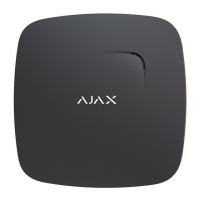
The FireProtect / FireProtect Plus is a wireless indoor fire detector designed to enhance safety by detecting various fire-related hazards. This device is equipped with an in-built buzzer and a battery, allowing for up to four years of autonomous operation. Its primary functions include detecting smoke and rapid temperature increases. The FireProtect Plus model offers an additional capability: it can alert users to dangerous levels of carbon monoxide (CO). Both detectors are capable of functioning independently, even without being connected to a central hub.
When integrated into an Ajax security system, the FireProtect / FireProtect Plus communicates with the hub using a secured Jeweller radio protocol. This allows for communication over distances of up to 1,300 meters in line of sight. The detector can also be incorporated into third-party security systems by connecting it via the Ajax uartBridge or Ajax ocBridge Plus integration module.
The core function of the FireProtect / FireProtect Plus is to detect fire hazards. It employs an optical chamber containing an emitter and a photoelectric receiver to detect smoke. When smoke enters the chamber, it distorts the infrared beam between these components, triggering a smoke alarm.
In addition to smoke detection, the device monitors temperature. A fire alarm is triggered if the temperature exceeds 60°C or rises by 30°C within a 30-minute period (even if the temperature doesn't reach 60°C).
The FireProtect Plus model extends these capabilities by including a sensor for carbon monoxide. It generates an alarm if the concentration of CO in the air surpasses specific thresholds:
Upon detecting an alarm condition (smoke, rapid temperature increase, or dangerous CO levels for FireProtect Plus), the detector activates its built-in buzzer, emitting a loud siren sound that can be heard from a distance. Simultaneously, its light indicator blinks. If connected to a security system, both the user and the security company are notified of the alarm.
The system provides notifications for all events through push notifications, SMS, and calls (if activated). The Ajax security system can also be connected to a central monitoring station of a security company for professional monitoring.
The FireProtect / FireProtect Plus is designed for ease of use and integration.
To connect the detector to an Ajax hub, users must first install the Ajax app, create an account, add the hub, and create at least one room. The hub must be switched on with an active internet connection (Ethernet cable and/or GSM network), disarmed, and not undergoing updates. Only users with administrator rights can add devices to the hub.
The pairing process involves selecting "Add Device" in the Ajax app, naming the device, scanning or typing its QR Code (found on the detector body and packaging), and selecting its location room. After tapping "Add," a countdown begins. The device must then be switched on. To confirm it's on, pressing the on/off button will cause the logo to light up red for a second.
For successful pairing, the detector needs to be within the coverage area of the hub's wireless network. The connection request is transmitted for a short time when the device is switched on. If pairing fails, the detector operates autonomously; users can retry by switching it off for 5 seconds and then on again.
For integration with third-party security central units, the Ajax uartBridge or Ajax ocBridge Plus integration module can be used. The smoke detector always operates in active mode, making it suitable for placement in a permanently active protection zone when connected to third-party systems.
The siren of the device can be turned off in three ways:
If smoke and/or temperature levels do not return to normal within 10 minutes, the FireProtect/FireProtect Plus will reactivate its siren.
The "Interconnected FireProtect Alarms" feature allows all FireProtect and FireProtect Plus detectors connected to the hub to activate their buzzers if at least one of them triggers an alarm. This feature is supported by detectors with firmware versions 3.42 and later. When enabled, the hub-detector ping interval (Jeweller settings) cannot be set to more than 48 seconds.
Users can set a "Delay of Interconnected Alarms" from 0 to 5 minutes (in 1-minute increments) to postpone the interconnected alarm. If this option is inactive, the interconnected alarm is sent to all fire detectors within a minute.
The function works as follows:
To allow more time to eliminate false alarm causes, users can delay the propagation of the interconnected alarm for another 10 minutes via Ajax apps, by pressing the KeyPad/KeyPad Plus function button (in muting mode), by pressing the Button in muting mode, by eliminating the cause of the alarm, or by pressing the touch button of the triggered detector.
If a triggered detector does not return to normal within 10 minutes after the user postponed the interconnected alarm, another fire detector reports an alarm, or a triggered detector reports a different type of alarm, the system will send an alarm confirmation and activate the interconnected alarm for fire detectors. If after 30 seconds the detector still detects a threat, an alarm is sent to the hub.
The device can be temporarily deactivated without removing it from the system. Two options are available:
The detector should be installed at the ceiling's highest point where hot air and smoke concentrate during a fire. If there are ceiling beams protruding 30 cm or more, install a detector between every two beams. The location should be chosen considering its remoteness from the hub and obstacles like walls, floors, or large objects that can hinder radio signal transmission. The device is designed for indoor use only.
Regular maintenance is crucial for the optimal performance of the FireProtect / FireProtect Plus.
Users should regularly check the detector's operational capability and clean its body from dust, spider webs, and other contaminants as they appear. A soft, dry napkin suitable for tech equipment should be used for cleaning. It is important not to use substances containing alcohol, acetone, gasoline, or other active solvents to clean the detector.
The detector is designed to ignore a certain level of dust in its smoke chamber. However, if the chamber becomes too dusty, the detector will notify the user via the app and beep every minute and a half, indicating the need for cleaning. This maintenance is compulsory for the detector to function correctly.
The pre-installed batteries provide up to four years of autonomous operation. When the batteries are discharged, the security system sends notifications, and the detector signals with a sound every 90 seconds:
The Ajax security system allows for testing the detector's functionality. Before installation, the smoke sensor can be tested by switching on the detector and pressing the sensor button (the logo center) for a few seconds. This initiates an electronic simulation of smoke generation within the smoke chamber, followed by the siren activating for 6 seconds. Users will receive a notification in the Ajax app regarding the test result and detector status. According to EN50131 standard requirements, the radio signal level sent by wireless devices is decreased during test mode.
 General
| Battery Life | Up to 4 years |
|---|---|
| Dimensions | 132 × 132 × 31 mm |
| Weight | 220 g |
| Jeweller Technology | Yes |
| Tamper Protection | Yes |
| Hush Function | Yes |
| Interconnected Alarm | Yes |
| Humidity Range | Up to 80% |
| Power Supply | Two CR2 batteries |
| Installation Method | Ceiling mount |
| Communication Range with Hub | Up to 1, 300 m in open space |
| Alarm Volume | 85 dB |
| Certification | EN 14604 |
| Connectivity | Wireless |

 To Next Page