Need help?
Do you have a question about the AJAX MotionProtect and is the answer not in the manual?
Guides users through connecting the detector to the Ajax hub using the application.
Tests the signal strength between the hub and the detector.
Tests the detection area of the motion sensor.
Explains how to choose the optimal location for detector placement.
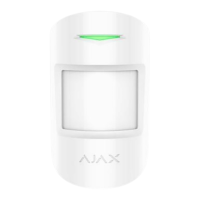
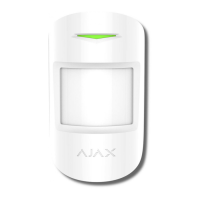
The MotionProtect is a wireless motion detector designed for indoor use within the Ajax security system. It connects to the hub via the protected Jeweller protocol, offering a communication range of up to 1700 meters in line of sight. For integration with third-party security central units, it can be used with Ajax uartBridge or Ajax ocBridge Plus modules. The device is configured through the Ajax app, available on iOS, Android, macOS, and Windows, and notifies users of events via push notifications, SMS, and calls. The system can also be connected to a central monitoring station.
The MotionProtect utilizes a thermal PIR sensor to detect intrusion by identifying moving objects with a temperature similar to the human body. It can be configured to ignore domestic animals by adjusting its sensitivity settings.
The MotionProtect Plus model enhances this functionality by incorporating radio frequency scanning alongside the thermal sensor. This additional feature helps filter out interference from thermal radiation sources such as air flows from sun-heated curtains, louvre shutters, operating thermal air fans, fireplaces, and air conditioning units, thereby preventing false alarms.
Upon detecting motion, an armed detector immediately transmits an alarm signal to the hub, which then activates sirens and notifies the user and the security company. If motion is detected before the system is armed, the detector will not arm immediately but will do so during the next inquiry by the hub.
Connecting to the Hub: To connect the detector to the Ajax security system, first ensure the Ajax application is installed, an account is created, the hub is added, and at least one room is set up. The hub must be switched on with an active internet connection (Ethernet and/or GSM) and disarmed, with no ongoing updates. Only users with administrator rights can add devices.
The connection process involves selecting "Add Device" in the Ajax app, naming the device, scanning or manually entering the QR Code (found on the device body and packaging), and selecting its location room. After selecting "Add," a countdown begins, and the device should then be switched on. For successful detection and pairing, the detector must be within the hub's wireless network coverage. The connection request is transmitted for a brief period when the device is switched on. If connection fails, switch off the detector for 5 seconds and retry. Once connected, the detector will appear in the device list, with status updates depending on the hub's device inquiry time (default is 36 seconds).
Connecting to Third-Party Systems: For integration with third-party security central units via uartBridge or ocBridge Plus, follow the specific recommendations provided in the manuals for those integration modules.
Settings and Configuration: The detector's settings can be accessed through the Ajax app. Key configurable parameters include:
Installation Location: The controlled area and system efficiency depend heavily on the detector's location. The device is designed exclusively for indoor use. Optimal placement should consider the remoteness from the hub and any obstacles (walls, floors, large objects) that might hinder radio signal transmission. The detector lens should be perpendicular to the probable path of intrusion. Avoid installing it:
The recommended installation height is 2.4 meters. Deviating from this height can reduce the motion detection zone and impair the animal ignoring function. Ensure no furniture, plants, vases, or glass structures block the detector's field of view.
Installation Process: Before installation, confirm the chosen location is optimal and adheres to guidelines. The MotionProtect (MotionProtect Plus) should be attached to a vertical surface or in a corner. The SmartBracket attachment panel is secured using bundled screws, with at least two fixing points (one above the tamper). If using alternative screws, ensure they do not damage or deform the panel. Double-sided adhesive tape is only for temporary attachment, as it can dry out, causing the detector to fall and potentially triggering the security system or damaging the device. Once the detector is placed on the SmartBracket, its LED will blink, indicating the tamper is closed. If the LED does not actuate, check the tamper status in the Ajax Security System application and the panel's fixing tightness. If the detector is removed from the surface or attachment panel, a notification will be sent.
Regular checks of the MotionProtect detector's operational capability are recommended. The detector body should be cleaned periodically to remove dust, spider webs, and other contaminants using a soft, dry napkin suitable for equipment maintenance.
Crucially, do not use substances containing alcohol, acetone, gasoline, or other active solvents for cleaning, as these can damage the detector. The lens should be wiped very carefully and gently, as scratches on the plastic can reduce the detector's sensitivity.
The pre-installed battery provides up to 5 years of autonomous operation, assuming an inquiry frequency by the hub of 3 minutes. When the battery is discharged, the security system will send notifications, and the LED will smoothly light up and go out if motion is detected or the tamper is actuated. Information on battery replacement is detailed in the Battery Replacement manual.
 General
| Detection distance | up to 12 m |
|---|---|
| Pet immunity | up to 20 kg |
| Battery life | up to 7 years |
| Installation height | 2.4 m |
| Sensing element | PIR sensor |
| Detection angles | Horizontal: 88.5°, Vertical: 80° |
| Dimensions | 110 × 65 × 50 mm |
| Weight | 86 g |
| Detection angle | Horizontal: 88.5°, Vertical: 80° |
| Protection class | IP50 |
| Sensor type | PIR sensor |
| Installation method | Indoor |
| Time to alarm delivery | 0.15 seconds |
| Power supply | Battery: CR123A |
| Anti-tampering | Tamper alarm |
| Jeweller radio technology | Available |
| Wireless communication | Available |
| Frequency | 868.0 - 868.6 MHz |
| Installation | Wall-mounted |
| Communication range | up to 1, 700 m in open space |
| Operating temperature range | From -10°C to +40°C |
| Operating humidity | up to 75% |

 To Next Page