EasyManua.ls Logo

AJAZZ AK692 - AJAZZ AK692 Status Indicator Description; AJAZZ AK692 Sleep Mechanism and Bluetooth Name; AJAZZ AK692 Keyboard Connection; Mode Switching and Wireless Connection

AJAZZ AK692
5 pages
Print Icon
To Next Page IconTo Next Page
To Previous Page IconTo Previous Page
Loading...
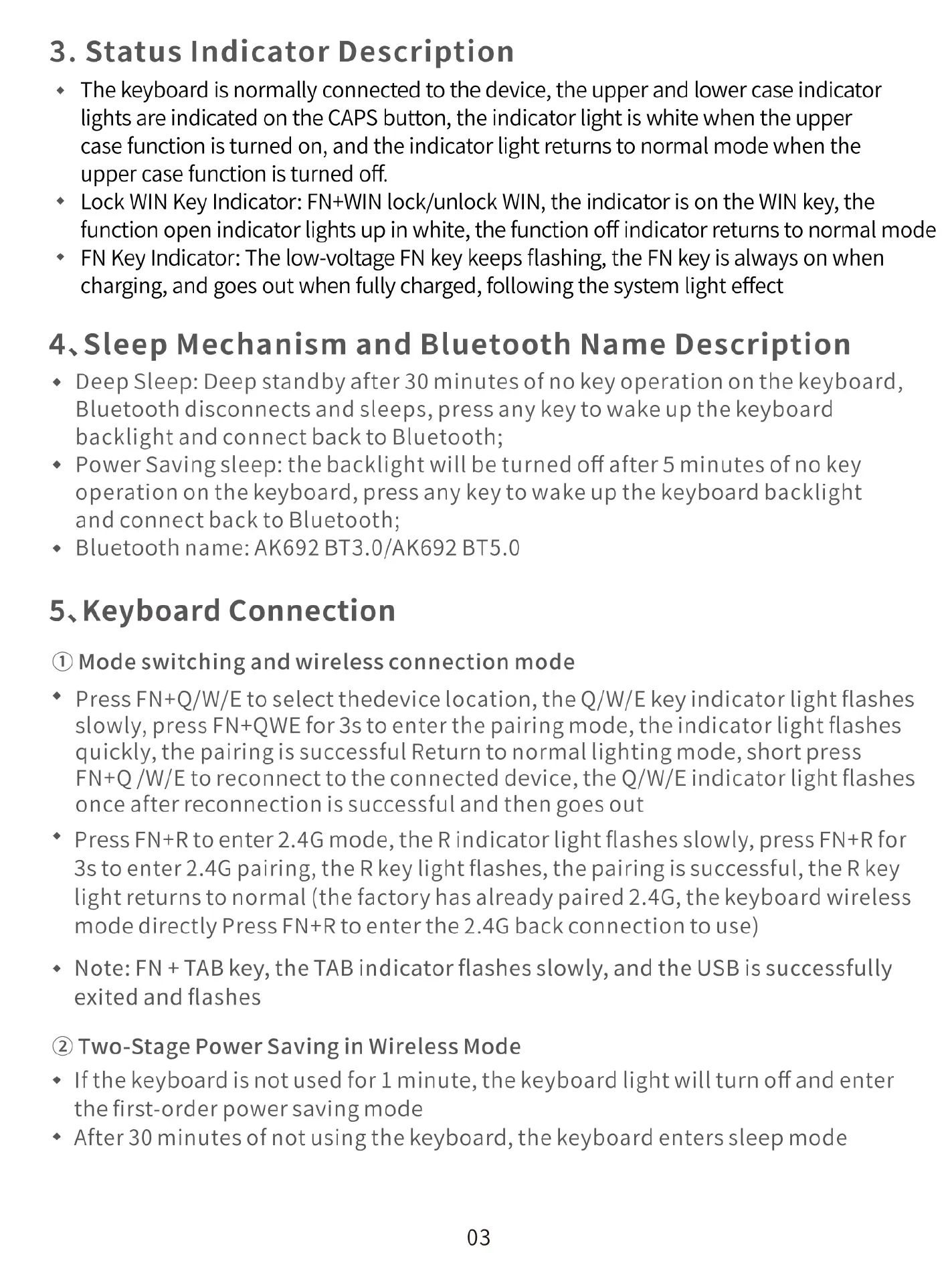
3.
Status
Indicator
Description
+
The
keyboard
is
normally
connected
to
the
device,
the
upper
and
lower
case
indicator
lights are
indicated
on
the
CAPS
button,
the
indicator
light
is
white
when
the
upper
case
function
is
turned
on,
and
the
indicator
light
returns
to
normal
mode
when
the
upper
case
function
is
turned
off.
*
Lock
WIN
Key
Indicator:
FN+WIN
lock/unlock
WIN,
the
indicator
is
on
the
WIN
key,
the
function
open
indicator
lights
up
in
white,
the
function
off
indicator
returns
to
normal
mode
*
FN
Key
Indicator:
The
low-voltage
FN
key
keeps
flashing,
the
FN
key
is
always
on
when
charging,
and
goes
out
when
fully
charged,
following
the
system
light
effect
4.Sleep
Mechanism
and
Bluetooth
Name
Description
+
Deep
Sleep:
Deep
standby
after
30
minutes
of
no
key
operation
on
the
keyboard,
Bluetooth
disconnects
and
sleeps,
press
any
key
to
wake
up
the
keyboard
backlightand
connect
back
to
Bluetooth;
+
Power
Savingsleep:
the
backlight
will
be
turned
off
after
5
minutes
of
no
key
operation
on
the
keyboard,
press any
key
to
wake
up
the
keyboard
backlight
and
connect
back
to
Bluetooth;
+
Bluetooth
name: AK692
BT3.0/AK692
BT5.0
5.Keyboard
Connection
(D
Mode
switching
and
wireless
connection
mode
*
Press
FN+Q/W/E
to
select
thedevice
location,
the
Q/W/E
key
indicator
light
flashes
slowly,
press
FN+QWE
for
3s to
enter
the
pairing
mode,
the
indicator
light
flashes
quickly,
the
pairingis
successful
Return
to
normal
lighting
mode,
short
press
FN+Q
/W/E
to
reconnect
to
the
connected
device,
the
Q/W/E
indicator
light
flashes
once
afterreconnectionis
successful
and
then
goes
out
*
Press
FN+Rto
enter2.4G
mode,
the
Rindicator
light
flashes
slowly,
press
FN+R
for
3stoenter2.4G
pairing,
the
Rkey
light
flashes,
the
pairing
is
successful,
the
R
key
lightreturns
to
normal
(the
factory
has
already
paired
2.4G,
the
keyboard
wireless
mode
directly
Press
FN+R
to
enter
the
2.4G
back
connection
to
use)
+
Note:
FN
+
TAB
key,
the
TAB
indicator
flashes
slowly,
and
the
USB
is
successfully
exited
and
flashes
@
Two-Stage
Power
Saving
in
Wireless
Mode
+
Ifthe
keyboard
is
not
used
for
1
minute,
the
keyboard
light
will
turn
off
and
enter
thefirst-order
power
saving
mode
+
After
30
minutes
of
not
using
the
keyboard,
the
keyboard
enters
sleep
mode
03

Related product manuals