EasyManua.ls Logo

Akai AM-U210 - Page 4

Akai AM-U210
39 pages
Print Icon
To Next Page IconTo Next Page
To Previous Page IconTo Previous Page
Loading...
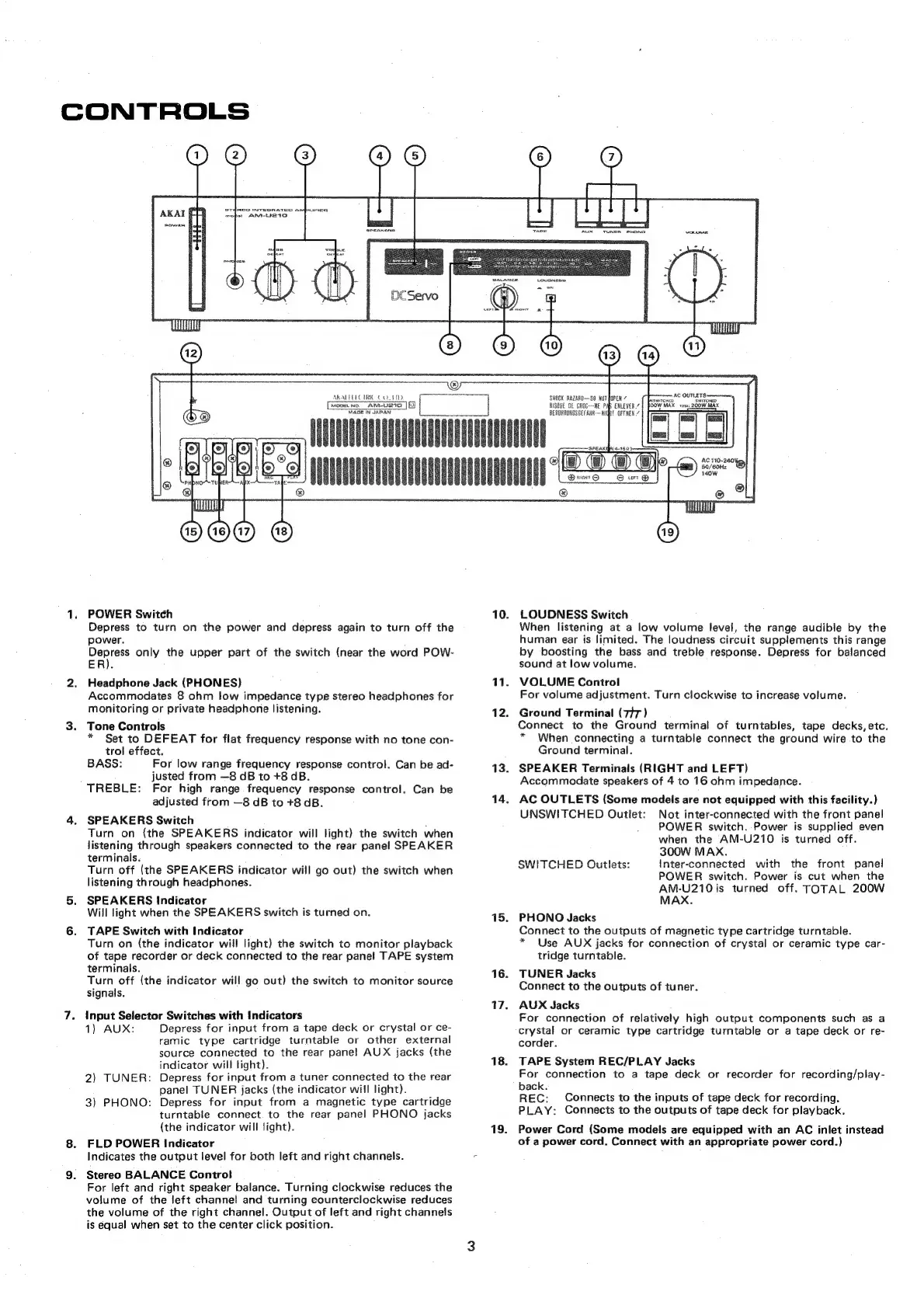
CONTROLS
AKALELEC
UC
COT
1D.
MooEL
NO.
ANM-URIO
MAGE
IN
JAPAN
POWER
Switch
Depress
to
turn
on
the
power
and
depress
again
to
turn
off
the
power.
oar
only
the
upper
part
of
the
switch
(near
the
word
POW-
ER).
Headphone
Jack
(PHONES)
Accommodates
8
ohm
low
impedance
type
stereo
headphones
for
monitoring
or
private
headphone
listening.
Tone
Controls
*
Set
to
DEFEAT
for
flat
frequency
response
with
no
tone
con-
trol
effect.
BASS:
For
low
range
frequency
response
control.
Can
be
ad-
justed
from
—8
dB
to
+8
dB.
TREBLE:
For
high
range
frequency
response
control.
Can
be
adjusted
from
—8
dB
to
+8
dB.
SPEAKERS
Switch
.
Turn
on
(the
SPEAKERS
indicator
will
light)
the
switch
when
listening
through
speakers
connected
to
the
rear
panel
SPEAKER
terminals.
Turn
off
(the
SPEAKERS
indicator
will
go
out)
the
switch
when
listening
through
headphones.
SPEAKERS
Indicator
Will
light
when
the
SPEAKERS
switch
is
turned
on.
TAPE
Switch
with
Indicator
Turn
on
(the
indicator
will
light)
the
switch
to
monitor
playback
of
tape
recorder
or
deck
connected
to
the
rear
panel
TAPE
system
terminals.
Turn
off
(the
indicator
will
go
out)
the
switch
to
monitor
source
signals.
Input
Selector
Switches
with
Indicators
1)
AUX:
Depress
for
input
from
a
tape
deck
or
crystal
or
ce-
ramic
type
cartridge
turntable
or
other
external
source
connected
to
the
rear
panel
AUX
jacks
(the
indicator
will
light).
Depress
for
input
from
a
tuner
connected
to
the
rear
panel
TUNER
jacks
(the
indicator
will
light).
Depress
for
input
from
a
magnetic
type
cartridge
turntable
connect.
to
the
rear
panel
PHONO
jacks
(the
indicator
will
light).
FLD
POWER
Indicator
Indicates
the
output
level
for
both
left
and
right
channels.
Stereo
BALANCE
Control
For
left
and
right
speaker
balance.
Turning
clockwise
reduces
the
volume
of
the
left
channel
and
turning
counterclockwise
reduces
the
volume
of
the
right
channel.
Output
of
left
and
right
channels
is
equal
when
set
to
the
center
click
position.
2)
TUNER:
3)
PHONO:
10.
11.
12.
13.
14,
15.
16.
17.
18.
19.
LOUDNESS
Switch
When
listening
at
a
low
volume
level,
the
range
audible
by
the
human
ear
is
limited.
The
loudness
circuit
supplements
this
range
by
boosting
the
bass
and
treble
response.
Depress
for
balanced
sound
at
low
volume.
VOLUME
Control
For
volume
adjustment.
Turn
clockwise
to
increase
volume.
Ground
Terminal
(7+7)
Connect
to
the
Ground
terminal
of
turntables,
tape
decks,
etc.
*
When
connecting
a
turntable
connect
the
ground
wire
to
the
Ground
terminal.
SPEAKER
Terminals
(RIGHT
and
LEFT)
Accommodate
speakers
of
4
to
16
ohm
impedance.
AC
OUTLETS
(Some
models
are
not
equipped
with
this
facility.)
UNSWITCHED
Outlet:
Not
inter-connected
with
the
front
panel
POWER
switch.
Power
is
supplied
even
when
the
AM-U210
is
turned
off.
300W
MAX.
SWITCHED
Outlets:
inter-connected
with
the
POWER
switch.
Power
is
cut
when
the
AM-U210
is
turned
off.
TOTAL
200W
MAX.
front
panel
PHONO
Jacks
Connect
to
the
outputs
of
magnetic
type
cartridge
turntable.
*
Use
AUX
jacks
for
connection
of
crystal
or
ceramic
type
car-
tridge
turntable.
TUNER
Jacks
Connect
to
the
outputs
of
tuner.
AUX
Jacks
For
connection
of
relatively
high
output
components
such
as
a
crystal
or
ceramic
type
cartridge
turntable
or
a
tape
deck
or
re-
corder.
TAPE
System
REC/PLAY
Jacks
For
connection
to
a
tape
deck
or
recorder
for
recording/play-
back.
REC:
Connects
to
the
inputs
of
tape
deck
for
recording.
PLAY:
Connects
to
the
outputs
of
tape
deck
for
playback.
Power
Cord
(Some
models
are
equipped
with
an
AC
inlet
instead
of
a
power
cord.
Connect
with
an
appropriate
power
cord.)

Related product manuals