EasyManua.ls Logo

Akai AM-U210 - Before Operation; Tape Dubbing

Akai AM-U210
39 pages
Print Icon
To Next Page IconTo Next Page
To Previous Page IconTo Previous Page
Loading...
OPERATIONS
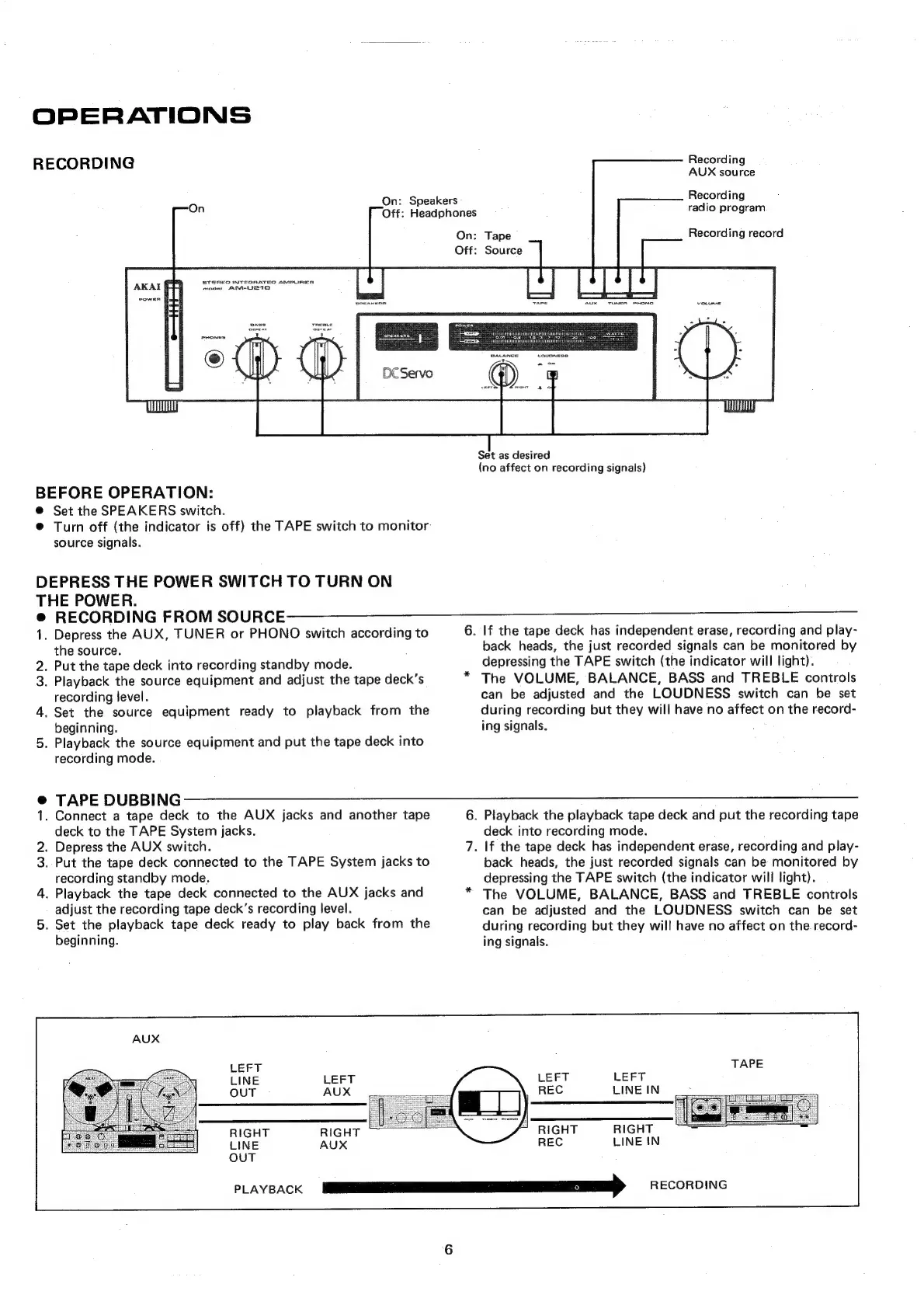
Recording
RECORDING
AUX
source
Recording
¢
S$
i
On:
Speaker:
radio
program
Off:
Headphones
Recording
record
On:
Tape
Off:
Source
STEREO
INTEGRATES
ampuEER
Set
as
desired
(no
affect
on
recording
signals)
BEFORE
OPERATION:
@
Set the
SPEAKERS
switch.
@
Turn
off
(the
indicator
is
off)
the
TAPE
switch
to
monitor
source
signals.
DEPRESS
THE
POWER
SWITCH
TO
TURN
ON
THE
POWER.
@
RECORDING
FROM
SOUR
CIR
_
OO
1.
Depress
the
AUX,
TUNER
or
PHONO
switch
according
to
6.
If
the
tape
deck
has
independent
erase,
recording
and
play-
the
source.
back
heads,
the
just
recorded
signals
can
be
monitored
by
2.
Put
the
tape
deck
into
recording
standby
mode.
depressing
the
TAPE
switch
(the
indicator
will
light).
3.
Playback
the
source
equipment
and
adjust
the
tape
deck’s
*
The
VOLUME,
BALANCE,
BASS
and
TREBLE
controls
recording
level.
can
be
adjusted
and
the
LOUDNESS
switch
can
be
set
4.
Set
the
source
equipment
ready
to
playback
from
the
during
recording
but
they
will
have
no
affect
on
the
record-
beginning.
ing
signals.
5.
Playback
the
source
equipment
and
put
the
tape
deck
into
recording
mode.
@
TAPE
DUBBING
1.
Connect
a
tape
deck
to
the
AUX
jacks
and
another
tape
6.
Playback
the
playback
tape
deck
and
put
the
recording
tape
deck
to
the
TAPE
System
jacks.
deck
into
recording
mode.
2.
Depress
the
AUX
switch.
7.
|f
the
tape
deck
has
independent
erase,
recording
and
play-
3.
Put
the
tape
deck
connected
to
the
TAPE
System
jacks
to
back
heads,
the
just
recorded
signals
can
be
monitored
by
recording
standby
mode.
depressing
the
TAPE
switch
(the
indicator
will
light).
4.
Playback
the
tape
deck
connected
to
the
AUX
jacks
and
*
The
VOLUME,
BALANCE,
BASS
and
TREBLE
controls
adjust
the
recording
tape
deck’s
recording
level.
can
be
adjusted
and
the
LOUDNESS
switch
can
be
set
5.
Set the
playback
tape
deck
ready
to
play
back
from
the
during
recording
but
they
will
have
no
affect
on
the
record-
beginning.
ing
signals.
LEFT
LINE
LEFT
LEFT
LEFT
OUT
AUX
;
REC
LINE
IN
RIGHT
RIGHT
REC
LINE
IN
RIGHT
RIGHT
LINE
AUX
OUT
PLAYBACK
a
ee
Se,
RECORDING

Related product manuals