5
Features
Top Panel
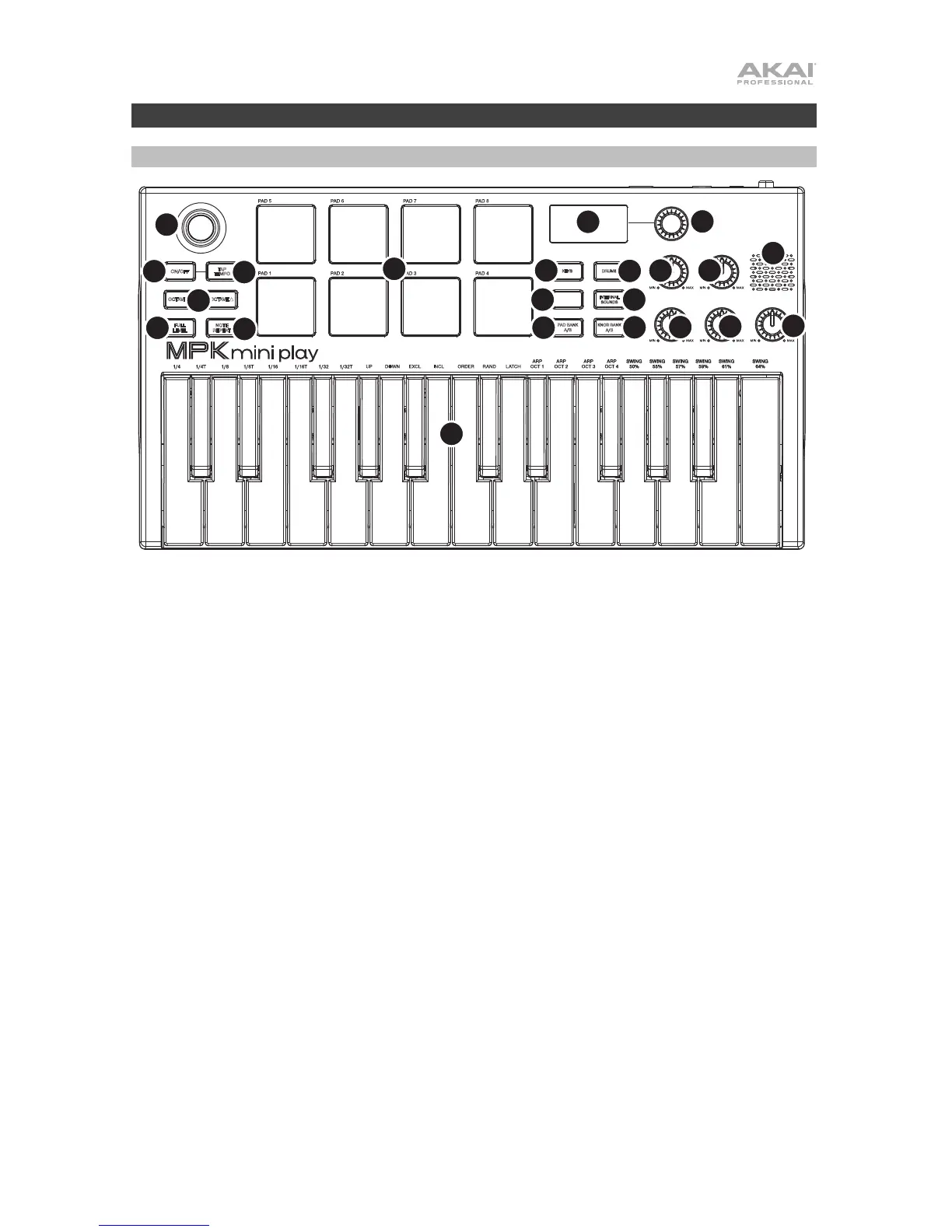
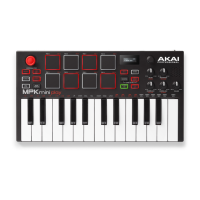
1. Keybed: This 25-note keyboard is velocity-sensitive and, along with the Octave Down / Up buttons,
can control a ten-octave range. You can use the keys to access certain additional commands, as well.
Hold down the Arpeggiator button and press a key to set the Arpeggiator parameters. Press the Keys
button and turn the encoder to change sounds triggered from the keys.
2. Drum Pads: The pads can be used to trigger drum hits or other samples in your software. The pads
are velocity-sensitive, which makes them very responsive and intuitive to play. When the Drums
button is pressed, you can turn the encoder to change sounds on the drum pads. Access one of the 8
Favorites (a combination of a sound on the keyboard and a sound on the drum pads) by pressing and
holding the Favorites button and tapping a drum pad.
3. X-Y Controller: Use this 4-axis thumbstick to send MIDI pitch bend messages or send MIDI CC
messages.
4. Arpeggiator: Press this button to turn the Arpeggiator on or off. Pressing it during a latched arpeggio
will stop the arpeggio. Hold down this button and press the corresponding key to set the following
parameters:
ARPEGGIATOR
RESONANCE
REVERB AMT
CHORUS AMT
FILTER
VOLUME


 To Next Page