EasyManua.ls Logo

Akai TX-500 - Page 20

Akai TX-500
82 pages
Print Icon
To Next Page IconTo Next Page
To Previous Page IconTo Previous Page
Loading...
5-2.
CD
PLAYER
SECTION
TEST
MODE
FOR
CD
PLAYER’S
OPERATION
Some
adjustments
of
the
CD
PLAYER
section
are
automatically
carried
out
by
the
micro
computer.
If
the
CD
player
section
is
defective
and
it
is
necessary
to
partially
check
the
operation,
the
“CD
TEST”
mode
can
be
used
while
repairing.
Engaging
the
“CD
TEST”
mode
While
pressing
and
holding
both
the
“as”
and
“CD1”
buttons,
plug
in
the
AC
power
cord
to
the
AC
outlet.
NOTE
:
e
During
“CD
TEST”
mode,
only
the
DISC
“1”
&
open/close
button
can
be
used
for
loading.
So,
place
a
disc
on
“TRAY
1"
©
Proceed
testing
by
pressing
the
“CD1”
button
once
for
each
testing
step.
The
testing
step
will
return
to
“TEST”
if
the
"1"
&
open/close
button
is
pressed
during
steps
“TEST-1”
to
“TEST-5”.
To
repeat
the
check
after
the
step
number
has
reached
“TEST-5”,
open
the
tray
once
and
repeat
the
procedure
by
also
pressing
the
“1"
4
open/close
button.
©
To
disengage
the
“CD
TEST”
mode,
press
the
“POWER
ON/STANDBY"
button
or
disconnect
the
AC
power
cord
from
the
AC
outlet.
©
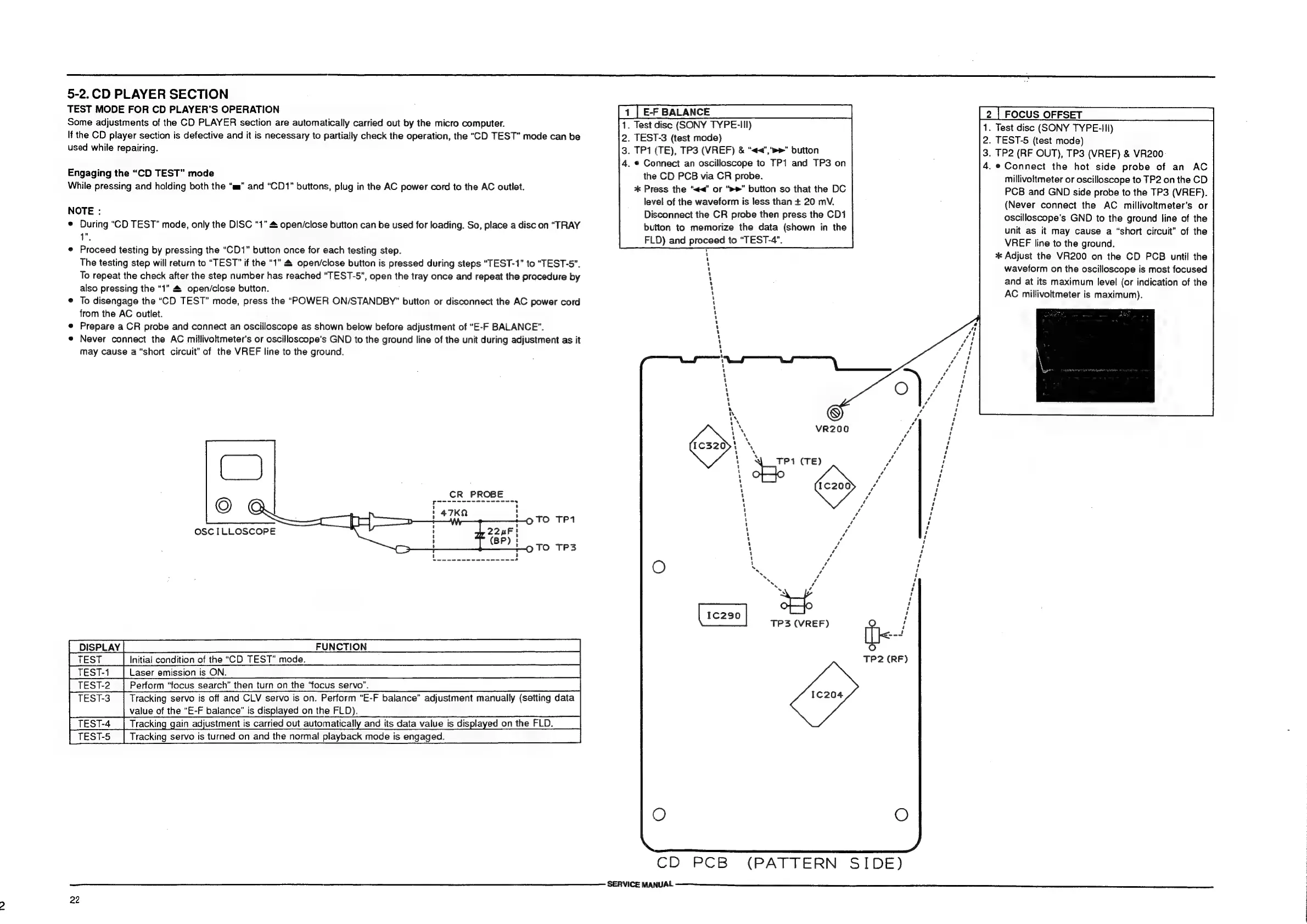
Prepare
a
CR
probe
and
connect
an
oscilloscope
as
shown
below
before
adjustment
of
“E-F
BALANCE”.
e
Never
connect
the
AC
millivoltmeter's
or
oscilloscope's
GND
to
the
ground
line
of
the
unit
during
adjustment
as
it
may
cause
a
“short
circuit”
of
the
VREF
line
to
the
ground.
CR
PROBE
pescnesccscusonee=
x
OSCILLOSCOPE
|
DISPLAY.
Initial
condition
of
the
“CD
TEST”
mode.
Laser
emission
is
ON.
Perform
“focus
search”
then
turn
on
the
“focus
servo".
TEST-3
|
Tracking
servo
is
off
and
CLV
servo
is
on.
Perform
“E-F
balance”
adjustment
manually
(setting
data
Bee
value
of
the
“E-F
balance”
is
displayed
on
the
FLD).
|
TEST-4
Tracking
gain
adjustment
is
carried
out
automatically
and
its
data
value
is
displayed
on
the
FLD.
TEST-5
Tracking
servo
is
turned
on
and
the
normal
playback
mode
is
engaged.
FUNCTION
22
[1
[EFBALANCE
1.
Test
disc
(SONY
TYPE-III)
2.
TEST-3
(test
mode)
3.
TP1
(TE),
TP3
(VREF)
&
“«<","»»"
button
4.
©
Connect
an
oscilloscope
to
TP1
and
TP3
on
the
CD
PCB
via
CR
probe.
*
Press
the
“<<”
or
“>>”
button
so
that
the
DC
level
of
the
waveform
is
less
than
+
20
mV.
Disconnect
the
CR
probe
then
press
the
CD1
button
to
memorize
the
data
(shown
in
the
FLD)
and
proceed
to
“TEST-4”.
7
1
1
1
4
ry
4
1
1
1
1
1
4
1
4
1
1
1
Y
1
1
'
1
1
1
1
J
7
1
iY
ww
ts
Vs
VR200
ert
by
1
.y
t
LY
1
7
,
TP1
(TE)
1
1
iY
'
i)
1
1
1
1
%
y
iy
1
1
cA
i}
¢
\
.
>
b
1¢c2390
TP3
(VREF)
CD
“PGB
SERVICE
MANUAL
TP2
(RF)
(PATTERN
SIDE)
|2|FOCUSOFFSET
Cid
1.
Test
disc
(SONY
TYPE-III)
2.
TEST-5
(test
mode)
3.
TP2
(RF
OUT),
TP3
(VREF)
&
VR200-
4.
e
Connect
the
hot
side
probe
of
an
AC
millivoltmeter
or
oscilloscope
to
TP2
on
the
CD
PCB
and
GND
side
probe
to
the
TP3
(VREF).
(Never
connect
the
AC
millivoltmeter’s
or
oscilloscope’s
GND
to
the
ground
line
of
the
unit
as
it
may
cause
a
“short
circuit”
of
the
VREF
line
to
the
ground.
*
Adjust
the
VR200
on
the
CD
PCB
until
the
waveform
on
the
oscilloscope
is
most
focused
and
at
its
maximum
level
(or
indication
of
the
AC
millivoltmeter
is
maximum).