EasyManua.ls Logo

Akai X-2000SD - Page 19

Akai X-2000SD
42 pages
Print Icon
To Next Page IconTo Next Page
To Previous Page IconTo Previous Page
Loading...
ial
(y)
(0)
(£)
(F)
aaa
aw
|
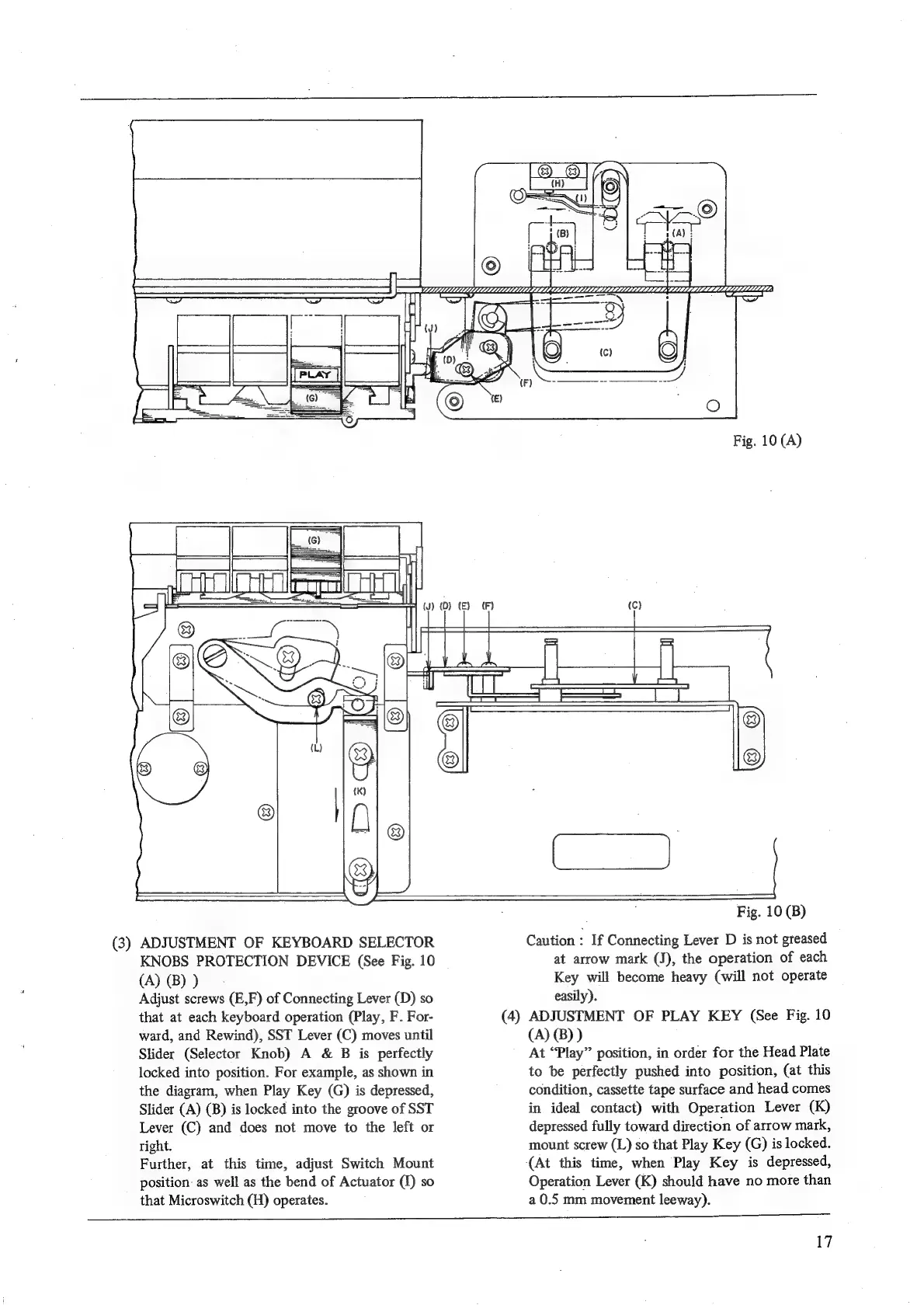
(3)
ADJUSTMENT
OF
KEYBOARD
SELECTOR
KNOBS
PROTECTION
DEVICE
(See
Fig.
10
(A)
(B)
)
Adjust
screws
(E,F)
of
Connecting
Lever
(D)
so
that
at
each
keyboard
operation
(Play,
F.
For-
ward,
and
Rewind),
SST
Lever
(C)
moves
until
Slider
(Selector
Knob)
A
&
B
is
perfectly
locked
into
position.
For
example,
as
shown
in
the
diagram,
when
Play
Key
(G)
is
depressed,
Slider
(A)
(B)
is
locked
into
the
groove
of
SST
Lever
(C)
and
does
not
move
to
the
left
or
right.
Further,
at
this
time,
adjust
Switch
Mount
position:
as
well
as
the
bend
of
Actuator
(1)
so
that
Microswitch
(H)
operates.
Fig.
10
(B)
Caution
:
If
Connecting
Lever
D
is
not
greased
at
arrow
mark
(J),
the
operation
of
each
Key
will
become
heavy
(will
not
operate
easily).
ADJUSTMENT
OF
PLAY
KEY
(See
Fig.
10
(A)
(B)
)
At
“Play”
position,
in
order
for
the
Head
Plate
to
be
perfectly
pushed
into
position,
(at
this
condition,
cassette
tape
surface
and
head
comes
in
ideal
contact)
with
Operation
Lever
(K)
depressed
fully
toward
direction
of
arrow
mark,
mount
screw
(L)
so
that
Play
Key
(G)
is
locked.
(At
this
time,
when
Play
Key
is
depressed,
Operation
Lever
(K)
should
have
no
more
than
a
0.5
mm
movement
leeway).
i
i
i
i
17

Related product manuals