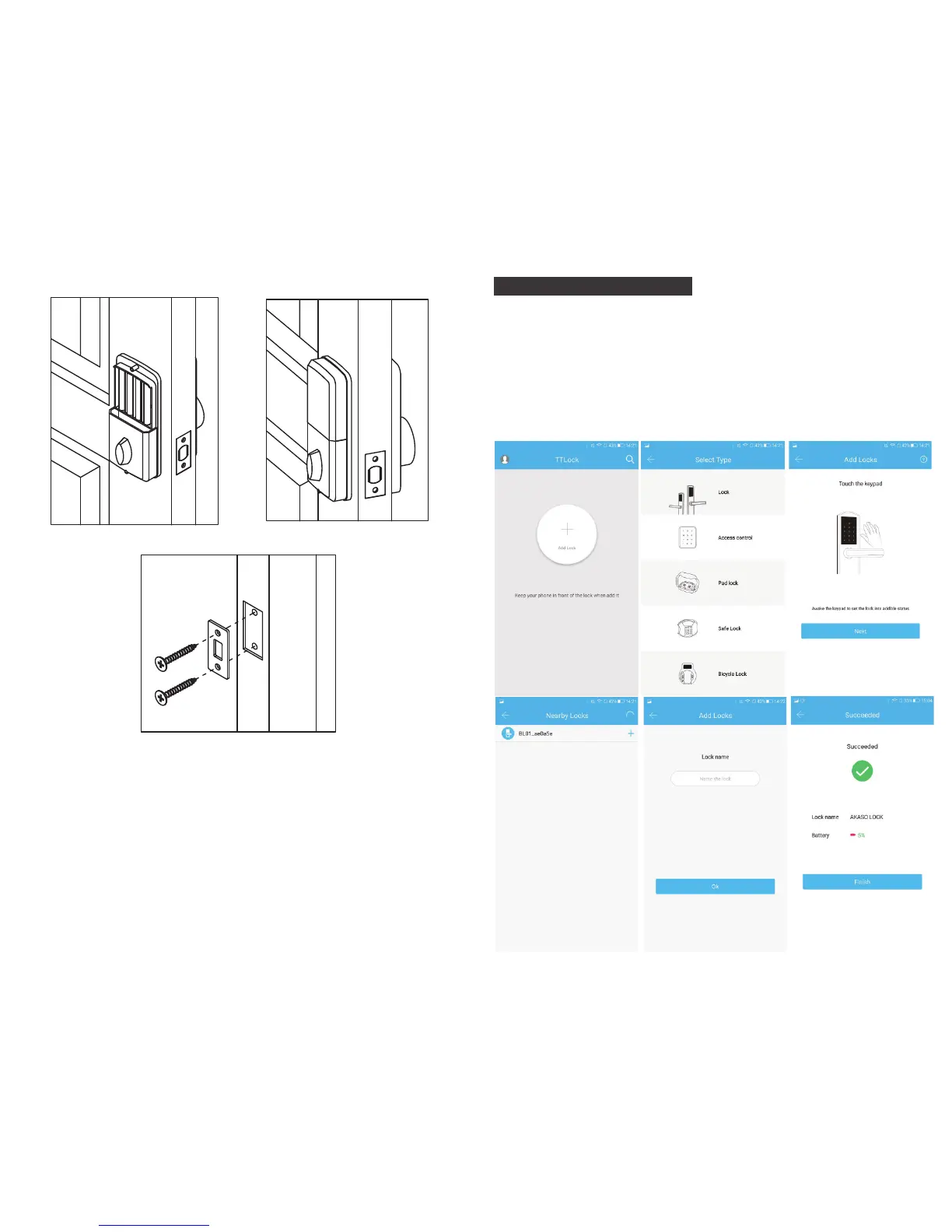
IV. APP Operation Guide
1. APP Installation and Registration
1.1 Download the "ttlock" APP from Google play store or Apple store.
1.2 Install and register an account with your phone number or email.
Note: The APP only supports Android 4.3 / IOS7.0 version and above.
We suggest family members or tenants downloading and installing
the APP.
2. APP connection
3. Installation Precautions
3.1. Doorjamb ≥ 110mm.
3.2. Door thickness: more than 32mm and less than 48mm.
3.3. Lock cylinder installation: push the cylinder out before installation.
3.4. Back panel installation: connect the data cable of the Front panel
to the socket of the Back panel and insert the redundant part of
the data cable into the door hole of the lock. If it is a left hand
door, please turn the switch on the back panel to L and if it is a
right hand door, please turn it to R. After installation, please twist
the Back panel knob to check whether the cylinder can be twisted
(otherwise re-install after the knob is rotated 90 degree). (Image)
Step 9 Step 10
L
F
Step 11
5 6


 To Next Page