C. Ethernet
With Ethernet function, you can connect the network to your projector via RJ45 cable.
Note: There is no RJ45 cable socket on the projector, it needs an external USB to RJ45
Console cable (IC drive RTL8152 or LAN9500 only).
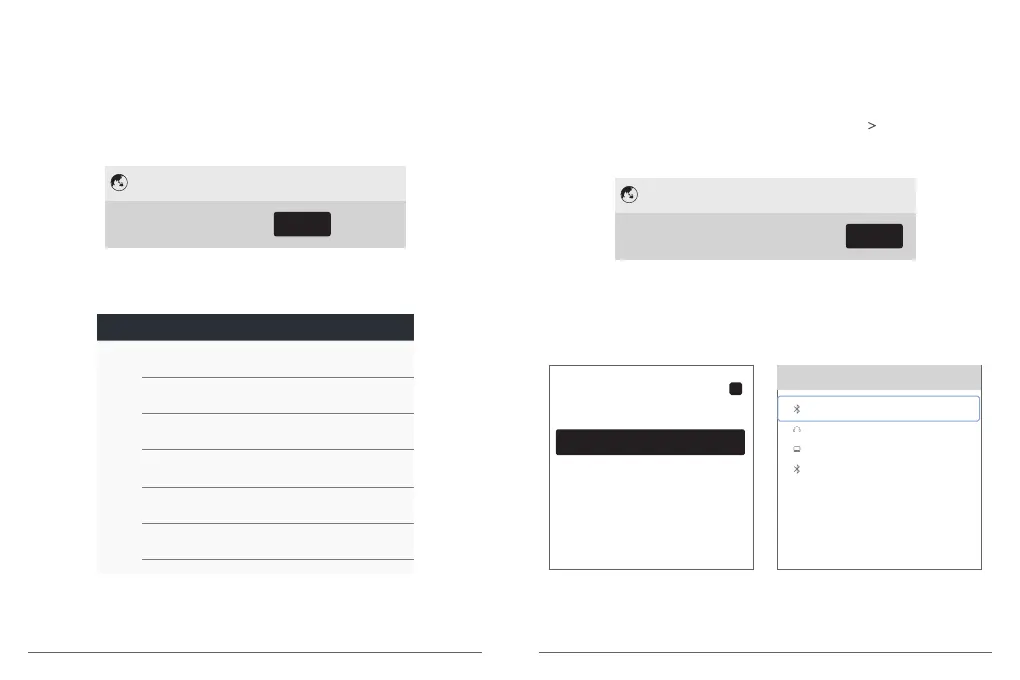
① Select [Ethernet] and press OK on the remote(or click on the touch area of the
projector) to access the Ethernet setting interface.
② You will see the details about your network indicating the connection is successful.
Network settings
Wi-Fi
Convenient hot spot Ethernet Bluetooth
D. Bluetooth
You can connect external Bluetooth headphones or speakers to AKASO projector while in
Bluetooth mode.
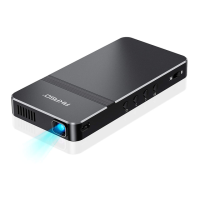
① Select [Bluetooth] and press OK on the remote(or click on the touch area of the
projector) to access the Bluetooth setting interface. Then press on your remote
control or move the mouse to OFF / ON button on the projection screen to turn on the
Bluetooth.
Network settings
Wi-Fi
Convenient hot spot Ethernet Bluetooth
② Click “AKASO” and press OK on the remote(or click on the touch area of the device)
to rename the Bluetooth.
Select “Available equipment” and choose available device to connect.
Note: In Bluetooth mode, you can transfer files to AKASO from an android device, but not
an apple device.
IP address
192.168.1.84
netmask
255.255.255.0
gateway
192.168.1.1
dns1
8.8.8.8
dns2
114.114.114.114
Ethernet Ip mode
dhcp
Ethemet
Bluetooth
Rename
AKASO
Available equipment
ON
Available equipment searching...
AKASO
unknown
Beoplay M3
PC
11
12


 To Next Page