13. Disc Care
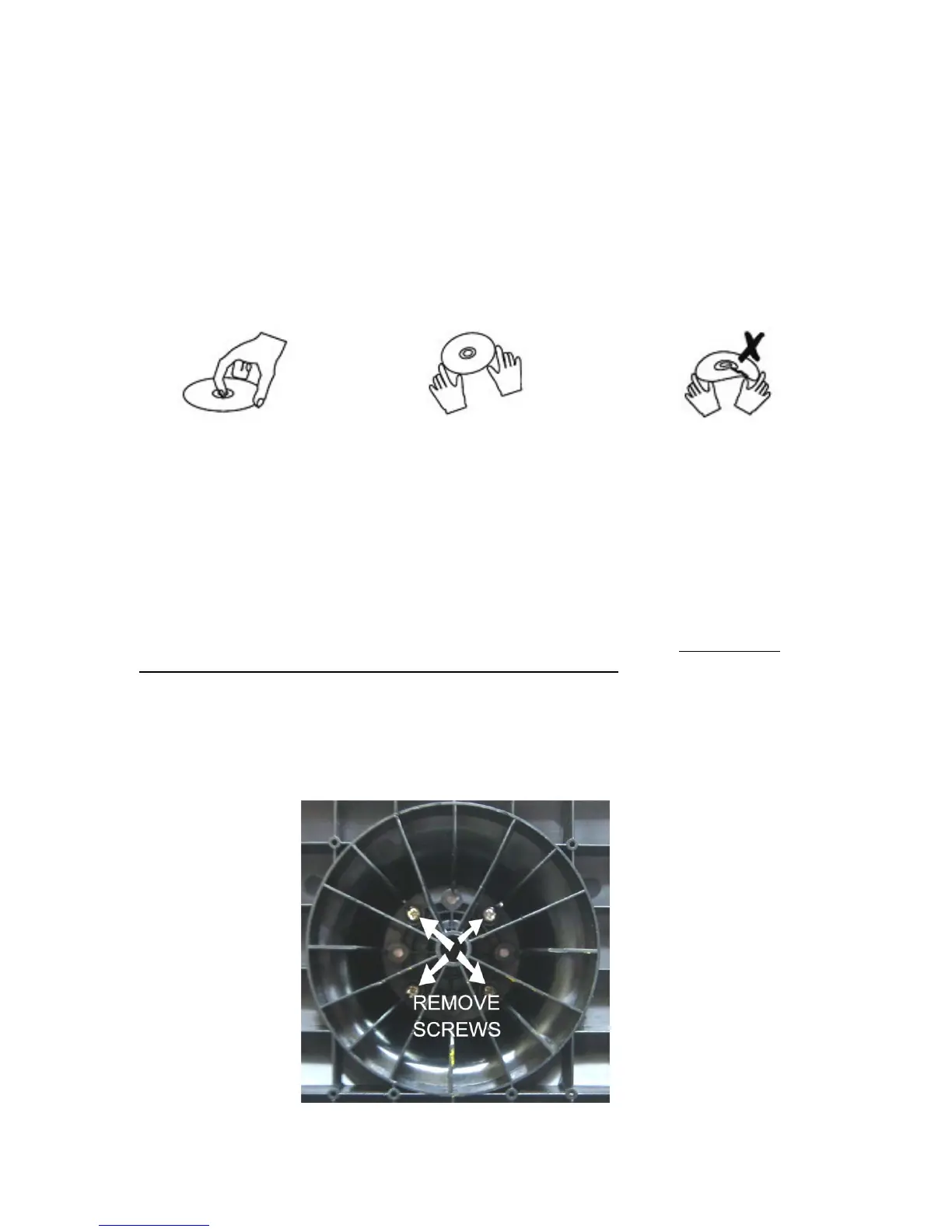
Disc Handling.
DVD and CD discs require careful handling and storage.
Hold the disc with your fingers as shown carefully gripping the outer edges or using a finger
in the centre hole. Do NOT touch the playing surface.
Do NOT bend the disc. If badly scratched, cracked or broken do NOT place into the player.
Store discs in a cool dry place, vertical storage in dust covers is recommended.
To clean discs, carefully wipe from the centre outwards not in a circular motion.
Use a soft dry cloth. For stubborn dirt, use a soft cloth with dilute detergent. Ensure the disc is
completely dry before placing into the player.
DO NOT USE CHEMICAL CLEANERS OR VYNYL DISC FLUID.
14. Wall Mounting
To mount the TV on a wall you need to purchase an adjustable bracket to fit 400 x
200mm centres.
Remove the screws as shown below (Fig 26).
Slide the base from the TV.
Mount the wall bracket as described by the manufacturer.
Mount the TV to the wall bracket using 4 x 5 mm x 10 mm set screws. (Do NOT use
longer screws as the internal parts of the TV may be damaged).
Akura Ltd accepts no responsibility for any damage, caused to or by, incorrect mounting
of the wall bracket.
21
Fig 26


 To Next Page