
 Need help?
Do you have a question about the Alarm.Com ADC-SVR100 and is the answer not in the manual?
List of necessary components and connections for setting up the SVR.
Details of items included within the SVR product packaging.
Instructions for physically connecting the SVR to the network and power source.
Procedure for registering the SVR with the customer's account.
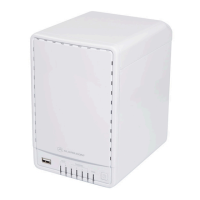
Explanation of Power LED indicators and their meanings.
Description of Hard Drive LED states and their interpretations.
Comprehensive meanings for all Hard Drive LED states.
Explanation of Channel LED indicators for camera association and recording.
This document outlines the installation and setup of the Alarm.com Stream Video Recorder (ADC-SVR100), a device designed to record and manage video streams from connected cameras. It serves as a central hub for video surveillance, allowing users to store footage locally and access it through the Alarm.com platform. The SVR is intended for use in conjunction with Alarm.com-compatible cameras and requires an active Alarm.com account for full functionality.
The ADC-SVR100 is a dedicated video recording device that integrates with the Alarm.com ecosystem. Its primary function is to provide continuous or event-based recording of video feeds from associated cameras, offering a robust solution for local video storage. This local storage capability ensures that video footage is retained even if internet connectivity is temporarily lost, providing a reliable backup for surveillance needs. The SVR supports multiple camera channels, allowing for comprehensive coverage across various locations. It is designed to work seamlessly with Alarm.com's cloud services, enabling remote access to recorded video and live camera feeds through the customer's account. The device acts as an intermediary between the cameras and the Alarm.com platform, facilitating the efficient management and retrieval of video data.
The SVR's core functionality revolves around its ability to record video to an internal hard drive. This allows for extended periods of recording, depending on the hard drive capacity and video quality settings. The device is equipped with an Ethernet port for network connectivity, ensuring a stable and high-bandwidth connection for video streaming and recording. It also features LED indicators that provide visual feedback on its operational status, including power, network connection, and hard drive activity. These indicators are crucial for quick troubleshooting and verifying the device's health. The SVR is designed to be a plug-and-play device, with a straightforward installation process that minimizes the need for complex configurations. Once connected to the network and powered on, it can be easily added to an Alarm.com account through various methods, including the MobileTech app, the Customer app Video Installation Wizard, or a web browser.
The device supports the association of multiple cameras, allowing users to consolidate their video recording needs into a single unit. This centralized recording approach simplifies video management and retrieval. The SVR's integration with the Alarm.com platform means that users can access their recorded video and live feeds from anywhere using a computer or mobile device. This remote access capability is a key feature, providing users with peace of mind and the ability to monitor their property at all times. The SVR also plays a role in enhancing the overall security system by providing a dedicated recording solution that complements other Alarm.com devices and services.
The ADC-SVR100 offers several usage features designed to enhance the user experience and provide flexible video surveillance options. One of the primary features is its ease of installation. The device requires a standard Ethernet cable for network connection and an AC power adapter for power. It is crucial that the SVR is connected to the same router as the cameras it will be associated with to ensure proper communication. Once connected and powered on, the SVR automatically attempts to establish a network connection. The PWR LED provides clear indication of the connection status, turning solid green when a stable wireless connection is achieved.
Adding the SVR to an Alarm.com account is a straightforward process, offering multiple avenues for enrollment. Users can utilize the MobileTech app, the Customer app Video Installation Wizard, or a web browser by navigating to www.alarm.com/addcamera. This flexibility ensures that users can choose the method that best suits their technical comfort level. Once enrolled, the SVR can be configured to record video from associated cameras. The device's LED indicators provide valuable feedback on its operational status, which is essential for monitoring its performance. The PWR LED, for instance, can indicate whether the device is powered off, booting up, experiencing network issues, or has a full internet connection. This visual feedback helps users quickly diagnose and resolve minor issues.
The Channel 1/2/3/4 LED indicators are particularly useful for understanding the recording status of individual camera channels. These LEDs provide information such as whether a hard drive is connected, if cyclic recording is active, if RAID 1 rebuilding is in progress, or if there are hard drive configuration or general hard drive errors. They also indicate whether a camera is associated with a channel, if cameras are associated but not recording, or if channels are actively recording. A unique feature is the sharing of LEDs for channels 5-8, where channel 5 shares with 1, 6 with 2, 7 with 3, and 8 with 4. This design provides a compact way to convey information for multiple channels. If one or both cameras sharing an LED are unable to record, the corresponding LED will blink, alerting the user to a potential issue.
The SVR is designed to be a reliable component of a comprehensive security system. Its ability to store video locally provides a critical layer of redundancy, ensuring that important footage is not lost due to internet outages. The remote access capabilities, facilitated by integration with the Alarm.com platform, allow users to monitor their property and review recorded events from virtually anywhere. This convenience and accessibility are key usage features that enhance the value of the SVR.
While the ADC-SVR100 is designed for robust and continuous operation, it incorporates several features that facilitate maintenance and troubleshooting. The most prominent maintenance feature is the comprehensive set of LED indicators. These LEDs provide real-time status updates on the device's power, network connectivity, hard drive status, and individual camera channel recording activity. By observing the patterns and colors of these LEDs, users can quickly identify the operational state of the SVR and pinpoint potential issues without needing to access complex software interfaces. For example, a solid red PWR LED after two minutes indicates either a power-on/system booting phase or a lack of local or internet connection, prompting the user to check network cables or router status. A green blinking PWR LED every second signifies a local network connection with a local IP address, while a solid green indicates a full internet connection with Alarm.com.
For hard drive maintenance, the HDD LED is crucial. If this LED is off, it indicates that the hard drive is disconnected, suggesting a need to check the hard drive installation or connection. The Channel 1/2/3/4 LEDs offer detailed insights into the hard drive's health and recording processes. A solid green LED indicates a connected hard drive, while a green blinking LED every second signifies cyclic recording. Rapid green blinking (every 0.2 seconds) points to RAID 1 rebuilding, and red blinking (every 0.2 seconds) or solid red indicates a hard drive configuration error or a general hard drive error, respectively. These specific indicators help users understand the nature of a hard drive issue, guiding them towards appropriate maintenance actions, such as checking the hard drive's integrity or considering replacement.
The device also includes a reset button, which is a critical maintenance feature for troubleshooting. If users experience difficulties with the camera setup process or if the device becomes unresponsive, holding down the reset button for 15 seconds will reset the SVR to its factory default settings. This can resolve various software-related issues and provide a fresh start for configuration. The inclusion of a security screw wrench in the packaging for opening the SVR suggests that internal components, such as the hard drive, may be user-serviceable or replaceable. This allows for potential upgrades or replacements of the hard drive, extending the lifespan and utility of the device.
The documentation itself serves as a maintenance guide, providing clear instructions for installation, enrollment, and troubleshooting. It directs users to additional resources, such as the Alarm.com Academy training courses, for further learning and support. This commitment to providing comprehensive information empowers users to perform basic maintenance and resolve common issues independently. The SVR's design, with its clear visual indicators and accessible reset function, emphasizes user-friendliness in maintenance, aiming to minimize downtime and ensure continuous video surveillance.
 General
| Video Compression | H.264 |
|---|---|
| Number of Channels | Up to 16 |
| Power Input | 12V DC |
| USB Ports | 2 x USB 2.0 |
| Network Connectivity | Ethernet |
| Weight | 3.5 lbs |
| Operating Temperature | 32°F to 104°F (0°C to 40°C) |
| Ethernet | 10/100/1000 Mbps |

 To Next Page