UL LISTED: ELECTRICALLY-CONTROLLED SINGLE-POINT LOCK
USER’S GUIDE TO DL2700-SERIES CODES ANDUSER’S GUIDE TO DL2700-SERIES CODES AND
FEATURESFEATURES
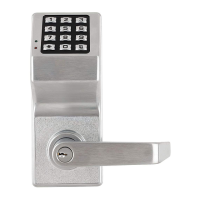
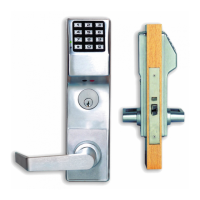
CONGRATULATIONS! Your new Alarm Lock Trilogy elec-
tronic digital lock is a rugged entry lock of advanced design
with several programmable features. Three security levels
are provided: Master, Management, and User, the latter
comprising 15 User Codes, including a 1-time entry Service
Code. Take the time to read through this guide to familiarize
yourself with the features and operation of the lock, and its
quick and easy programming procedures.
PRELIMINARY INFORMATIONPRELIMINARY INFORMATION
The DL2700 allows you to program
• 1 Master Code (all functions including entry)
• 1 Management Code (all functions including entry, but
not Master Code, Management Code or Passage Func-
tion)
• 15 User Codes (3 banks of 5; entry only)
• 1 Service Code (1-time entry)
Important:Important: Before attempting to program any codes or
functions, note the following:
• While the lever or knob may be rotated at any time, the
latch will not be engaged to unlock the door unless a
valid code has been entered.
• When a valid code is entered, the lock will unlock imme-
diately and remain unlocked for about 5 seconds (or
longer, if reprogrammed). When attempting to change a
code, the respective program address and replacement
code must be entered while unlocked. Therefore, it is
recommended that all codes be prepared in advance for
reference while programming (see Program Sheet), then
be secured when finished.
Audible IndicationsAudible Indications
• A beep will sound (a) when each key is pressed and (b)
after a valid code is entered and (c) at the end of the
unlock time (just before the unit relocks).
• If a wrong key is pressed during code entry, press the
[AL] Button to clear the entry and start again.
• Two beeps will sound at the end of the antitamper
lockout time.
• Five beeps will sound upon entry of an invalid code.
• Six beeps indicate acceptance of a programmed code.
• A 5-second tone (with red LED) when a key is pressed
signifies a low-battery condition.
LED IndicationsLED Indications
LED indications are especially useful when the lock is
used in noisy environments.
Red LED
• The red LED will light momentarily whenever a key is
pressed.
• If a wrong code is entered, the red LED will flash 5 times.
• If the batteries are weak, pressing any button will cause
the red LED to come on, along with a steady sounder
indication.
Green LED
• The green LED will come on momentarily when a valid
code has been entered.
PROGRAMMING YOUR CODESPROGRAMMING YOUR CODES
Master CodeMaster Code
The Master Code can program any entry code or function.
It may consist of 3 to 5 digits; the number of digits selected
determines the number required for all other codes. The
factory-programmed code is ‘‘1-2-3-4-5’’, but this code
must be changed as follows to preserve security. For
example, change the factory-programmed Master Code to
‘‘5-4-3-2-1’’. Note:Note: Changing the Master Code will erase all
other codes.
1. Enter existing Master Code:
[1] [2] [3] [4] [5].
A beep will sound and the lock will open.
2. Within 5 seconds, enter Master Program Address:
[AL] [1] [AL].
3. Within 5 seconds, enter new Master Code:
[5] [4] [3] [2] [1].
4. (For Master Code only):
Press [AL].
5. Enter Master Code again to validate (only the Master
Code must be validated):
[5] [4] [3] [2] [1].
Six beeps will sound and lock will relock after about five
seconds.
6. Test the new Master Code. Enter:
[5] [4] [3] [2] [1].
A beep will sound and the lock will open.
Note:Note: If only one code is required, stop here and proceed
to PROGRAMMING SPECIAL FUNCTIONS.
Management CodeManagement Code
The Management Code can program any user code (but
not the Master or Management Code) or any programma-
ble function except the Passage Function. It must contain
the same number of digits as the Master Code. The follow-
ing example will program a Management Code of ‘‘2-3-4-5-
1’’ using the Master Code programmed in the example
above. Note:Note: Changing the Management Code will not
affect any other code.
1. Enter the existing Master Code:
[5] [4] [3] [2] [1].
A beep will sound and the lock will open.
2. Within 5 seconds, enter the Management Program
Address:
[AL] [2] [AL].
3. Enter the Management Code:
[2] [3] [4] [5] [1].
Six beeps will sound and lock will relock after about five
seconds.
4. Test the Management Code. Enter:
[2] [3] [4] [5] [1].
A beep will sound and the lock will open.
Note:Note: If only two codes are required, stop here and
proceed to PROGRAMMING SPECIAL FUNCTIONS.
User Codes User Codes (Provide entry only)
Up to 15 User Codes are available in three banks, each
containing five users. User Codes are programmed by
either a Master Code or a Management Code and the
respective User Program Address shown below. Users may
be ‘‘locked out’’ either individually or by bank, therefore
when assigning codes, consider which users or groups will
DL2700-SERIESDL2700-SERIES
DIGITAL LOCKSDIGITAL LOCKS
Programming InstructionsProgramming Instructions
OI209 4/96

 Need help?
 General



 To Next Page