35
English
7. Main menu
Press the MENU key to enter the main menu. Use the ▲/▼ keys
to move through the menu. Press the MENU key again to enter
the submenus.
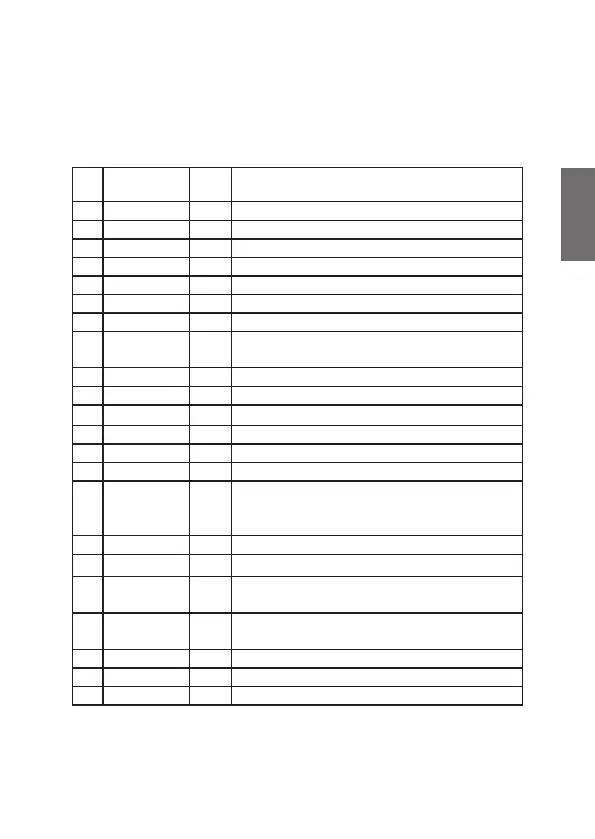
No. Display
Def-
ault
Function
1 KEY.BP ON Key tones on/off
2 MIC.SET 06 Microphone gain selectable in 9 levels
3 MIC.TP EL Microphone type: electret / dynamic
4 VOX.L 03 VOX sensitivity: 9 levels
5 VOX.T 04 VOX delay: 9 levels
6 SQL.SET 08 Squelch adjustable in 34 levels
7 ASQ.SET 06 Automatic squelch: 9 levels
8 SCA.TYPE SQ
Scan type time: stops for 10sec. if signal
Squelch: stops as long as signal lasts
9 HI.CUT OF Treble cut: high frequencies are ltered out
10 TAL.BACK OF Talkback: 9 volume levels
11 NBL.ANK OF
Noise blanker on/off
12 RF.AUTO ON Automatic RF-Gain: on/off
13 RF.GAIN 48 RF-Gain in 16 levels (3,6,9,....48)
14 ROG.BP OF Roger Beep tone: OFF or level 1-5
15 COLOR RE
Background color in the display: RE-red,
GR-green, BL-blue, CY-cyan, YE-yellow,
PU-purple, WH-white
16 BRIGHT 06 Brightness in 6 levels selectable
17 TOT.SET 02
Time-Out-Timer: 1-10 minutes
18 RPT.RX 40
Receiving channel in repeater mode
(transmitting channel of the relay)
19 RPT.TX 41 Transmitting channel in repeater mode
(receiving channel of the relay)
20 RPT.SET OF Repeater mode: on/off
21 EMG1 9 Emergency channel 1 selectable
22 EMG2 19 Emergency channel 2 selectable



 To Next Page