Need help?
Do you have a question about the Alcatel-Lucent Enterprise OmniSwitch 9900 Series and is the answer not in the manual?
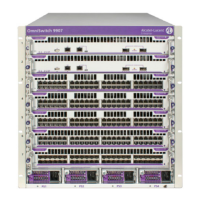
Covers the Chassis Management Module (CMM) and its functions.
Explains the role and specifications of the OS9907-CFM switch fabric modules.
Introduces the different types of Network Interface (NI) modules available.
Covers the AC and DC power supply units for the chassis.
Covers pre-installation checks, ambient temperature, and airflow considerations.
Details methods for mounting the chassis, including standalone and rack mounting.
Provides recommendations for installing the chassis in a rack.
Guides on the process of installing various chassis components.
Covers the process of booting the switch and performing the first login.
Covers IP addressing, login password changes, and system time settings for initial setup.
Procedures for enabling, disabling, and adjusting PoE power on ports and slots.
 General
| Switch Model/Series | OmniSwitch 9900 Series |
|---|---|
| Form Factor | Chassis-based |
| Product Type | Switch |
| Power over Ethernet (PoE) | Yes |
| Power Supply | Redundant Power Supplies |
| Layer Support | Layer 2, Layer 3 |
| Management | CLI, Web, SNMP |
| Operating Temperature | 0°C to 40°C (32°F to 104°F) |
| Security Features | Access control lists |
| Virtualization Support | Yes |
| Port Density | High (varies by model) |

 To Next Page