51 52
1
2
3
4
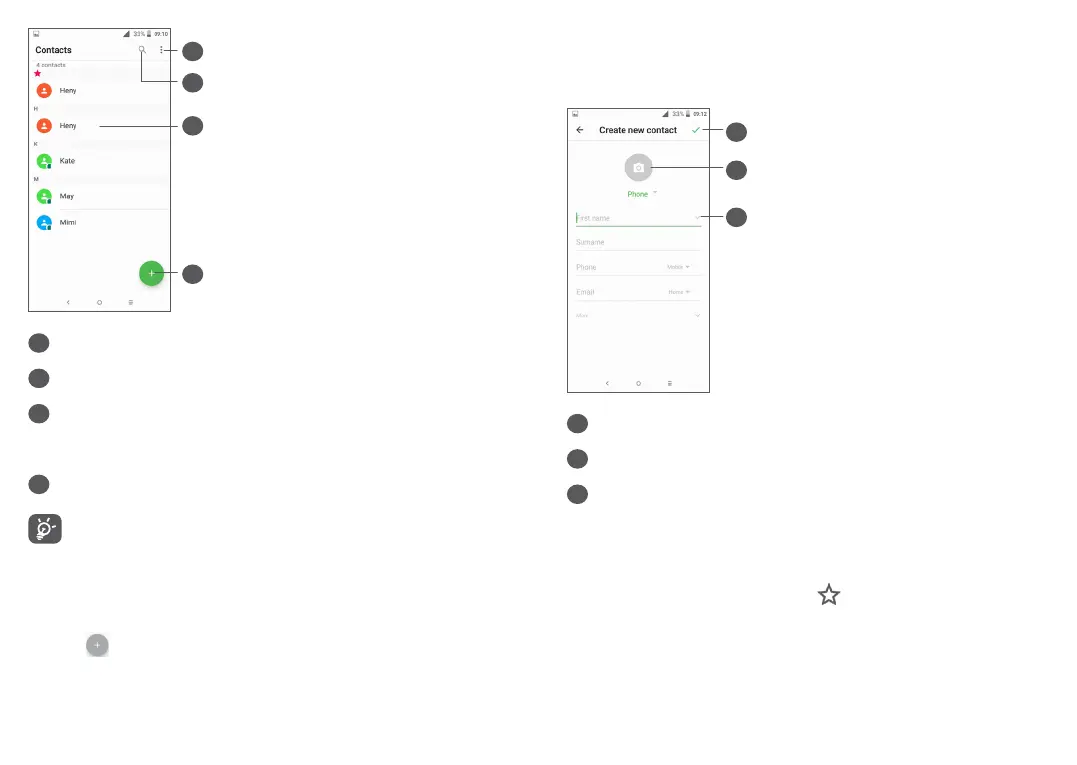
1
Display the contacts list option menu
2
Touch to search contacts
3
Open the Quick contact panel
Long press to select contact(s) to delete
4
Add new contact
Deleted contacts will also be removed from other
applications on the phone or web the next time
you synchronise your phone.
3.3.2 Adding a contact
Touch in the contact list to create a new contact.
You are required to enter the contact's name and other
contact information. By scrolling up and down the
screen, you can move from one field to another.
2
3
1
1
When finished, touch this icon to save
2
Select a picture or take a photo for the contact
3
Touch to open available labels
Add to/Remove from Favourites
(1)
To add a contact to favourites, you can touch a contact
to view details then touch to add the contact to
favourites.
(1)
Only phone contacts and account contacts can be added
to Favourites.



 To Next Page