23 24
Protection against theft
(1)
Your phone is identified by an IMEI (phone serial
number) shown on the packaging label and in the
phone’s memory. We recommend that you note the
number the first time you use your phone by entering
*#06# and keep it in a safe place. It may be requested
by the police or your carrier if your phone is stolen. This
number allows your phone to be blocked preventing a
third person from using it, even with a different SIM
card.
Disclaimer
There may be certain differences between the user
manual description and the phone’s operation,
depending on the software release of your phone or
specific carrier services.
TCL Communication Ltd. shall not be held legally
responsible for such differences, if any, nor for their
potential consequences, which responsibility shall be
borne by the carrier exclusively.
(1)
Contact your network carrier to check service availability.
1
Your mobile .............................
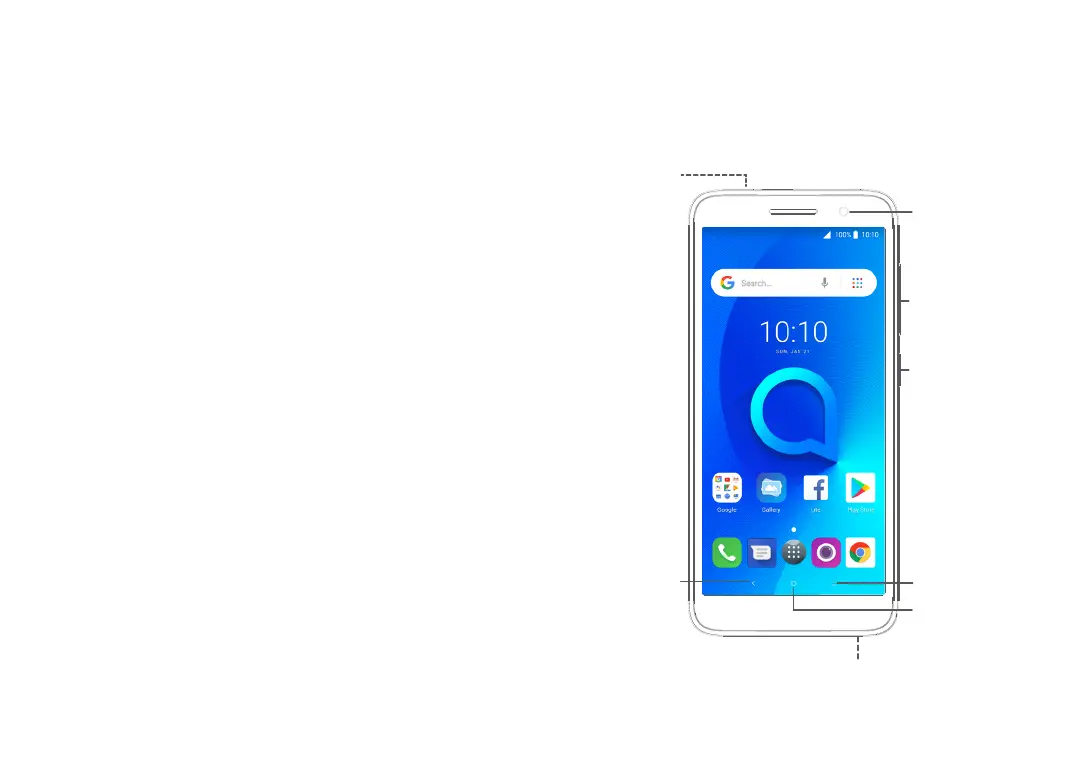
1.1 Keys and connectors
Front camera
Volume
up/down
Power key
Headset
connector
Back
button
Recent apps
button
Home button
Micro-USB connector



 To Next Page