83 84
8
Others ...................................
8.1 Radio ..................................................
Your phone is equipped with a radio
(1)
with RDS
(2)
functionality. You can use the application as a traditional
radio with saved channels or with visual information
related to the radio program displayed if you turn to
stations that offer Visual Radio service.
To listen to a radio programme, touch from the
Home screen, then touch Radio.
(1)
The quality of the radio depends on the coverage of the
radio station in that particular area.
(2)
Depending on your network operator and market.
2
1
5
4
3
6
7
8
9
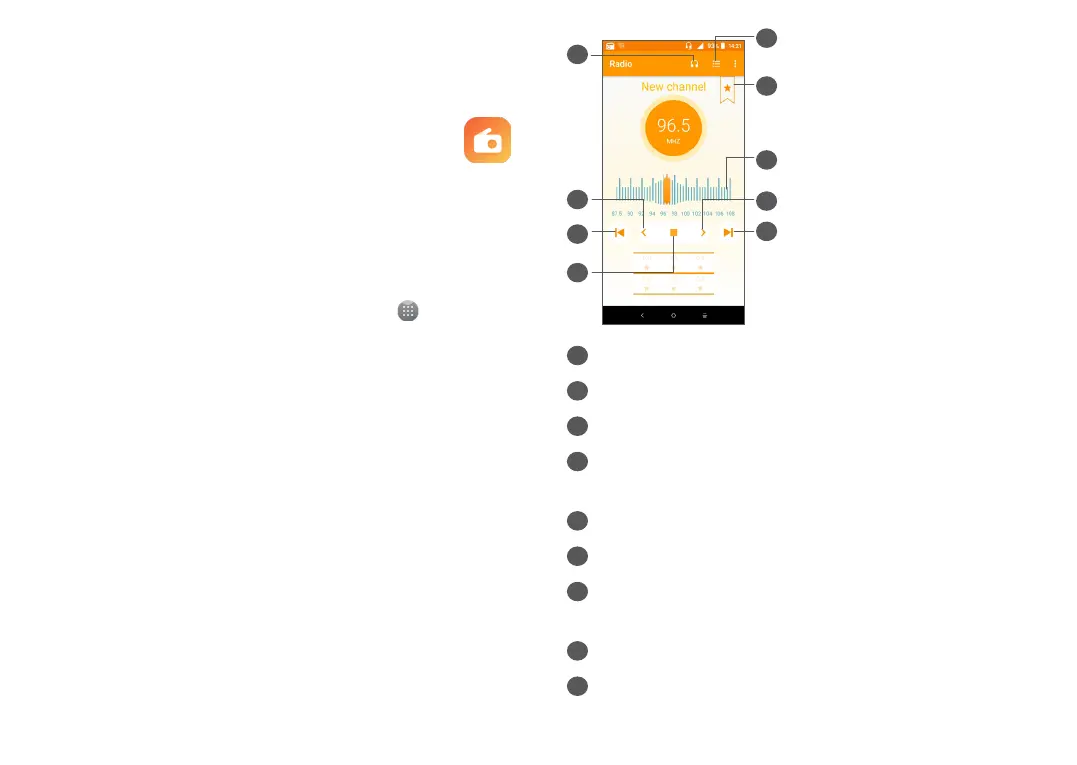
1
Touch to open and view the saved channels list.
2
Touch to add the current station to favorites.
3
Drag to change current frequency.
4
Touch to increase 0.1MHz. Long press to search and
go to the nearest higher frequency channel.
5
Touch to go to next saved channel.
6
Touch to enable/disable the loudspeaker.
7
Touch to decrease 0.1MHz. Long press to search
and go to the nearest lower frequency channel.
8
Touch to go to previous saved channel.
9
Touch to play/stop.



 To Next Page