19 20
Your mobile
2
..........................
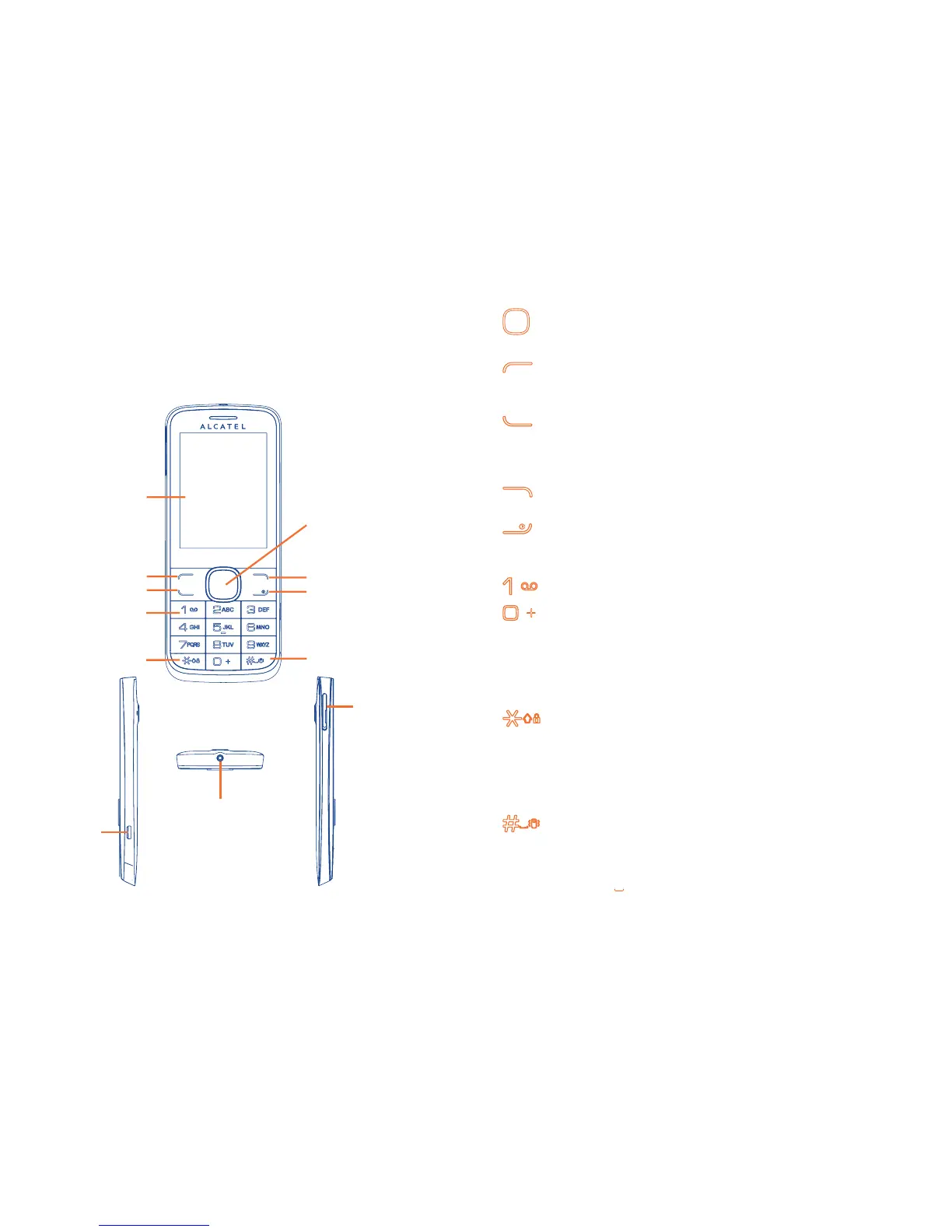
Keys and connectors2.1
micro-USB
connector
SIM-card cover
Headset connector
Left softkey
Home screen
Send key
Right softkey
End key
*
key
Voicemail key
Navigation key/
OK key
# key
Press to go left/right/up/down•
Press to confirm an option •
Press and hold to enter Music player•
Left softkey
Unlock keypad•
Access main menu•
Send key
Pick up/Send a call•
Press: Enter Call log•
Press and hold: Enter Fake call•
Right softkey
Access contacts•
Press: End a call •
Return to the Home screen
Press and hold: Power on/off•
Press and hold: Access your voicemail•
From Idle screen
Press: 0•
Press and hold: “+/P/W”•
In Edit mode
Press: Access symbols table•
Press and hold: 0•
From Idle screen
Press: *•
Press and hold: Lock keypad•
In Edit mode:
Press: Change input methods •
Press and hold: Access language list•
From Idle screen
Press: #•
Press and hold: Vibration alert•
In Edit mode
Press: • (space)













 To Next Page