33 34
8.3 Video
8.3.1 Framing mode
When you enter the "Record" function through "Camera\More Options\DV mode", you are in framing
mode. Use the mobile screen as a viewfinder and double press the Left softkey to access "More
Options" for the selection of "Size", "Brightness", "Contrast" and "Effect". You can also access the
following functions:
DC mode • Access picture capturing mode.
View video directory
• Access "My files\Phone" or "My files\Memory Card" to view the list
of videos you have shot.
Settings • You can set the video quality, banding values, storage location etc.
Help • Access the instructions to shortcuts in framing mode.
8.3.2 Recording mode
Once you have chosen your settings, you can start recording your video-clip by pressing the key.
8.3.3 Further operations after shooting a video
After shooting a video, you can play it directly, delete it; send it by MMS, Bluetooth; view your video
directory or go to "My file" to play it.
In the "Video" list, press "Options" to rename the video, copy to phone or memory card, etc.
9
Media applications .............................
9.1 Music ..........................................................................................................
You can access this feature from the main menu by selecting "Music".
You have full flexibility in managing music on your mobile and SD card.
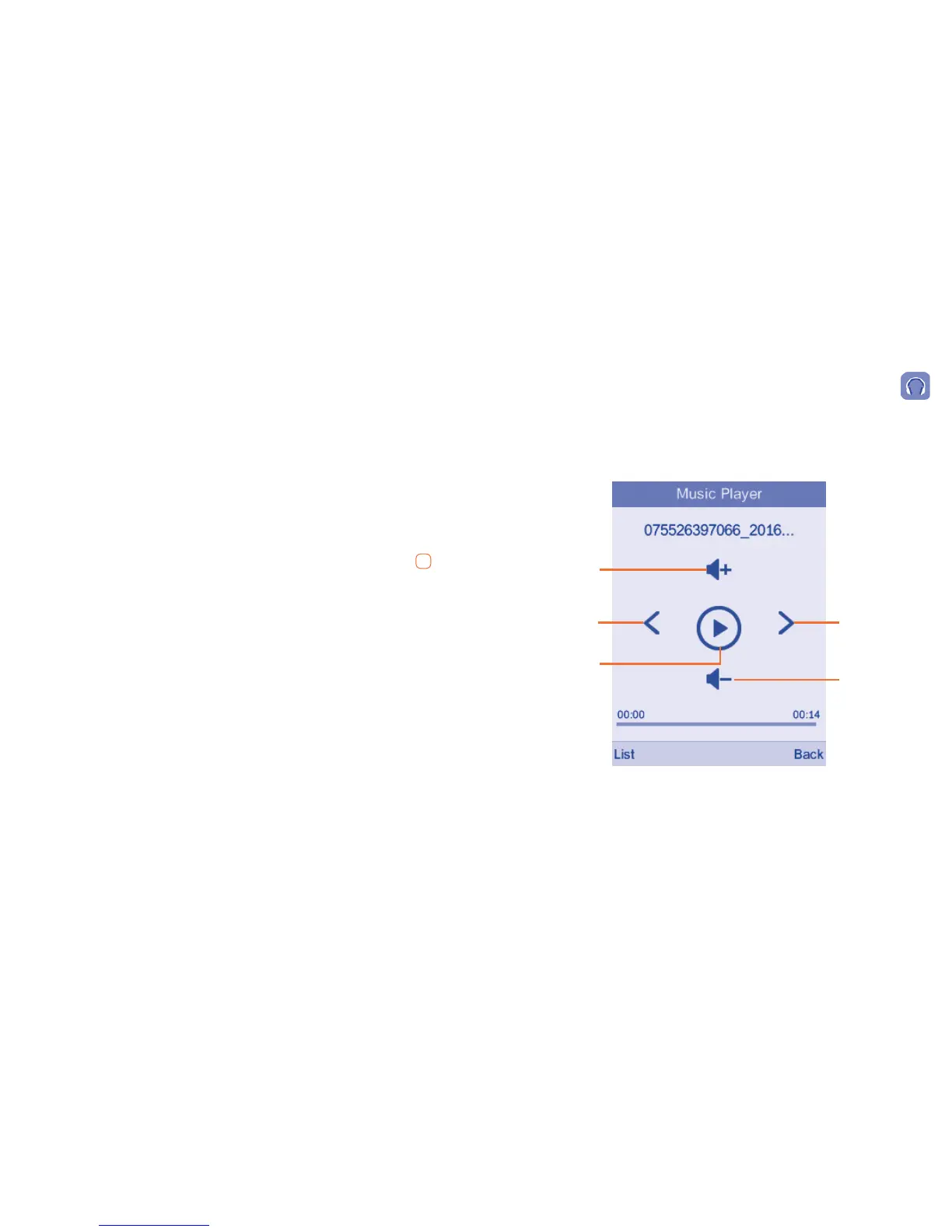
9.1.1 Music playing mode
Play/pause
Previous song
Next song
Adjust the
volume up
Adjust the
volume down


 To Next Page