9 10
1
Your mobile
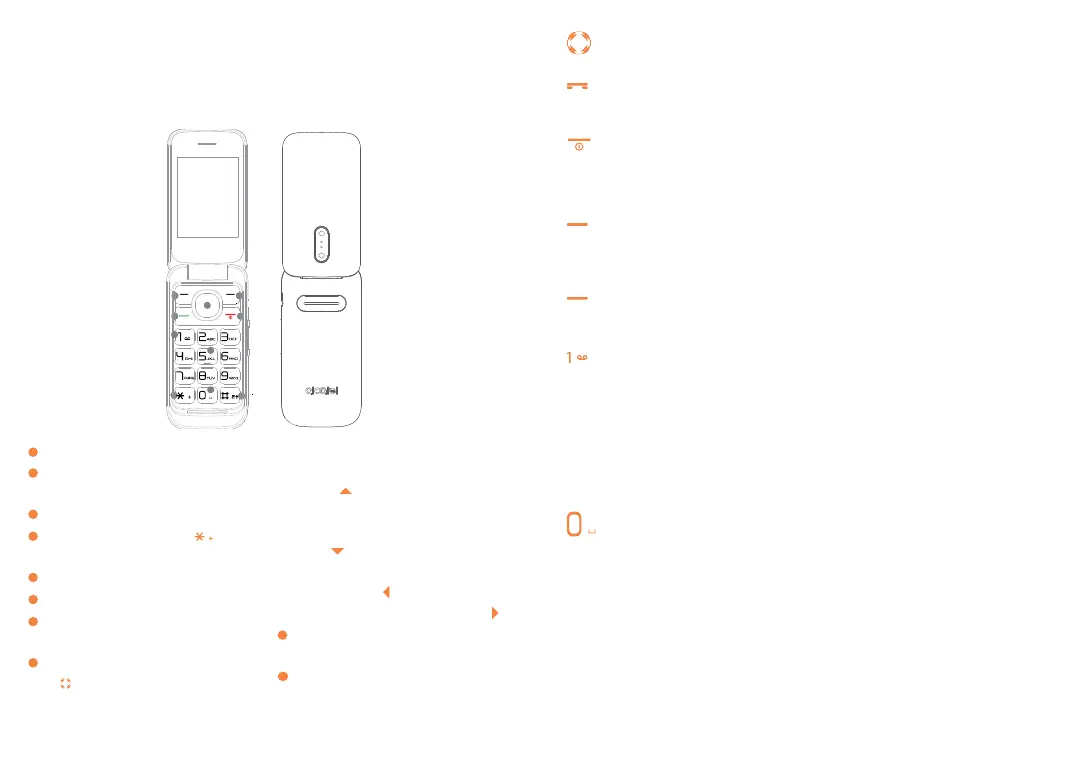
1.1 Keys
7
4
2
1
8
6
5
3
9
10
1
Left soft key
2
Call logs (idle screen) Send
call
3
Voice mail (long key-press)
4
Star Key (long press key
+/P/W)
5
Right soft key
6
Power on/Power off End call
7
Vibrate alert (Vibrate mode
activated)
8
Menu key:Confirm an option
Profile (when no widgets)
(No side key default Volume
+)
Calendar (when no widgets)
(No side key default Volume
-)
Write message(when no
widgets)
Alarm (when no widgets)
9
Torch key(Long press: switch
on/off the torch )
10
“0“ key Short press: Dial ‘0’
Short press: Add space
Navigation key
Confirm an option (press the middle of the key)
Send call
Access to call log (idle screen)
Power on/off the handset (long press)
End call
Return to idle
Left soft key
• Unlock keypad
• Access to main menu
Right soft key
Access contacts
On the Home screen
• Input "1"
• Dial voice mail number (long press)
In edit mode
• Input most frequently used symbols
• Input "1" (long press)
On the Home screen
• Enter "0"
• "0" key Idle screen:Short key press: Dial ‘0’ Edit mode:Short
press: Add space.
In edit mode:
• Input "0" (long press)



 To Next Page