13 14
2
Getting started
2.1 Set up
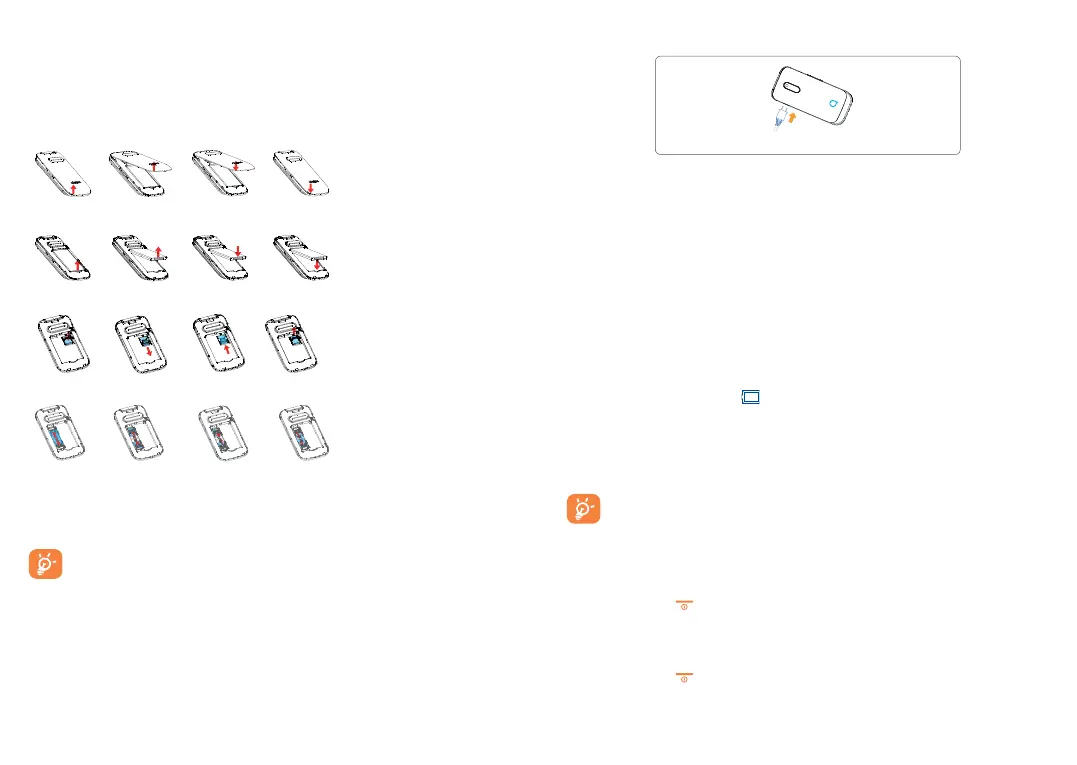
Removing and installing the back cover
Removing and installing the battery
Inserting and removing SD card
Inserting and removing the SIM car
1
1
1
1
Place the SIM card with the chip facing downwards and slide it into
its housing. Make sure that it is correctly inserted. To remove the card,
press it and slide it out.
For dual SIM models
(1)
and single SIM model
(2)
,which only
support mini SIM card. Do not attempt to insert other SIM types
like micro and nano cards, otherwise this may cause damage to your
phone. .
(1)
2053D
(2)
2053X
Charging the battery
Connect battery charger to your phone and plug into the socket.
Charging may take about 20 minutes to start if the battery is out of
power.
Be careful not to force the plug into the socket.
Make sure the battery is correctly inserted before connecting the
charger.
The mains socket must be near to the phone and easily accessible
(avoid electric extension cables).You are advised to charge the
battery to its maximum when using the phone for the first time
(approximately 3 hours) (
).
To reduce power consumption and energy waste, when battery is fully
charged, disconnect your charger from the plug; reduce the backlight
time, etc.
The charge is complete when the animation stops.
2.2 Power on your phone
Hold down the key until the phone powers on.
2.3 Power off your phone
Hold down the key from the idle screen.



 To Next Page