64 65
Setting a song as the default ringtone
The song will be used as the ringtone for all incoming calls, except those
from contacts to whom you have assigned special ringtones.
1.
From the home screen, tap > Music to see the music library.
2.
Tap beside of a song in any list.
3.
Tap Use as ringtone.
Playing music
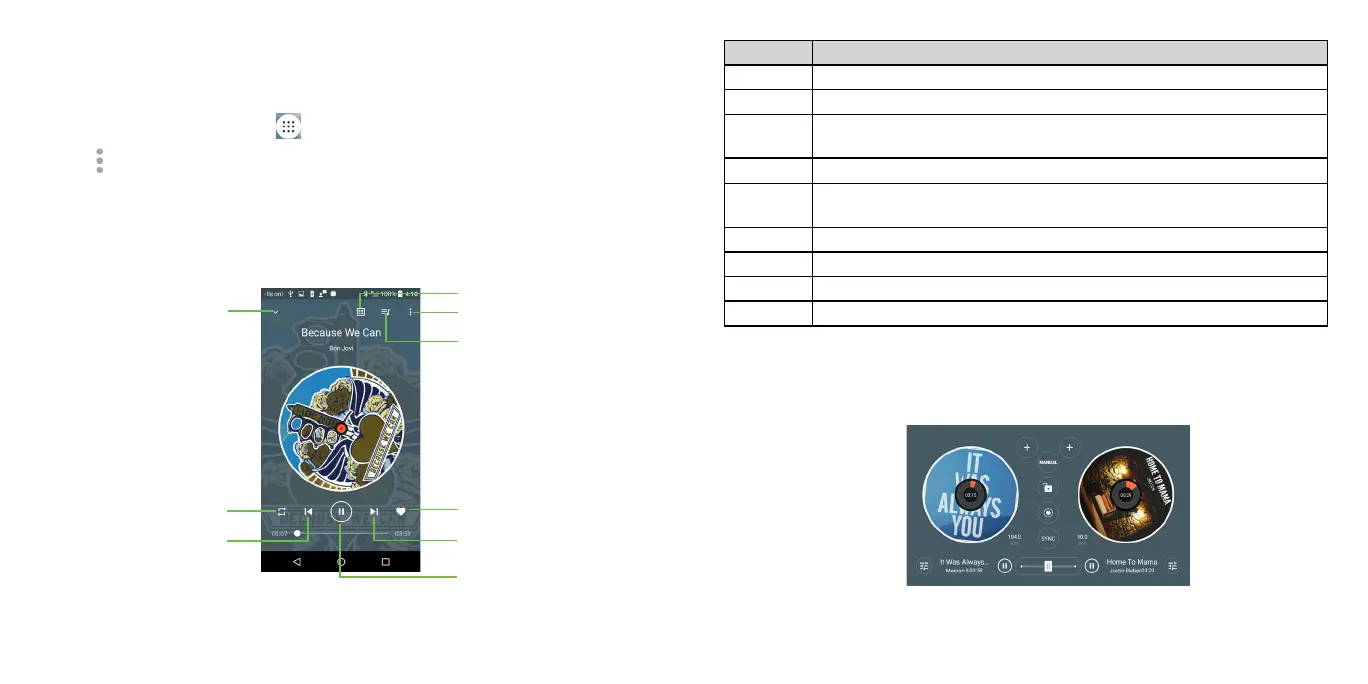
Tap a song in the music library to listen to it. The following playback screen
appears.
Number Function
1 Tap to enter your music library.
2 Tap to add effects.
3 Tap to access the song list where you can change the play
sequence.
4
Tap to access more options.
5 Tap to choose play mode: Random, Repeating all, Repeating
current one, Repeating off.
6 Tap to play the previous song.
7 Tap to play or pause.
8 Tap to play the next song.
9 Tap to label the song to your favorite.
Mixing Music
Be the life of the party! DJ like a pro. Mix, scratch, and add effects to playlists
at a touch of a button.











 To Next Page