L1 Service Manual TCL Communication Ltd.
Rev.
5056A/J/M/X/D/W/E/T
Level 1 Service Manual
Page
1.1
14/27
All rights reserved. Transfer, copy, use or communication of this file is prohibited without authorization.
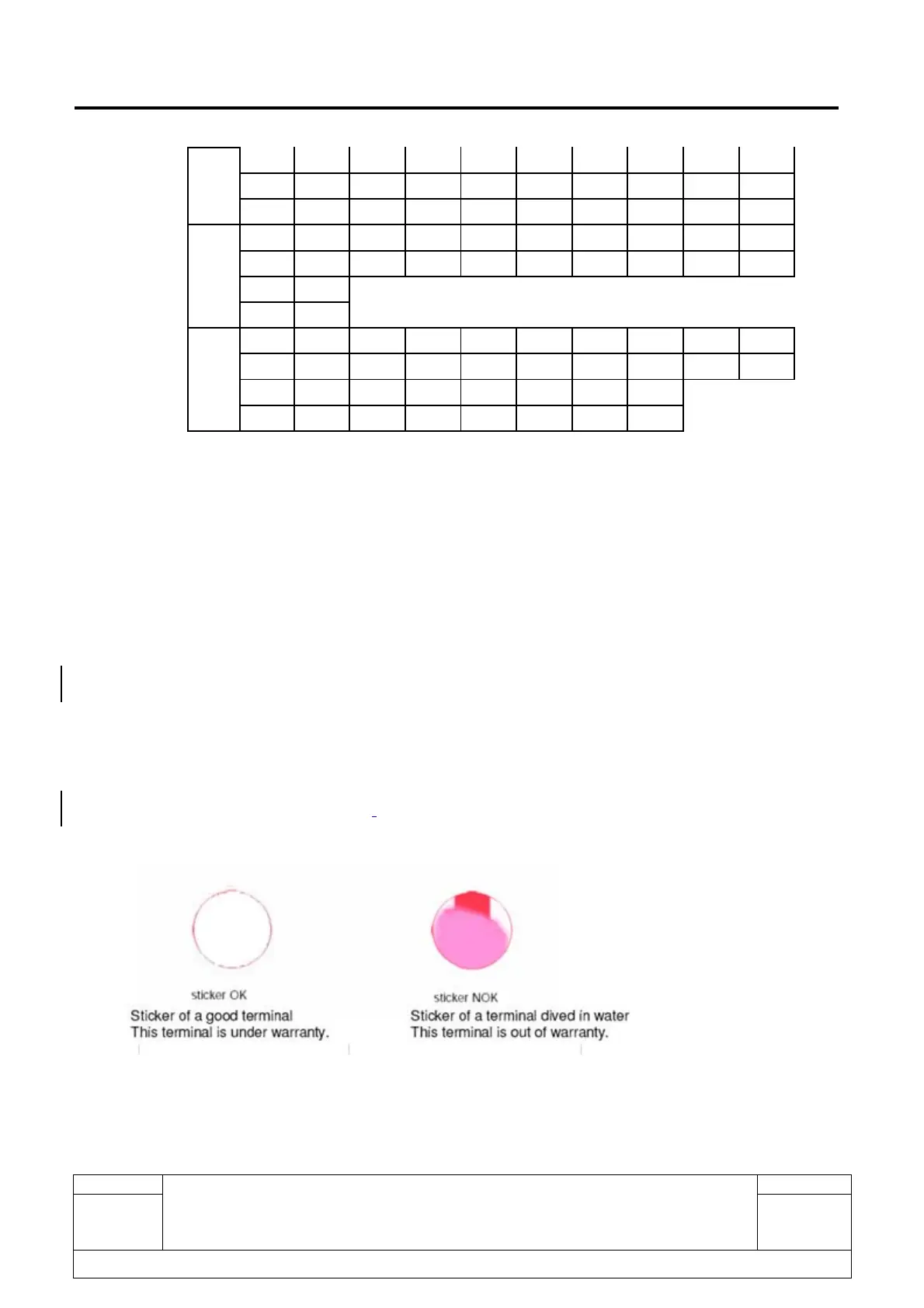
L M N O P Q R S T U
31
V
mouth
1 2 3 4 5 6 7 8 9 10
E F G H I J K L M N
11 12
O P
year
16 17 18 19 20 21 22 23 24 25
Z A B C D E F G H I
26 27 28 29 30 31 32 33
J K L M N O P Q
2.9. IMEI Check
1) Power on the handset, enter ”Settings” -> “About” -> “Status” -> “IMEI/IMEI SV”
2) If the IMEI sticker in the back casing is not lost:
We should make sure that the IMEI number MUST be the same with the one on the IMEI sticker; if not,
it’s out of warranty policy.
2.10. Humidity sensitive sticker Check
If humidity sensitive label is not good, the cell phone will be considered as out of guarantee.
¾ Liquid was detected by humidity sensitive label.
¾ Three positions of humidity sensitive sticker.











 To Next Page