EasyManua.ls Logo

Alcatel TKEE MINI - User Manual

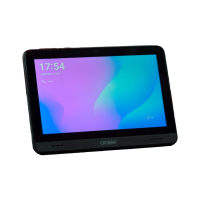
Alcatel TKEE MINI
67 pages
Print Icon
To Next Page IconTo Next Page
Loading...
2
For more information on how to use the tablet, please go to www.alcatelmobile.com and download the
complete user manual. Moreover, on the website, you can also find answers to frequently asked questions,
upgrade the software via Mobile Upgrade, and so much more.

Questions and Answers

  • W
    William MontesSep 12, 2025
    Why can't I use the features described in the manual on my Alcatel TKEE MINI Tablet?
    • A
      Antonio ChapmanSep 12, 2025
      If you can't use the features described in the manual on your Alcatel Tablet, check with your operator to ensure your subscription includes the service. Also, verify that the feature doesn't require an Alcatel accessory.
  • M
    Melissa HouseSep 13, 2025
    What to do if, when I select a number from my contacts, the number can't be dialled on my Alcatel Tablet?
    • S
      Shelby RuizSep 13, 2025
      If you can't dial a number from your contacts on your Alcatel Tablet, ensure that you have correctly recorded the number in your file. If calling an international number, make sure you have selected the correct country code.
  • M
    Mr. Kevin AguirreSep 15, 2025
    Why does my Alcatel Tablet become warm after playing games or surfing the internet?
    • C
      Cody MillerSep 15, 2025
      If your Alcatel Tablet becomes warm after playing games, surfing the internet or running other complex applications, ending these activities will allow your device to return to its normal temperature.

Alcatel TKEE MINI Specifications

General IconGeneral
Display7.0 inches
Resolution1024 x 600 pixels
ProcessorQuad-core 1.3 GHz
RAM1 GB
Internal Storage16 GB
Rear Camera2 MP
Front Camera0.3 MP
Battery2580 mAh
Expandable StoragemicroSD, up to 128 GB
Weight245 g

Related product manuals