13
Battery Replacement
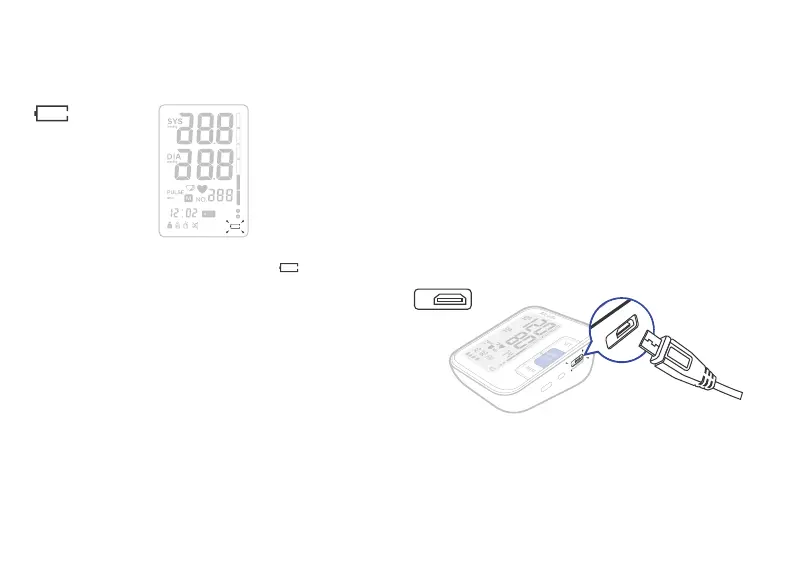
Low Battery Indicator
When the Low Battery Indicator appears on
the display, turn the monitor off and remove all
the batteries. Replace with 4 new batteries at
the same time. Long-life alkaline batteries are
recommended.
To prevent the damage of monitor from leaked
battery fluid, please take out of battery if the
monitor unused in a long time (generally more
than 3 months). If battery fluid get in your eyes,
immediately rinse with plenty of clean water.
Contact a physician immediately.
Attached battery is only for testing the func-
tion of the monitor. Long-life alkaline batter-
ies are recommended.
1.
2.
3.
Dispose of th
e device, components and op-
tional accessories according to applicable lo-
cal regulations. Unlawful disposal may cause
environmental pollution.
Battery is dangerous stuff, do not mix it with
other rubbish.
4.
5.
Micro USB Power Cable
Make sure the power cable is not damaged.
Plug the cable into the power socket on the
right side of the blood pressure monitor.
Plug the USB into a 5V powered USB port.
You may also use the monitor with the 5V micro
USB power cable. Only use an approved micro
USB power cable to avoid damaging the moni-
tor.
1.
2.
3.
D C
5 V
DC
5
V


 To Next Page